
jeanneb88320076
Participating Frequently
September 13, 2017
Answered

Help with French fold layout

  • September 13, 2017
  • 4 replies
  • 10079 views

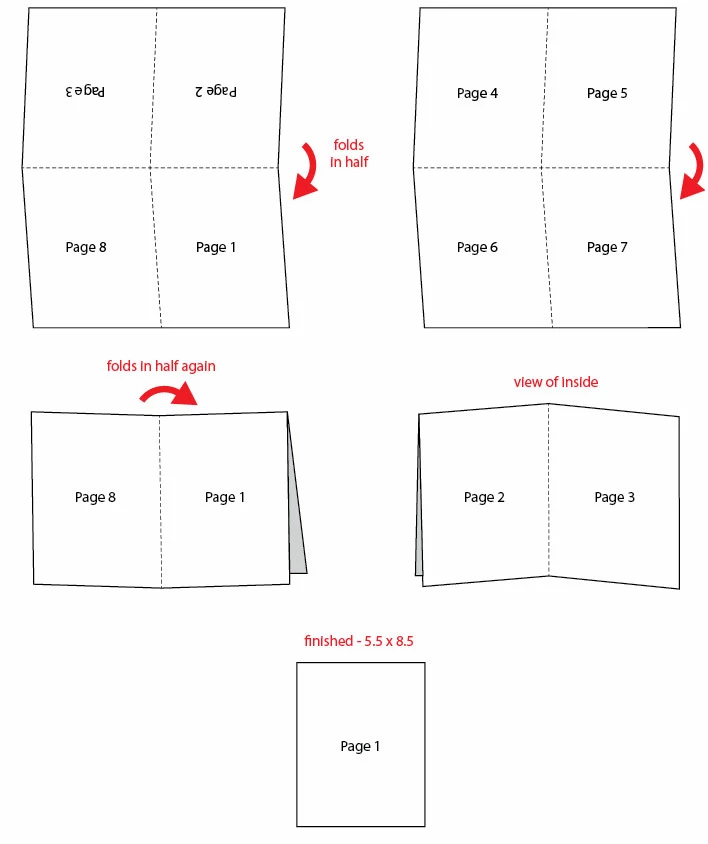
Can anyone point me in the direction to CLEAR instructions re: how to set up the layout for a French fold brochure in InDesign, i.e., an 11 x 17 document that will be folded once vertically and once horizontally to create an 8.5 x 5.5" final product?  I've found downloadable templates on-line, but confess it's not clear to me how I load those into InDesign (and they all have the waterwark/logo of the printing company in question). The one article I found on-line wasn't clear.  I found an excellent tutorial re: trifold brochure design, but couldn't find anything similar for French fold.  I'm an InDesign beginner (so you might say I have no business trying to do this!), but I have some time to devote to this.  Thanks for any help...
This topic has been closed for replies.
Correct answer Jeffrey_Smith

The below image shows the fold assembly

4 replies

dave c courtemanche
Inspiring
September 13, 2017

Couple of things:

1. If you're sending this off to a printer, most times, they will want to do the imposition themselves. Set it up at finished page size and give a high res PDF.

2. If you're trying to figure out how to coordinate a doc, whether french fold, booklet, etc. take some blank paper and make a dummy. Number the way it should read, then unfold. This gives you all the info you need.

jeanneb88320076
Participating Frequently
September 14, 2017

Thanks so much, Dave.

With your first point, do you mean that printers might prefer to create the 11 x 17 presentation themselves, using the 8 individual 5.5 x 8.5 pages I create?

Community Expert
September 13, 2017

You can do this in basically 2 methods.

Method 1: One Indesign document: 11 x 17, 2 pages - front and back, guides created for the four quarters. One drawback, from example, pages 2 and 3 are rotated 180°, however you can rotate view when working on these pages of project.

Method 2: Two Indesign documents. First document used for content creation: 5.5 x 8.5, 8 pages for all quarters of finished piece, orientation normal. Second document used for final assembly: 11 x 17, 2 pages - with content placeholders for each quarter.  This will require export of first doc, and then placed into second document. Rotate pages 2 and 3, and also consider bleed of content.

Jeffrey_SmithCommunity ExpertCorrect answer
Community Expert
September 13, 2017

The below image shows the fold assembly

Steve Werner
Community Expert
Community Expert
September 13, 2017

Become a free member on www.foldfactory.com. Then you can use their free Template Builder which is very easy to use for Adobe InDesign. It covers dozens of common kinds of folds.

jeanneb88320076
Participating Frequently
September 13, 2017

Thanks, Steve; I'd seen your referrals to Fold Factory in other posts, and I checked it out but didn't see any guidance for the French fold format/option, although there are certainly many other interesting options.

Steve Werner
Community Expert
Community Expert
September 14, 2017

Sorry, the foldfactory.com website has changed since I referred to it in a class in the spring. I need to spend some time there to figure out the new website layout.

amaarora
Inspiring
September 13, 2017

Hi,

Learn how to create a french fold template from here: https://design.tutsplus.com/tutorials/quick-tip-creating-a-french-fold-template-in-indesign--vector-5551

it has a number of screenshots to guide you.

modify it to suit your page dimensions

-Aman

jeanneb88320076
Participating Frequently
September 13, 2017

Hi Aman,

Thank you for your prompt reply!  I'd seen this particular article, but found it difficult to follow (all of the measurements being metric didn't help), and it wasn't clear to me that the layout being set up allowed content on both sides...i.e., the initial set-up was for one page, but then there were instructions for duplicating pages later...I guess it's a reflection of my newness to InDesign that I found it tricky to follow.