
MystiMac
Inspiring
December 18, 2020
Answered

How do I add back separator lines above footnotes in InDesign cc

  • December 18, 2020
  • 8 replies
  • 815 views

The separator lines above my footnotes disappeared for some reason. How do I get those back? I don't see the option to do that in the footnote options panel.

This topic has been closed for replies.
Correct answer pixxxelschubser

1) In the same options (as in your other thread)  
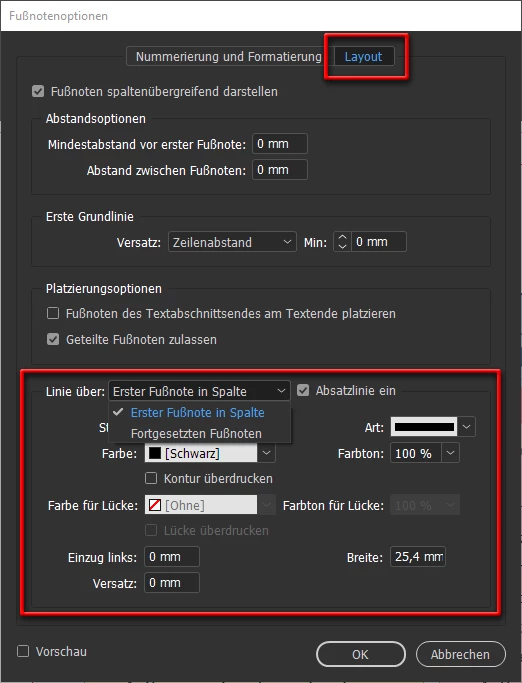


or

2) In the paragraph style of the footnotes (if one was applied) 


Sorry for the German UI

8 replies

pixxxelschubser
Community Expert
Community Expert
December 18, 2020

Yes.

The setting in my first answer is exactly responsible for this. Try it.

😉

MystiMac
MystiMacAuthor
Inspiring
December 18, 2020

Here's scrnshot where the separator is in place, as it should be:


pixxxelschubser
Community Expert
Community Expert
December 18, 2020

And a side note:

moderators always will remove your personal data from your posts (Adobe forum rules)

pixxxelschubser
Community Expert
Community Expert
December 18, 2020

eMail?


And sorry, no screenshots in your post.

MystiMac
MystiMacAuthor
Inspiring
December 18, 2020

Email is what didn't translate the screenshots. I just now posted the
screenshots directly into the forum page. I hope you can see those.
Solved: Betreff: How do I add back separator lines above f... - Page 2 -
Adobe Support Community - 11689483

--
*Karen*


[ private informations removed by moderator for security reasons ]

pixxxelschubser
Community Expert
Community Expert
December 18, 2020

Sorry, there is no sceenshot.

MystiMac
MystiMacAuthor
Inspiring
December 18, 2020

I sent in an earlier email to you the two screenshots, comparing where the
separator is missing and instance where the separator is there.

Here, again:
[image: image.png]

[image: image.png]
--
*Karen*


[ private informations removed by moderator for security reasons ]

pixxxelschubser
Community Expert
Community Expert
December 18, 2020

Please show a screenshot. (Maybe in a new document)

I don't know which other visible "divider" do you mean.


MystiMac
MystiMacAuthor
Inspiring
December 18, 2020

[image: image.png]

See how there is no separator line between the body of the text and the
footnotes at the bottom of each page.

Here's where the separator lines do show up, in another chapter:
[image: image.png]

*Karen*


[ private informations removed by moderator for security reasons ]

MystiMac
MystiMacAuthor
Inspiring
December 18, 2020

Sorry, I am not referring to the underlining of each of the lines within the footnotes, but rather to the short divider that separates all the footnotes from the body of the text.


pixxxelschubser
Community Expert
pixxxelschubserCommunity ExpertCorrect answer
Community Expert
December 18, 2020

1) In the same options (as in your other thread)  


or

2) In the paragraph style of the footnotes (if one was applied) 


Sorry for the German UI

MystiMac
MystiMacAuthor
Inspiring
December 18, 2020

Sorry, but I am not referring to the underlines within the footnotes. I'm referring the the divider that separates ALL the footnotes from the body of the text.