
edie_adams
Participating Frequently
September 22, 2017
Answered

How do I permanently add a bullet to my default bullet character list?

  • September 22, 2017
  • 2 replies
  • 1456 views

There are certain characters that I really like using for bullets, such as arrows and checkmarks under Webdings. Obviously, these are not part of the standard bullet character set we get when pulling up the Bullets and Numbering dialog box. The thing is, I edit multiple IDDs every week, so anytime I want to use a non-standard bullet character I have to manually add it, so it's a pain in the butt. Is there a way to permanently add a bullet character to my default Bullet Character list so I don't have to do that every time I use them? Thanks!

[Moved from the non-technical Lounge Forum to InDesign forum... Mod]

[Here is the list of all Adobe forums... https://forums.adobe.com/welcome]
This topic has been closed for replies.
Correct answer amaarora

Hi,

To do that...

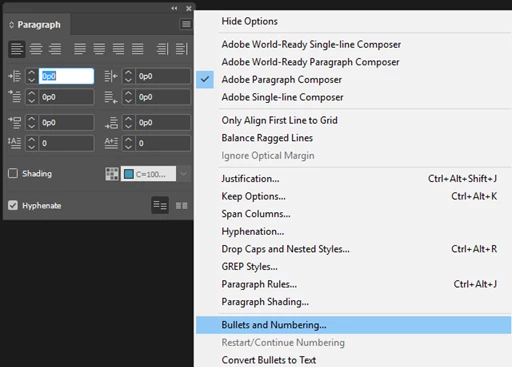
1. Open Type menu->paragraph panel

2. From paragraph panel menu-> Bullets and numbering.

Ensure your InDesign is in "No doc state"

-Aman

2 replies

cmgap
Community Expert
Community Expert
September 22, 2017

You can also save as a bullet style in your cc library. Very quick way to keep special characters a click away.

BobLevine
Community Expert
Community Expert
September 22, 2017

Add them with no files open. It will be available for all new files.

edie_adams
Participating Frequently
September 22, 2017

So I'd seen similar answers when I was trying to google this before, but with no details. I cannot figure out how to open the bullets and numbering dialogue box without a document open.

amaarora
Community Manager
amaaroraCommunity ManagerCorrect answer
Community Manager
September 22, 2017

Hi,

To do that...

1. Open Type menu->paragraph panel

2. From paragraph panel menu-> Bullets and numbering.

Ensure your InDesign is in "No doc state"

-Aman