

How do I set up my pages to scroll horizontally?
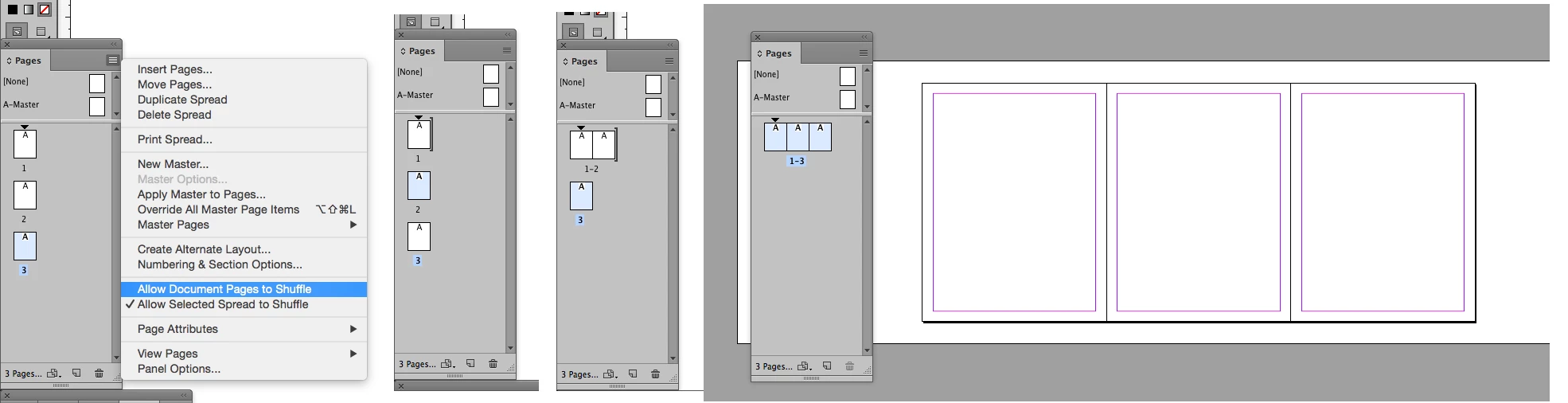
I don't use ID a lot and this may be obvious but I can't find it. I have a document with three pages. When I work on them they are vertically lined up on my screen. I want to be able to scroll horizontally to view them, as I work on all three.
Maybe I have set this up wrong altogether. I am doing a menu that will open up to three panels (each 8.5 x 11) and I am trying to see them all, horizontally as they would be viewed. Lining ups blocks of text, titles etc. across the three visually. Should this ultimately be one "spread" with three sections? Help would be appreciated.
Note: Ultimately, each page will be printed separately at the printers, so I will need three documents for them...I think.
The story is...I used to use ID years ago for everything (and loved it), but almost all my clients have been needing only websites, and I have learned and been using DW and PS for almost everything these days. I use ID so seldom now I have lost the learning curve. I do keep up with the latest versions of everything. Don't ask me about using Illustrator any more! 
 AdChoices