
Question
How to copy and paste tables in Indesign keeping the format
Hi,
I'm trying to copy and paste tables in indesign keeping the format showing and I can't seem to figure out why it's cutting off the header. I have a whole page with these little tables that need to be copied and pasted in the same place to different pages but because it's cutting off the header it's not placed in the same spot.
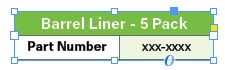
Below is what I'm selecting and copying.
This is how it's pasting
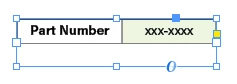
It cuts off the header and I have to double click the blue frame so that it shows everything again therefore it's not 'pasting in place'. Do I have to export the table somehow so that it treats it as one element and shows everything?
Please advice, thank you in advance
 AdChoices