
Inspiring
February 9, 2021
Question

how to create <art> (Article) tag in InDesign before export to Accessible PDF

  • February 9, 2021
  • 2 replies
  • 476 views

Hi ALL:


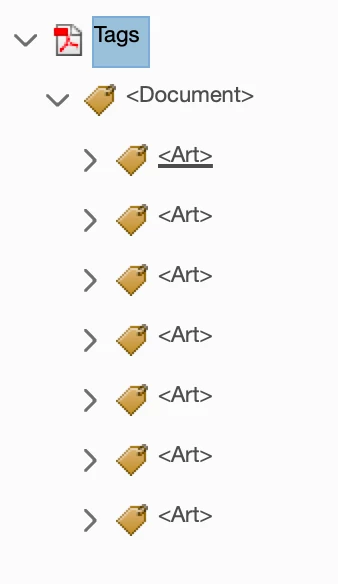
While Creating Accessible PDF most of the things I fixed in InDesign before exporting. But in Acrobat I manually creating <Art> article tag for each and every page. There is any possible way to create this tag InDesign while exporting.


Thanks

Ganesh.R

This topic has been closed for replies.

2 replies

Bevi Chagnon - PubCom.com
Legend
February 11, 2021

Did you check the options to:

  • Include When Exporting. You'll find this option when you drag the 1st item into a new article.
  • Use for tagging order in Tagged PDF. This option is in the Articles Panel options menu.


You can learn how to use this Panel's features at https://helpx.adobe.com/indesign/using/articles-cs5-5.html


|&nbsp;&nbsp;&nbsp;&nbsp;Bevi Chagnon &nbsp;&nbsp;|&nbsp;&nbsp;Designer, Trainer, &amp; Technologist for Accessible Documents ||&nbsp;&nbsp;&nbsp;&nbsp;PubCom |&nbsp;&nbsp;&nbsp;&nbsp;Classes &amp; Books for Accessible InDesign, PDFs &amp; MS Office |
Ganesh_InAuthor
Inspiring
February 12, 2021

Hi 


I Already fixed that option in Articles panel menu, but still it shows me as a single article <Art>. Please confirm while exporting to PDF there will be one <Art> tag?


Bevi Chagnon - PubCom.com
Legend
February 9, 2021

An <Art> tag is created every time a new article is created in InDesign's Articles Panel.


Be sure to learn how to use the Articles Panel for accessibility. Some key points:

  • Once it's invoked, everything in the entire INDD file must be in the panel, too (not necessarily in the same article). It's an all or nothing deal. Anything left out of the Articles Panel will not be tagged (and not artifacted, either).
  • It partly controls the Tag Reading Order in the PDF.
  • Before exporting to PDF, check the option in the Articles Panel to use it for the tagging order in the PDF.


|&nbsp;&nbsp;&nbsp;&nbsp;Bevi Chagnon &nbsp;&nbsp;|&nbsp;&nbsp;Designer, Trainer, &amp; Technologist for Accessible Documents ||&nbsp;&nbsp;&nbsp;&nbsp;PubCom |&nbsp;&nbsp;&nbsp;&nbsp;Classes &amp; Books for Accessible InDesign, PDFs &amp; MS Office |
Ganesh_InAuthor
Inspiring
February 11, 2021

Hi


Thanks for your reply

I have created 3 Articles in InDesign and Export to Interactive PDF in my pdf it shows only 1 article tag <Art>. This 3 page have text thread link. I need each page as a separate article. Now i am doing manually in PDF.

InDesign Screen shot