

Answered
How to fix my slow InDesign?
Hi, my InDesign acts very slow, it's InDesign CC 13.1.
I'm on a MacBook Pro Mid 2015, 16 Gb RAM, 2.8 Ghz, AMD Raedon R9, MacOs High Sierra 10.13.6.
When working in larger, more complex designs i.e. a 372 pages book with page spanning footnotes, if I try to insert a word it takes about 2 seconds before the first character gets visible, the "beach ball" appears, and if I try to delete a character the "bath ball" appears again. It's extremely frustrating!
I've tried to:
- restarted my computer
- saved a copy of the document
- deleted an reinstalled InDesign (without installing the old prefs)
- deleted the pref files
- deleted the InDesign cash folder
- exported the document to an imdl-file and reopened it
- deactivate the page preview in the page panel
- deactivated the two bottom checkboxes (in all 4 possible configurations) in the "advanced text"-meny under InDesign preferences (I'm on a Swedish version of the program so I don't know the correct english name for these boxes: "Sammanhangsberoende textkontroller" in Swedish, se pic below).
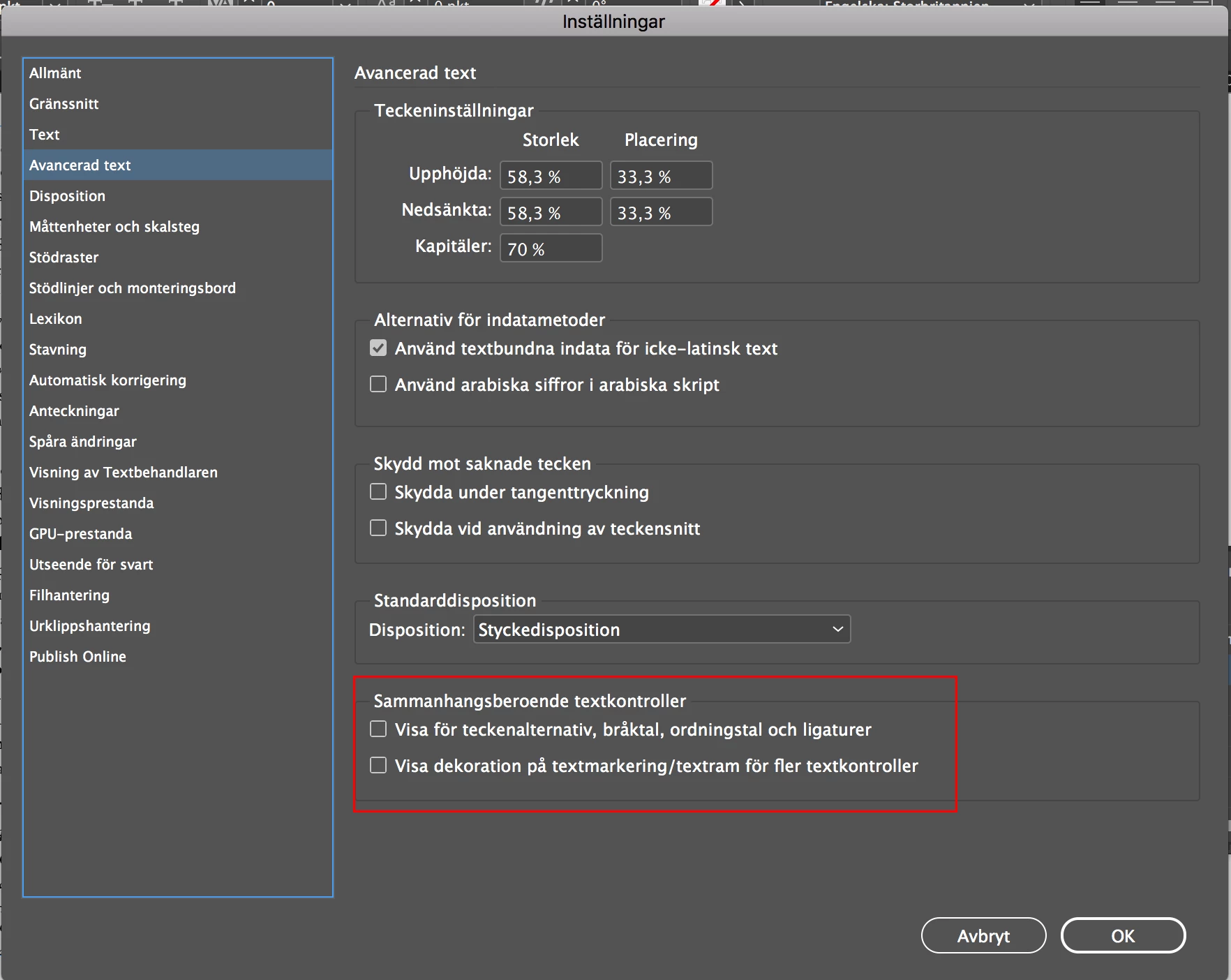
Any more suggestions anyone?
/Niklas
 AdChoices