
Inspiring
July 2, 2017
Answered

How to print the RHS page of a spread directly from InDesign?

  • July 2, 2017
  • 2 replies
  • 738 views

I like to print the current spread as two pages on my printer, just to have a simple paper output to look at. So, I hit Cmd-P, but I can't find out how to get the RHS printed. It is unclear how to tell ID to print both pages (how to define a range). E.g. the range says "A4 V:146" (must be an old name for the range from an import long ago, the format is actually Letter, not A4), I can try to turn it into A4 V:147, but I still get page 146 from the printer.

How can I quickly print a small range of pages directly from ID itself, without going through creating a full PDF first?
    This topic has been closed for replies.
    Correct answer jane-e

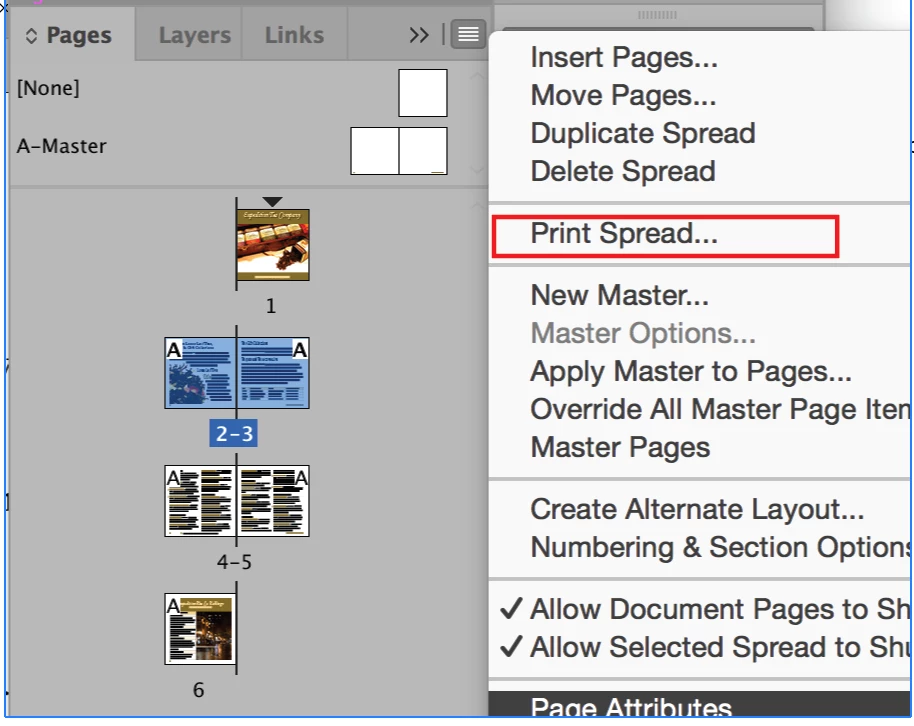
    Select the spread(s) in the Pages panel and use the Pages panel menu to Print Spread

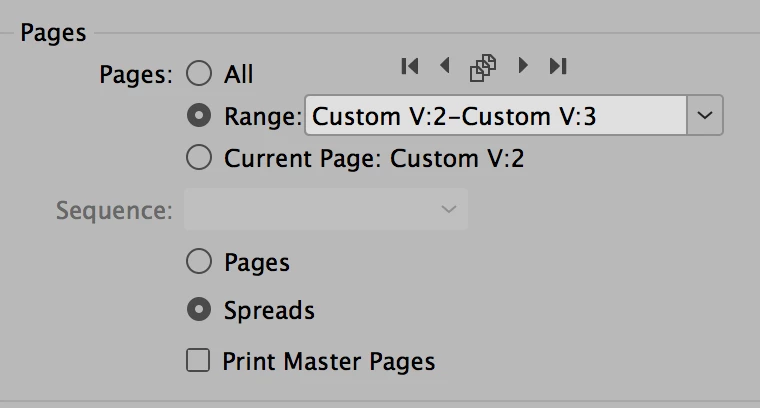
    The Print dialog will be pre-filled, but check it:

    2 replies

    jane-e
    Community Expert
    jane-eCommunity ExpertCorrect answer
    Community Expert
    July 2, 2017

    Select the spread(s) in the Pages panel and use the Pages panel menu to Print Spread

    The Print dialog will be pre-filled, but check it:

    Steve Werner
    Community Expert
    Community Expert
    July 2, 2017

    On the General panel, check Spreads instead of Pages.

    Inspiring
    July 2, 2017

    I already tried that of course, but it did not work

    Steve Werner
    Community Expert
    Community Expert
    July 2, 2017

    I'd suggest restoring your InDesign preferences:

    Trash, Replace, Reset, or Restore the application Preferences

    If that doesn't work, I'd try saving the file as an IDML and reopening and reprinting. The file could have become corrupted:

    Clean corrupt files by exporting to .IDML or .INX