New Participant
February 2, 2021
Answered

How to remove extra Line Breaks when copy / pasting after exporting to PDF

  • February 2, 2021
  • 2 replies
  • 6693 views

After exporting my InDesign file to a PDF, I noticed that line breaks are added when copy / pasting text from the PDF.


So, for example, a snippet of exported placeholder text pastes as

Xero moluptae nisit et hillestiis re nectorios porunt as aborum aut veliqui cumqui
volorep udaest aut la peliquam eatis aut rerum nobit, odici cum fugit dunt eum
quiasse cuptasp ernates nonsend itiurib erumquam haris sinctur, sae non repra
quod ma volo into omnihit dolum volorae deseque nihil into quid ut fugia quam,
seremquam quibus, seque vit, quis volore voloria de sitem inum aciasit aperios

Instead of the expected format of

Xero moluptae nisit et hillestiis re nectorios porunt as aborum aut veliqui cumqui volorep udaest aut la peliquam eatis aut rerum nobit, odici cum fugit dunt eum quiasse cuptasp ernates nonsend itiurib erumquam haris sinctur, sae non repra quod ma volo into omnihit dolum volorae deseque nihil into quid ut fugia quam, seremquam quibus, seque vit, quis volore voloria de sitem inum aciasit aperios


Is there a way to prevent this from happening?
This topic has been closed for replies.
Correct answer Laubender

Hi Drow17,

text in a PDF does not know that it belongs to a paragraph optically.

But Acrobat Pro has a mode where Acrobat tries to hold text together that has line breaks or uses hyphenation.


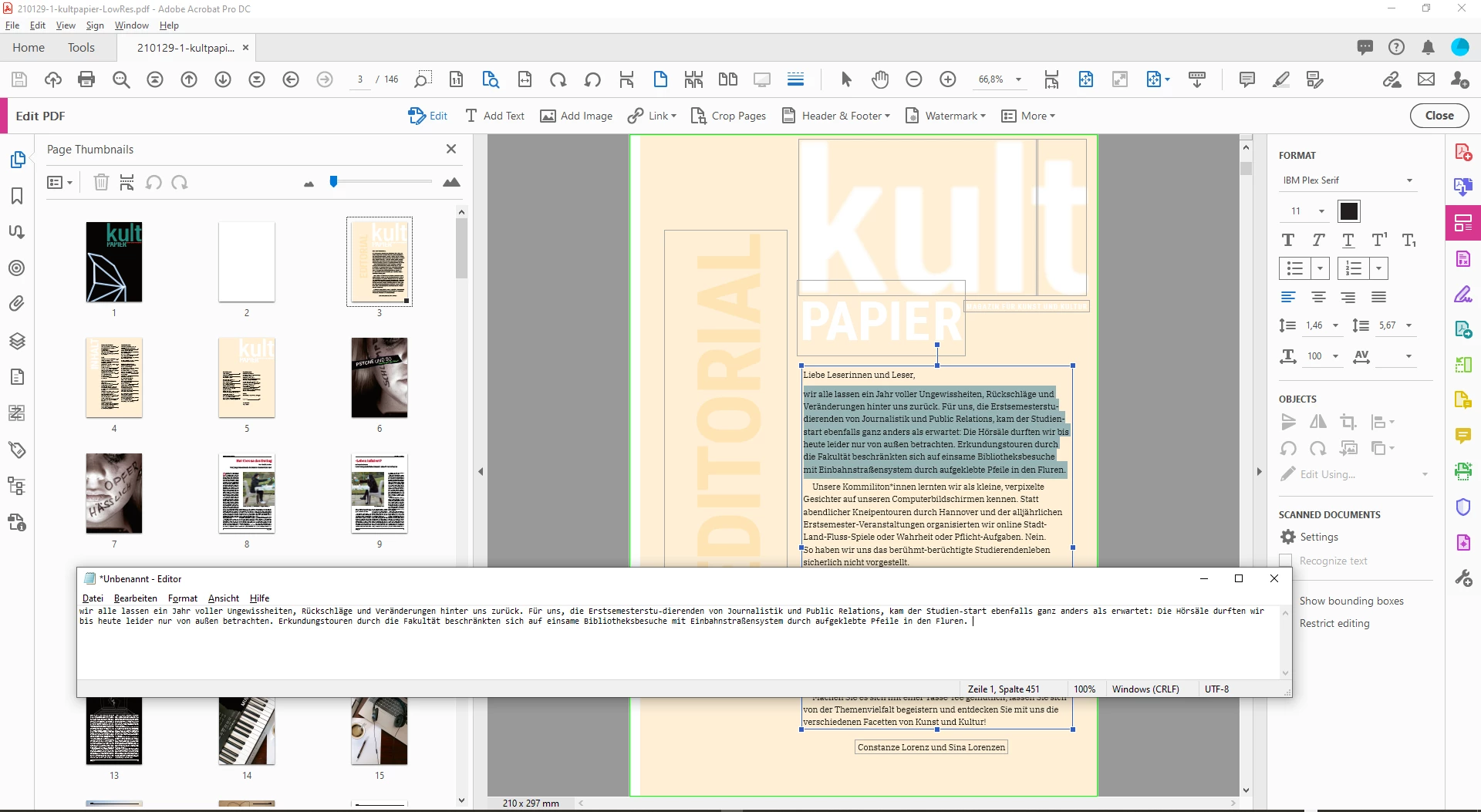
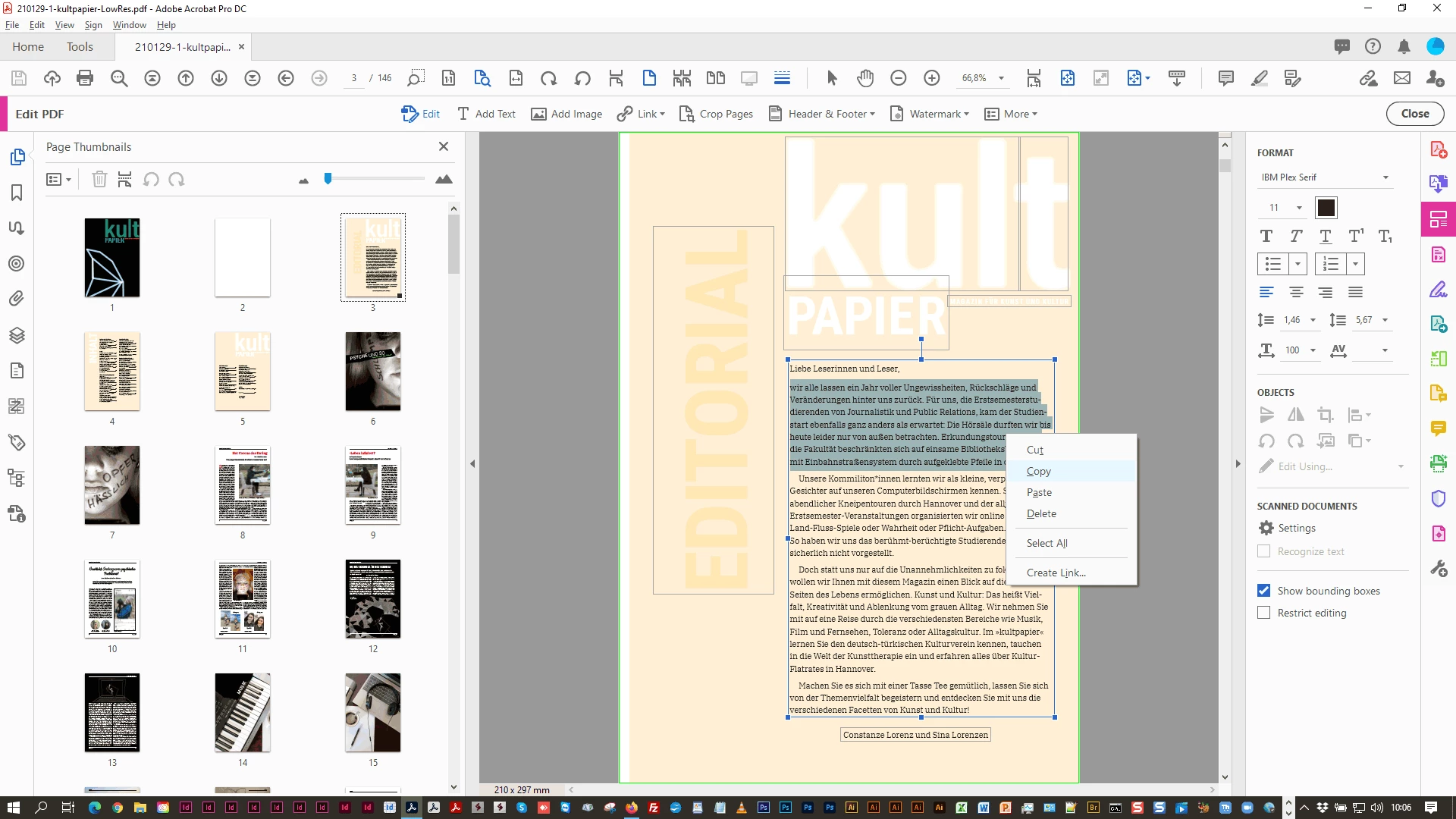
Select the text when in Edit PDF and copy it:


In my case the hyphenated words are detected as hyphenated; in the pasted text the hyphens will not show up:


Regards,
Uwe Laubender

( ACP )

2 replies

LaubenderCorrect answer
Community Expert
February 3, 2021

Hi Drow17,

text in a PDF does not know that it belongs to a paragraph optically.

But Acrobat Pro has a mode where Acrobat tries to hold text together that has line breaks or uses hyphenation.


Select the text when in Edit PDF and copy it:


In my case the hyphenated words are detected as hyphenated; in the pasted text the hyphens will not show up:


Regards,
Uwe Laubender

( ACP )

New Participant
December 28, 2023

Yes, PDFs know which lines belong to which, how could you even select them together, across lines if they didn't? The need for edit mode is really unconvenient, there are PDF viewers however, like Abby Finereader that let you select text without extra breaks.

Mike Witherell
Community Expert
February 2, 2021

Copying text from the PDF into ... what? In my experience, while some PDFs allow copying text, that is all you get: text.

Mike Witherell
Drow17Author
New Participant
February 2, 2021

I just wasn't sure if there was a way to prevent the exported text in the PDF from adding the additional line breaks. (My example above formatted differently before posting, so it's not very useful.)


Essentially, the PDF could have a line of text that says "This is a line of text" that spans across two separate lines. When I copy / paste it anywhere, it will include that line break, instead of pasting all into a single line


"This is a line

of text".