Participant
May 13, 2020
Answered

How to save pages as JPEG / PNG in multi-page PDF export? Possible script?

  • May 13, 2020
  • 4 replies
  • 3304 views

Hi guys,


I need to find a way to make quick/low file size PDF exports of a portfolio. The file is big, which is expected, but takes a long time to export as PDF. However, it takes no time ro export in raster formats. Which leads me to ask if there's a function in InDesign, that converts each page as JPEG / PNG then complies these in a PDF?


Many thanks  
This topic has been closed for replies.
Correct answer rob day

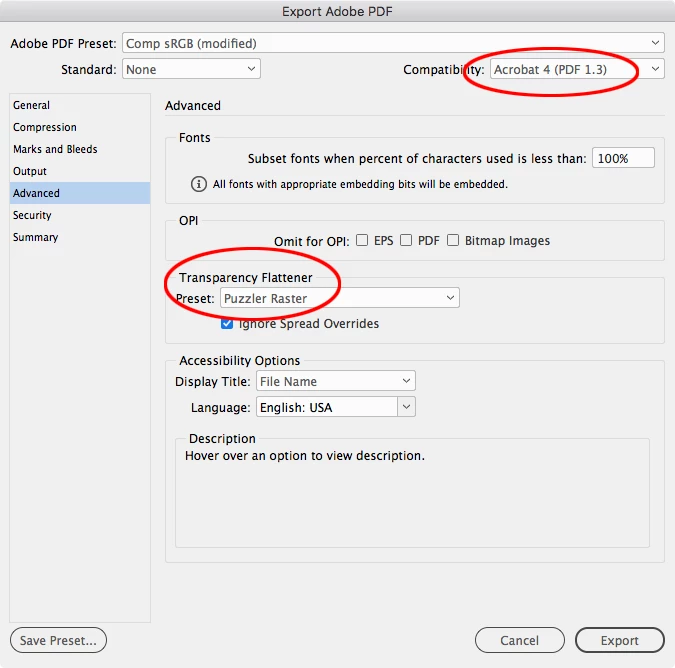
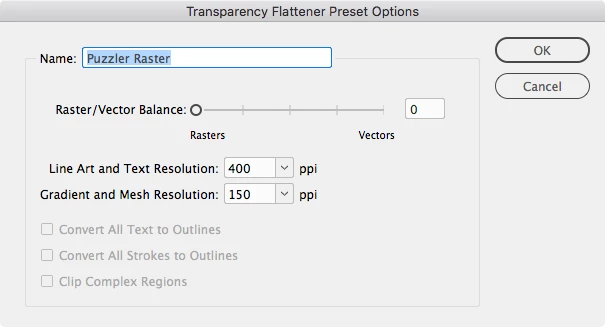
Not sure if it will help with your export time, but you can force the entire page to rasterize by including a transparent object on each spread, and exporting with Compatibility set to Acrobat 4. The transparent object can be fully transparent and placed anywhere on the Master spreads. The Acrobat 4 export will let you choose a Transparency Flattener preset from the Advanced tab, and you can make a Flattener Preset that forces all rasters. Something like this:


4 replies

rob day
Community Expert
rob dayCommunity ExpertCorrect answer
Community Expert
May 13, 2020

Not sure if it will help with your export time, but you can force the entire page to rasterize by including a transparent object on each spread, and exporting with Compatibility set to Acrobat 4. The transparent object can be fully transparent and placed anywhere on the Master spreads. The Acrobat 4 export will let you choose a Transparency Flattener preset from the Advanced tab, and you can make a Flattener Preset that forces all rasters. Something like this:


Community Expert
May 13, 2020

adekunleawodele said:

…Which leads me to ask if there's a function in InDesign, that converts each page as JPEG / PNG then complies these in a PDF?


Hi,

if the exported PNGs or JPGs are sufficient for your workflow you could open them in Acrobat Pro DC as PDF and save them. This should be possible with the contents of a whole folder.


In Acrobat Pro:

File > Create > Combine Files into a Single PDF…

File > Create > Create Multiple PDF Files…


Regards,
Uwe Laubender

( ACP )

Participant
May 13, 2020

Thank you Uwe Laubender!


I figured it would have to be a two-step process, which is okay, as it is still quicker than the normal process of exporting. I work with a lot of heavy vector drawings, hi-res JPEGs and more vectors indesign. Only when i want a final draft will i wait for it.


I saw this sript https://www.drscripto.com/indesign-export-as-rasterized-pdf/    which provides exaclty what i want, but at a price i am not ready to pay. Only if, this is built into InDesign next time...


rob day
Community Expert
Community Expert
May 13, 2020

How long does the PDF export take? Have you tried exporting a few pages at a time to test whether there is an object somewhere that is causing the slow export?

BarlaeDC
Community Expert
Community Expert
May 13, 2020

HI,

What are you export settings for the PDF? it may be that we can alter them to enable a faster creation of the PDF.

Regards

Malcolm

Participant
May 13, 2020


Hiya, i have attached screenshots of general and compression settings. Please let me know if there is already a 'rasterizer' function in InDesign PDF exporter, or if a script exists.