
ZHZ2
Participating Frequently
December 11, 2019
質問

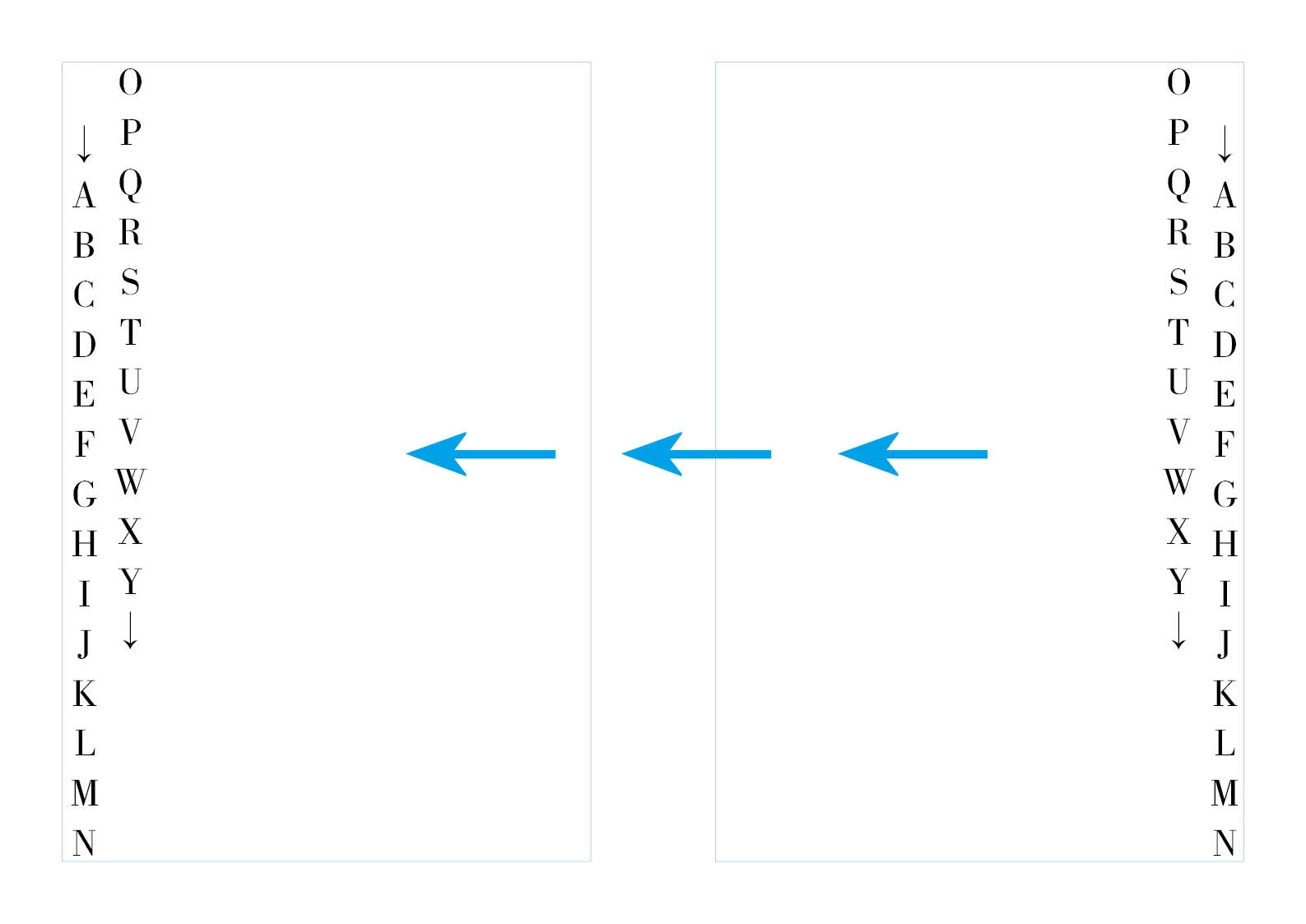
★ I want to arrange text on the left and right. How can I do that? 【左侧竖排文字,怎么实现?】★

  • December 11, 2019
  • 返信数 3.
  • 1667 ビュー

I want to arrange text on the left and right. How can I do that? 

(左侧竖排文字,怎么实现?)


このトピックへの返信は締め切られました。

返信数 3

Community Expert
December 12, 2019

Hi, then I would do a feature request at:

https://indesign.uservoice.com/


Explain your use case with ancient Chinese books and material; other cases as well.

Best link to this thread here.


Thanks,
Uwe Laubender

( ACP )

ZHZ2
ZHZ2作成者
Participating Frequently
December 13, 2019
Community Expert
December 11, 2019

Hi ZHZ2,

for what kind of text would you like to do this?

Is it Japanese only? English only? A mix of Japanese and English? Something else?


Note: If you want to do this with a regular text frame with e.g. an English version of InDesign you can do it, but the typography would be looking awful:


On the left: Character rotation used, character direction changed, paragraph composer is Adobe World-Ready Composer.

Text frame rotated to 90°.


On the right: Character rotation used with Japanese Paragraph Composer.

Text frame rotated to -90°.


So you better do it with several text frames threaded. One text frame for each line of text:


Regards,
Uwe Laubender

( ACP )

ZHZ2
ZHZ2作成者
Participating Frequently
December 12, 2019

Thank you! I'm using the Chinese version 2020. InDesign has no function of typesetting for the left side. I hope the next version will have it. Thank you very much! 

Geоrge
Legend
December 11, 2019

As far as I understand your question you are need to install InDesign with supporting of text writing in both directions (Hebrew and/or Arabic) and then you can copy from Europe language style and paste to Hebrew style for changing text direction. 


But, as I see - you're use it some Asian language too in post, may be you're need some your Asian version for such things.

Remember, never say you can't do something in InDesign, it's always just a question of finding the right workaround to get the job done. © David Blatner
Community Expert
December 11, 2019

Hi George,

because the reading direction for Japanese ( and I suppose also for Chinese ) vertical text is from right-to-left the Chinese or Japanese version of InDesign cannot change the direction of lines to left-to-right. One needed a Japanese Paragraph Composer that could combine features of the Adobe World-Ready Composer.


In my post above below I faked this with the Adobe World-Ready Composer, but as you can see the alignment of characters is a catastrophy.


Regards,
Uwe Laubender

( ACP )


EDITED

ZHZ2
ZHZ2作成者
Participating Frequently
December 12, 2019