
Participant
November 16, 2016
Answered

Identifying RGB images in a large .indd document

  • November 16, 2016
  • 1 reply
  • 25798 views

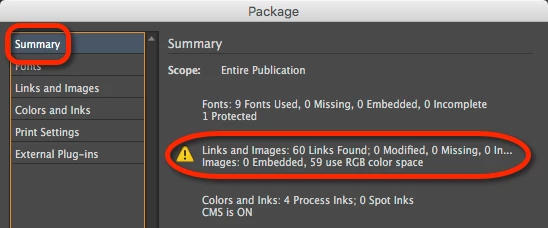
Hi all, I've got a large 116 page document that features hundreds of images. When I go to 'Package' the project, I get a warning message that 8 of the images are RGB (which I don't want as it's going to print). So, InDesign has identified that there's 8 RGB images, and it must know which ones. But is there any way I can find out where they are? The only way I can think of is to click on every individual image in the document, one-by-one, and refer to the 'Link info' panel. Does anyone know a quicker method? Thanks
    This topic has been closed for replies.
    Correct answer Sandee Cohen

    You're looking at the Summary

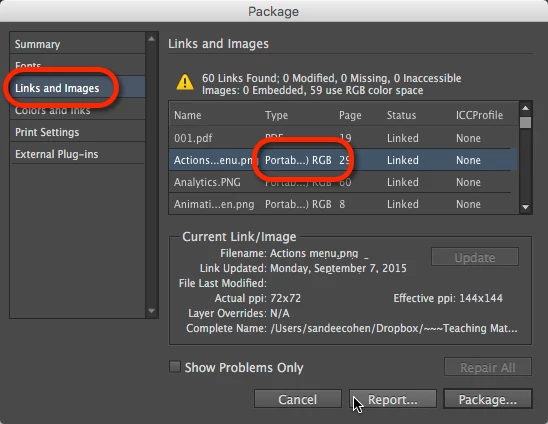
    Click on Links and Images and you'll see a list of all the images, which ones are RGB, and what pages they are on.

    But as many others will tell you, converting RGB to CMYK is no longer the optimum workflow. These days we let the print machine driver do the conversion at the proper values for that press.

    1 reply

    Sandee Cohen
    Sandee CohenCorrect answer
    Legend
    November 16, 2016

    You're looking at the Summary

    Click on Links and Images and you'll see a list of all the images, which ones are RGB, and what pages they are on.

    But as many others will tell you, converting RGB to CMYK is no longer the optimum workflow. These days we let the print machine driver do the conversion at the proper values for that press.

    Steve Werner
    Community Expert
    Community Expert
    November 16, 2016

    You can also create a Preflight profile to search for RGB images.

    Participant
    November 17, 2016

    Both good solutions - thanks guys!