
Participant
May 7, 2021
Answered

Import pdf into indesign and edit

  • May 7, 2021
  • 2 replies
  • 20279 views

I place a multipage pdf to indesgin.  Now I want to edit it?  Is it possible to edit this document in indesign, or do I have to edit it somewhere else?  As you can see I have no Idea how to use indesign.  I am tasked with modifying our companies technical manual.  Can someone point me in the right direction?  thanks much! 
Correct answer SJRiegel

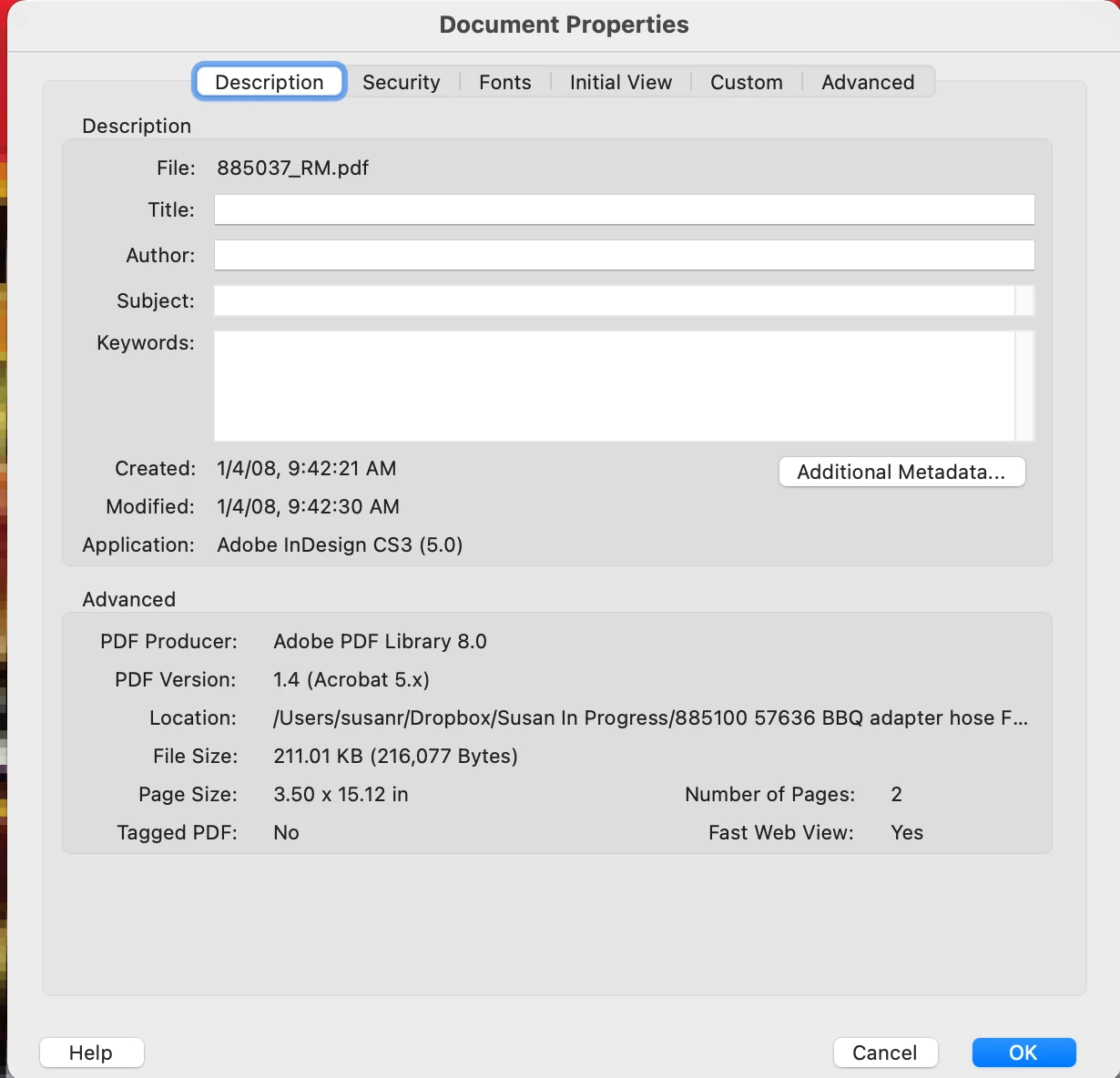
PDF is a final delivery format, and is not intended for major editing. Someone in your company should have the original work files for these technical manuals - they may have been done in InDesign, but there is a chance that they were done in some other program, such as Microsoft Word. If you open the PDF in Acrobat and look under File > Properties at the Description tab, it should show what program the PDF was generated from.

(In this example, it was Adobe InDesign CS3)

2 replies

SJRiegelCorrect answer
Legend
May 7, 2021

PDF is a final delivery format, and is not intended for major editing. Someone in your company should have the original work files for these technical manuals - they may have been done in InDesign, but there is a chance that they were done in some other program, such as Microsoft Word. If you open the PDF in Acrobat and look under File > Properties at the Description tab, it should show what program the PDF was generated from.

(In this example, it was Adobe InDesign CS3)

barley1Author
Participant
May 8, 2021

Thank you for replying.  I do have the document in Word.  I used word to create the PDF.  Am thinking that InDesign is not the application I need to write a technical user manual?  Seems that converting a word document to Indesign is also a terrible process?  Since I am not making brochurs, creating magazine ads, etc.  Shoule I move on to something else?  What would you do if you had a 100 page technical manual written in Word that you need to update?  Before trying Adobe I was going to use LateX to do this.  Any ideas? 

Legend
May 8, 2021

If you have a manual in Word form, update it in Word form. Putting it back in InDesign is not too bad if made the right way; especially no font changes. The word document should just have words. Have the text signed off completely, be sure it's finished. Then bring to InDesign once. Never change the PDF, not even to fix a single typo. 

Steve Werner
Community Expert
Community Expert
May 7, 2021

InDesign by itself is not capable of editing a PDF file (single page or multipage). There are third party products which can translate a PDF file into editable InDesign objects.


Check out PDF2ID at recosoft.com:


https://www.recosoft.com


Or PDF2DTP at markzware.com:


https://markzware.com