
Participant
May 10, 2018
Question

InDesign 2017 won't print TrueType fonts

  • May 10, 2018
  • 4 replies
  • 1592 views

Just upgraded the PC and switched to Windows 10 (it's not that bad). Updated the driver for our printer, and I'm experiencing problems. Previous driver would print TrueType fonts from InDesign just fine; now I get gibberish for some characters like curly quotes, em dashes, etc. Font prints fine from Acrobat PDF, but need to print from InDesign.

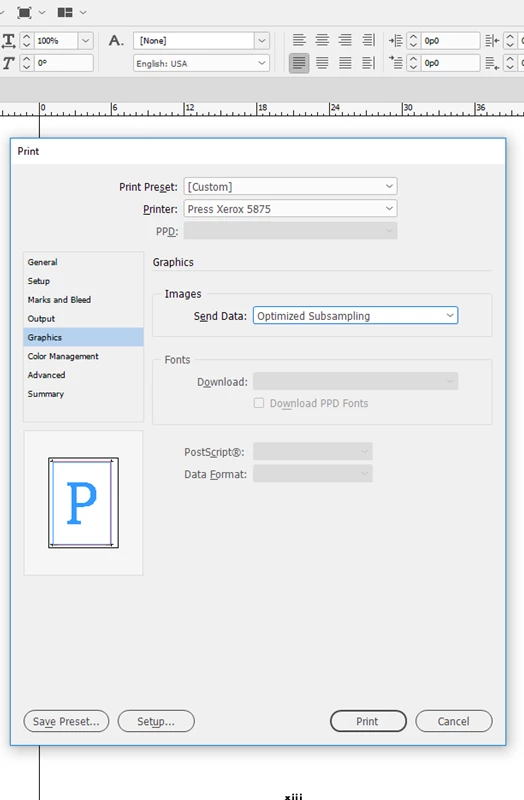
One possible way to correct the problem appears to be to tell InDesign to send a complete font set to the printer.  However, in the Print / Graphics panel where I should be able to change the selection to Complete, the Font part of that panel is grayed out and inaccessible.

How do I make the Font part of the panel accessible?  Do I need to revert to the previous printer driver?  Is modifying the Font part of the panel selection in fact the fix that will make the TrueType fonts print correctly, or is there a different fix for that problem?  Other tips?  Thank you!
This topic has been closed for replies.

4 replies

Bevi Chagnon - PubCom.com
Legend
May 11, 2018

How do I make the Font part of the panel accessible?

If you want to force a download of the fonts, then select a PostScript printer driver. Check to see if another driver, a PostScript version, is available and installed on your workstation.

I see from Xerox website that they offer both PCL and PS drivers.

Since I don't see the telltale "PS" in the driver that's selected in your screen capture above, I'm assuming it's PCL, not PS. That's why it's greyed out.

|    Bevi Chagnon   |  Designer, Trainer, & Technologist for Accessible Documents ||    PubCom |    Classes & Books for Accessible InDesign, PDFs & MS Office |
Caleb Clauset
Participating Frequently
May 11, 2018

Juliet,

I'd guess that there is a mismatch between the printer driver InDesign CC 2017 is using under Windows 10 (Windows 10 is a different beast from Windows 7) and the way the printer itself has been configured. That Windows 7 works fine may be a red herring as printer drivers can be OS-specific.

Anyway, if you have the ability to print a configuration page from the printer console, I'd start there as it'll show which protocols are enabled etc. Then you can try to cross-reference that against the driver you have installed and the method it's using to communicate with the printer (for example, printing over Port 9100 (Raw TCP/IP) or LPD/LPR or via a Windows print queue.

I doubt that upgrading to InDesign CC 2018 will make a difference, but Typefi 8 is compatible with InDesign CC 2018 (although we've uncovered a bug in the 13.1 release where Adobe changed their implementation of endnotes that is now causing us problems; we should have a fix for CC 2018.1 shortly).

Caleb

Product Manager, Typefi

Participant
May 21, 2018

Caleb, we tried switching to a different communication method last week.  No change.  We're beginning to suspect this is a bug.

Bevi Chagnon - PubCom.com
Legend
May 11, 2018

Any of these items can affect whether a font prints correctly.

  1. The printer driver. Is it the most recent one for your operating system and the printer itself? Check the manufacturer's website for new downloadable drivers.
  2. The font— is it a system font? Or a full-featured TrueType or OpenType/TrueType font?
    • You can view your fonts in the C:/Windows/Fonts folder. If the icon is jagged, then it's a system font and usually not printable. System fonts also have .fon dot file extension rather than TTF or OTF.
    • Double-click on the icons to see more information about each font. You can also right-click/Properties on each font, too.
  3. Are your fonts installed correctly? They should all be in the C:/Windows/Fonts folder unless you're using a font manager.
  4. The font could be corrupted, too. Uninstall it, reboot your computer (this clears the old font out of any cache the OS was using), and reinstall it.

Suggestion: if you have quite a lot of fonts, use a font management utility to install and turn off/on your fonts. It also can give you other font-related tools.

Try Linotype's Font Explorer X. Although they haven't updated the Windows version since Windows 8, you can still use it on Windows 10 and then run the "updater" to get newer version. Scroll to the Previous Versions sections. http://www.fontexplorerx.com/download/

Also Printer's Apprentice is good, too. Printer's Apprentice - A Font Manager for Windows 10, 8, 7, Vista & XP

|    Bevi Chagnon   |  Designer, Trainer, & Technologist for Accessible Documents ||    PubCom |    Classes & Books for Accessible InDesign, PDFs & MS Office |
Participant
May 11, 2018

Nope, still not solved. Thanks for your suggestions, but I've tried them already. The fact that none of those worked is what led me here.

Font is known to be healthy. Worked just fine on the previous system. Font prints from other programs including Acrobat, just not InDesign.

I have Printer's Apprentice, the new 8.2 version even. Printer's Apprentice says it's fine.

Uninstalled the font, rebooted, reinstalled. Same problem.

New wrinkle:The inability to modify the Fonts portion of that window persists regardless of what printer I've chosen.  So I don't think it is actually the printer driver.  Another person running InDesign 2017 on Windows 10 also has this problem. Someone else in the office who has not yet switched to Windows 10 does not have this problem. Oh, and this font works for her.

How do I unmark that one answer as Correct? Because it's not because the problem persists. . . .

JonathanArias
Legend
May 11, 2018

how do you know that font is healthy? might be missing data.

Can you print out of a .pdf?

Are you using a professional font manager?

Mike Witherell
Community Expert
Community Expert
May 11, 2018