Participant
October 9, 2019
Answered

InDesign 2019 not working properly on mac OS Catalina

  • October 9, 2019
  • 10 replies
  • 11410 views

Indd not working properly after installing OS Catalina yesterday. Selection tools not working. I've tried restarting a bunch of times and also have uninstalled and reinstalled indd with the same issue eventually happening. Any fixes out there? Greatly appreciate any suggestions! I am unable to work in indd. 


{Renamed by MOD}

This topic has been closed for replies.
Correct answer grazibm

I have this same issue. I recently updated to macOS Catalina 10.15.2 (19C57), newest version of Adobe InDesign CC. All my links appear correct in preflight panel, and I am also unable to export a .pdf (interactive); similar to the issue Aidanj is having.


• I exported an IDML, and ALL links disappear, so that doesn't seem to work.


• I open the original .indd document, and packaged it (including links, fonts and .imdl). I then opened the new InDesign file-copy located in the packaged folder, and successfully exported a .pdf (interactive).


The message I am receiving when exporting a .pdf is: "Indesign “this document contains links to files/URL(s) that are not accessible. Please check your network connectivity or the original source of content."


Hi everyone.


I was having the same problem for almost 2 months. 


This solved my problem:


Go to your system preferences >  security and privacy > files and folders > click all the boxes under Indesign and Illustrator
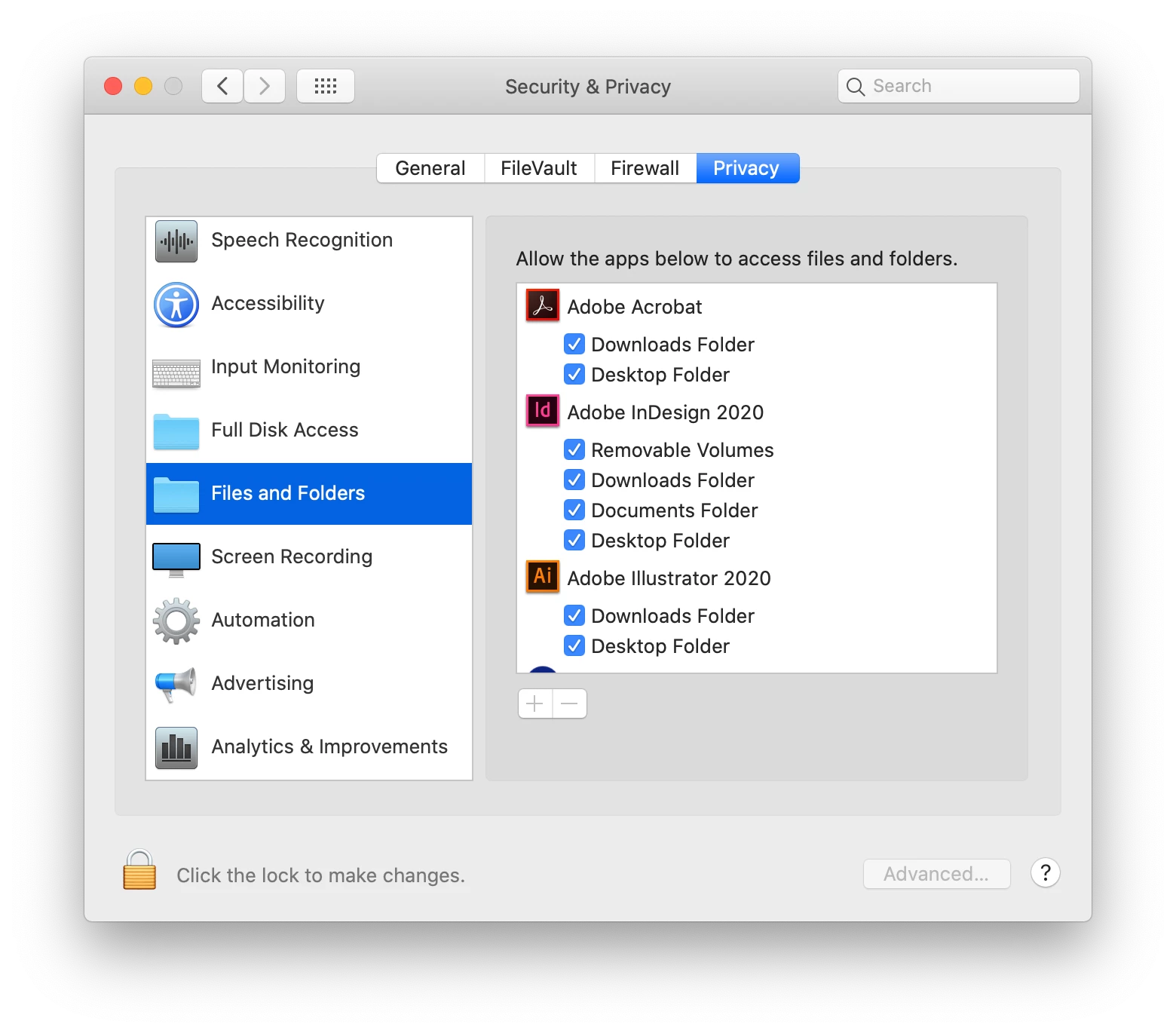
 

10 replies

Participant
September 28, 2020

I can add InDesign 2020, but cannot add Older versions to the list, even in full disk Access.  Quite frustrating — because not all printers or people use the most recent Adobe products where I live.
(I have projects in InDesign 2018, but cann not open older versions of Adobe products.)

Legend
September 28, 2020

Apple made sure old apps did not work properly in Catalina. If you want to run old apps (which is a reality for InDesign especially) you needed to keep an old system going to run them. (Too late to download now).

Participant
August 8, 2020

This saved my life, thank you! 

drewm98296949
Participant
May 4, 2020

Thank you, thank you, thank you! 

Participant
March 18, 2020

I dont get the option to populate the Files and Folders right hand screen with Adobe Indesign - how can I add it?

Participant
July 10, 2020

same question here!

Legend
July 10, 2020

1. use InDesign 2020

2. click + to add the app if needed

Inspiring
March 2, 2020

I've been looking for the solution for months. Thank you!

Srishti Bali
Community Manager
Community Manager
October 14, 2019

Hi Dana,


We are sorry to hear about this. In addition to the suggestions shared above, I would request if you can share a few more details like:

  • Does updating InDesign to 14.0.3 helped to resolve the issue?
  • Try booting the system into Safe Mode (https://helpx.adobe.com/in/x-productkb/global/start-safe-boot-mode-mac.html) and check how it works there.
  • If that doesn't help either, login to root account (https://support.apple.com/en-in/HT204012). Check how application works there. If it works fine there, then it could be related to permission errors. Follow these steps to repair permission errors: 
    Go to Terminal (Go > Utilities > Terminal.app) 
    Execute the following command on terminal to provide permission:
    • sudo chmod -R 777 /Users/<user>/Library/Preferences/Adobe InDesign
    • sudo chmod -R 777 /Users/<user>/Library/Caches/Adobe InDesign
    • sudo chmod -R 777 /Users/<user>/Library/Application Support


Let us know if this helps or if you need any further assistance.


Regards,

Srishti

Participant
October 15, 2019
Having problems too since upgrading. When reopening InDesign files that were created before the upgrade I'm discovering documents are not loading correct images (this is random throughout the doc) while the preflight panel is not showing any problems. When exporting to pdf, get notices that URLs are missing although links panel is showing everything is updated. Currently using InDesign 14.0.3. It's unfortunate that the most common advice is to run and hide. Adobe needs to hear about issues from real life users/situations and help figure it out.
Srishti Bali
Community Manager
Community Manager
October 23, 2019

Hi there,


Sorry to hear about this issue. I would request if you can share a few more details like:

  • Few screenshots of the issue.
  • Is the issue related to a specific document(s)/asset(s)? If yes, could you please share the document(s)/asset(s) with us? You can upload it to the creative cloud and share the download link. 
  • Where the files are saved (Network Drive/ System HDD/ Shared Folder on System /External HDD)? 


We’re here to help, just need more info.   


Regards,

Srishti


Legend
October 10, 2019

Go back to an older system. Wait. Learn caution: this happens with every new system. You were brave to go so early. 

Steve Werner
Community Expert
Community Expert
October 10, 2019

New operating systems are always susceptible to unreported and/or unfixed bugs. That's why you shouldn't update a production computer unless you've made a complete backup (so you can revert if you have to) and you're cautious about doing an update.

Steve Werner
Community Expert
Community Expert
October 9, 2019

What version of InDesign? InDesign CS6 or earlier won't install at all. Current versions were not tested with macOS Catalina. Probably only the version due out in November with the Adobe MAX conference was tested to work witn Catalina.


macOS Catalina is the End of the Road for InDesign CS6

Participant
October 9, 2019
I was on InDesign CC 14.0, which I believe is the latest and greatest? Any suggestions why the sudden bug would pop up?
Participant
October 10, 2019
14.0.3 is the latest version. Please try to update...
Frans v.d. Geest
Community Expert
Community Expert
October 9, 2019

No problem here. CC 2019 works fine with Catalina on my two Macs.
