
emilyp11872062
Participant
March 9, 2019
Question

InDesign Color Printing Issues

  • March 9, 2019
  • 1 reply
  • 8605 views

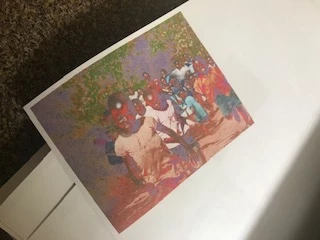
For some reason, when I print directly from InDesign, the colors print completed messed up (photo attached below). I thought it had to do with incorrect RGB/CMYK settings, so I made sure the document was in CMYK, and that did not fix the problem. However, when I exported the document as a pdf and used the "color conversion to Working CMYK" option, the colors printed correctly. Of course I could continue doing that and solve my own problem, but I am dying to know WHY I am having such a hard time printing correctl colors straight from InDesign! I'd rather not have to export a pdf every time I want a test print. Any insight would be greatly appreciated. Thanks.
This topic has been closed for replies.

1 reply

Michael Bullo
Community Expert
Community Expert
March 9, 2019

Have you tried printing using RGB settings? Lower end printers (no offence) generally default to expecting RGB over CMYK input. So before you take a terribly deep dive into the world of colour management and if you haven't already, try RGB printing over CMYK.

You might also have the issue where InDesign and your printer are both trying to colour manage the printing of your document. If you want InDesign to control the printing and that's where you are making any changes to print settings, ensure that you have turned off colour management within the printer driver.

emilyp11872062
Participant
March 9, 2019

Thanks for the suggestion Michael! I just tried switching the document to RGB, also converted the image link to RGB via photoshop, and it still came out wrong. We do have a pretty cheap printer, but the strange thing is that when I printed a CMYK and RGB version of the same image from photoshop, they both printed okay. When I tried the same thing through InDesign, the colors came out crazy. So it seems like its a problem in InDesign. I'm hoping this is just some small detail that I've overlooked while selecting print options but I can't figure out what it is. Here are my settings in InDesign in case anyone is curious. 

Michael Bullo
Community Expert
Community Expert
March 9, 2019

I appreciate that printing from Photoshop is working but did you try turning off any colour management within the printer driver when printing from InDesign?

If you can't get the printing from InDesign working you could always try exporting out a high quality PDF and try printing that.

At this point I'll step back and let the print masters offer their advice.