
Participant
April 20, 2020
Question

InDesign data merge of check box values

  • April 20, 2020
  • 2 replies
  • 809 views

Hi, 

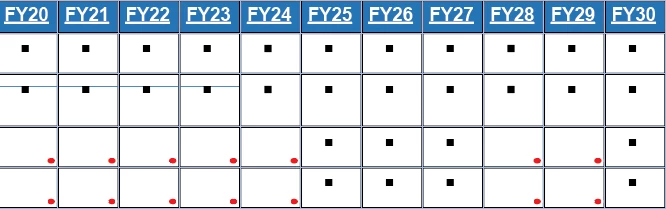
Problem 1: I have an InDesign report that I am building that merges data for check box values (true or null) representing whether a project is active in a particular calendar year. I'd like to show those "true" values with a check mark (✔) in a table. I'm able to get the "true" value to display but, after replacing "true" with the check mark in the txt file, am not able to get the check mark to show. I've replaced "true" in the source txt file with the check mark values. Is there a workaround? Would it be better to use a button?


Problem 2: For the same report, when there is a "true" in the field it shows as "true" in the report, but it also shows a black square bullet whether or not it is blank. How do I remove the square bullet icon?

Thanks!
This topic has been closed for replies.

2 replies

Legend
April 21, 2020

As I read it, the problem seems *just* to be formating. Colin is right as always, you could replace the "true" with "" in your source-textfile. Make it GREP and be variable in future. Otherwise, I dont see it much of a hassle to once search/replace, if its just for a few documents.


As I see it, your ✔ is just to big for the cell, and/or the cell has spacing to the content and shows the red dot, which indicates content beiing unable to be shown.
Hm, what about those black boxes? Top of my head, i think of a wrong style sheet containing Bulletpoints.

Colin Flashman
Community Expert
Community Expert
April 21, 2020

Problem one can be solved in one of three ways:

  1. in the excel file, replace the true comments with a zapf dingbats tick, and export the file as UTF-16 unicode text. Back in InDesign, the field that contains the field either needs to be set to zapf dingbats; or have a GREP style that will change the tickbox to zapf dingbats.
  2. in the excel file, replace the true comments with a "tick.ai" link and make a tick character in Adobe Illustrator. The field that contains the tick in InDesign will now be an image field.
  3. in the excel file, replace the true comments with a specific letter e.g. Y and then use an application such as indyfont to make a one-off font that contains a tick character where the Y character would be. Indyfont has a free version to make one character only so you may be able to use this for a solution: Script is here - http://www.indiscripts.com/post/2012/06/indyfont-build-opentype-fonts-from-within-indesign
If the answer wasn't in my post, perhaps it might be on my blog at colecandoo!