

Swandive stream
Inspiring
August 24, 2018
Answered

InDesign difficult to make invisible tables.

  • August 24, 2018
  • 5 replies
  • 7306 views

I use both Adobe CC and Microsoft Office and noticed considerable differences in how tables are created and edited (adding/removing rows etc.) but with which InDesign has a disadvantage. Here I'm going to compare InDesign to Word

  • Why do InDesign tables need to be in a text box? That seems weird to me.
  • Unless there is a trick I'm missing, trying to hide the borders on tables in InDesign, to use them purely as an invisible layout tool for restaurant menus etc, seems needlessly complicated unless I missed a trick. I get in a tangle of paragraph styles and what have you without a straightforward route to achieve this. Did I miss a trick? Achieving this in Word is straightforward and intuitive.

Perhaps I'm just not that experienced, I use Photoshop more than InDesign, but I find tables a bit awkward in InDesign and the sheer number of controls etc. can be a bit overwhelming.
This topic has been closed for replies.
Correct answer Colin Flashman

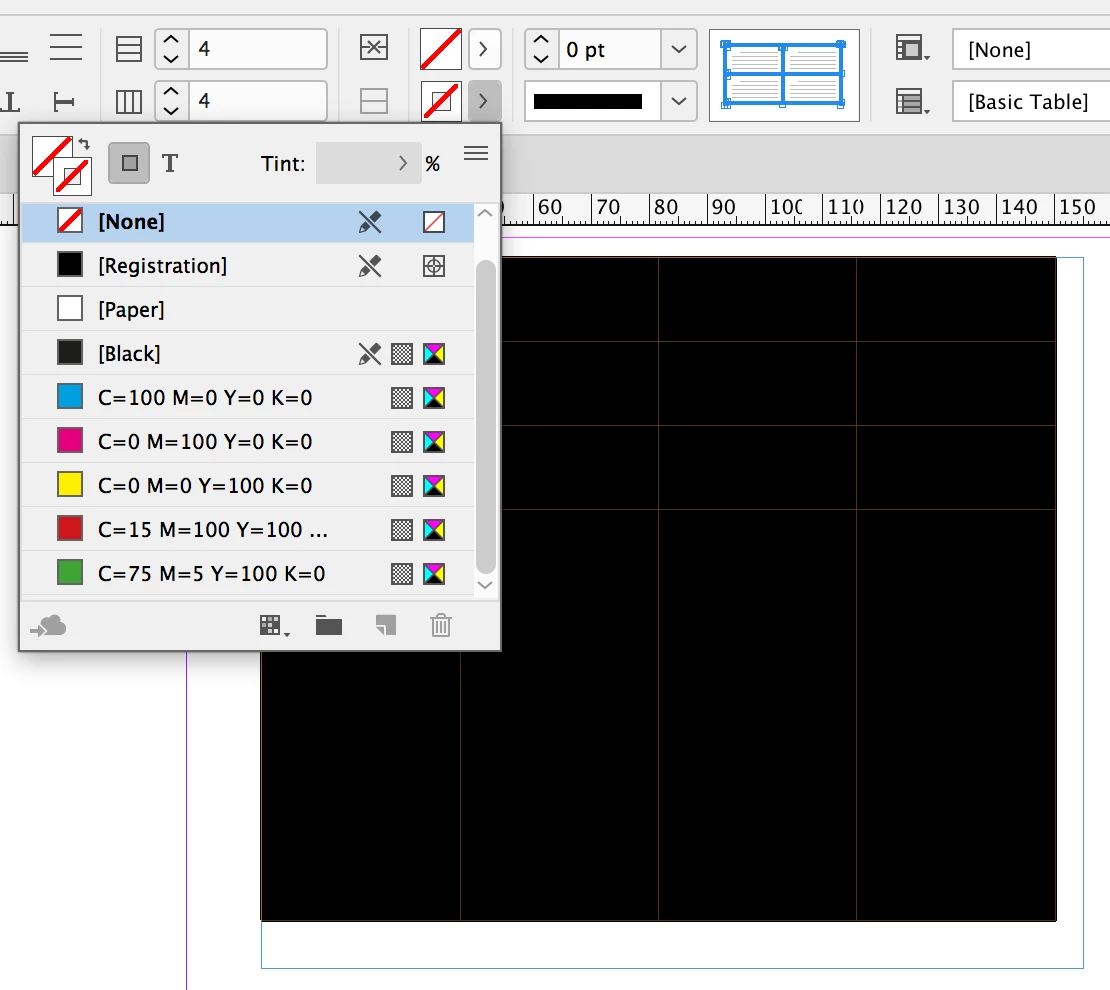
When I work with tables, I find it best to use the commands from the control palette to easily change the strokes in a table. In the following screengrab, I have changed the strokes to none, and this instantly changes the thickness of the strokes to zero.

My opinion is the control palette (i.e. the toolbar across the top that has the options change depending on what has been clicked) is the best way to easily control table formatting options.

As to why a table is in a text frame, I am only guessing that the developers imagined that a table would always be part of textual content and may need to flow from page to page, such as for a parts catalogue or lookup table.

5 replies

jane-e
Community Expert
Community Expert
August 25, 2018

u9iouiuljuiouj  wrote

Perhaps I'm just not that experienced, I use Photoshop more than InDesign, but I find tables a bit awkward in InDesign and the sheer number of controls etc. can be a bit overwhelming.

You will be much less frustrated if you spend some time learning to use the tools before using them in production. I use tables in Word, Excel, InDesign, and several other programs. There are many things to love about InDesign's tables, and they will cease to be "awkward" and "overwhelming" when you learn how to use InDesign and the table feature.

For learning tables, start here on lynda.com:

InDesign: Tables

and for InDesign:

InDesign CC 2018 Essential Training

Tip: Content in InDesign has to be in a frame; that's the way it was designed. But if you choose Create Table (nothing selected), InDesign will create the frame for you and make it the same size as the table, so you may not even notice it.

Colin Flashman
Community Expert
Colin FlashmanCommunity ExpertCorrect answer
Community Expert
August 25, 2018

When I work with tables, I find it best to use the commands from the control palette to easily change the strokes in a table. In the following screengrab, I have changed the strokes to none, and this instantly changes the thickness of the strokes to zero.

My opinion is the control palette (i.e. the toolbar across the top that has the options change depending on what has been clicked) is the best way to easily control table formatting options.

As to why a table is in a text frame, I am only guessing that the developers imagined that a table would always be part of textual content and may need to flow from page to page, such as for a parts catalogue or lookup table.

If the answer wasn't in my post, perhaps it might be on my blog at colecandoo!
ashleew44226948
Inspiring
August 24, 2018

Table/Cell styles can be a little mystifying; here's one of the more straightforward tutorials I've found for those new to working with them: https://www.bookdesignmadesimple.com/making-tables-look-good-in-indesign/

Re: why tables need to be in a text box, InDesign thinks of all content in terms of frames: content is either contained by a frame, or it is a frame. While I don't know the exact technical reason for this, my guess is that this frame-based logic exists to allow you to apply Object Styles to the frames in the question. So, for example, if you always want your tables to be free-floating with text wrapping around them instead of being part of the text flow, you could create an object style that would always apply a text wrap to your table frame, versus you having to constantly duplicate the frame or manually enter text wrap settings to achieve the same affect.

This saves time in both creation and updating: if you later decide you want your table frame to always have padding, a stroke, to have its own baseline grid, to have a fill color, whatever-- you can set it in the object style and the change(s) will be instantly reflected across the entire document, versus you having to update the frames one. by. one.

(Also, George's answer is correct: select the entire table and set the stroke color to "none." If this is a style you're going to be using frequently, be sure to save it as a table ​and ​cell style as well.)

Geоrge
Legend
August 24, 2018

>> Why do InDesign tables need to be in a text box? That seems weird to me.

What for you is "weird"? Do you wanna auto-adding pages as in Word?

https://indesignsecrets.com/make-indesign-add-pages-automatically-as-you-type.php

Remember, never say you can't do something in InDesign, it's always just a question of finding the right workaround to get the job done. © David Blatner
Geоrge
Legend
August 24, 2018

>> trying to hide the borders on tables

Add table strokes and fills in InDesign

Do the fill of table strokes as "none" color.

Remember, never say you can't do something in InDesign, it's always just a question of finding the right workaround to get the job done. © David Blatner