Participant
January 28, 2020
Answered

InDesign does not start because additional modules cannot be loaded on Windows 10

  • January 28, 2020
  • 8 replies
  • 8908 views

I try to work with InDesign on my Windows 10 PC. The Creative Cloud desktop app works well and the Installation of InDesign went through without issues. However, when starting InDesign I get two error messages, saying that additional modules could not be loaded. Like:

"Das Zusatzmodul PATH TYPE.RPLN kann nicht geladen werden. Es ist abhängig vom Zusatzmodul GENERIC PAGE ITEM.RPLN, das nicht geladen wurde. Bitte lesen Sie die Dokumentation zu Zusatzmodul GENERIC PAGE ITEM.RPLN."

After checking OK, InDesign quits.
I'm a new starter/tester with InDesign and have no experience with additional modules or documentations.
How can I become the InDesign running ? For me it looks simply buggy.
Thanks for you support !  Svenja from Germany

{Renamed By MOD}
This topic has been closed for replies.
Correct answer Sheena Kaul

Hi all,


Please try the steps below:

  • Close all the Applications.
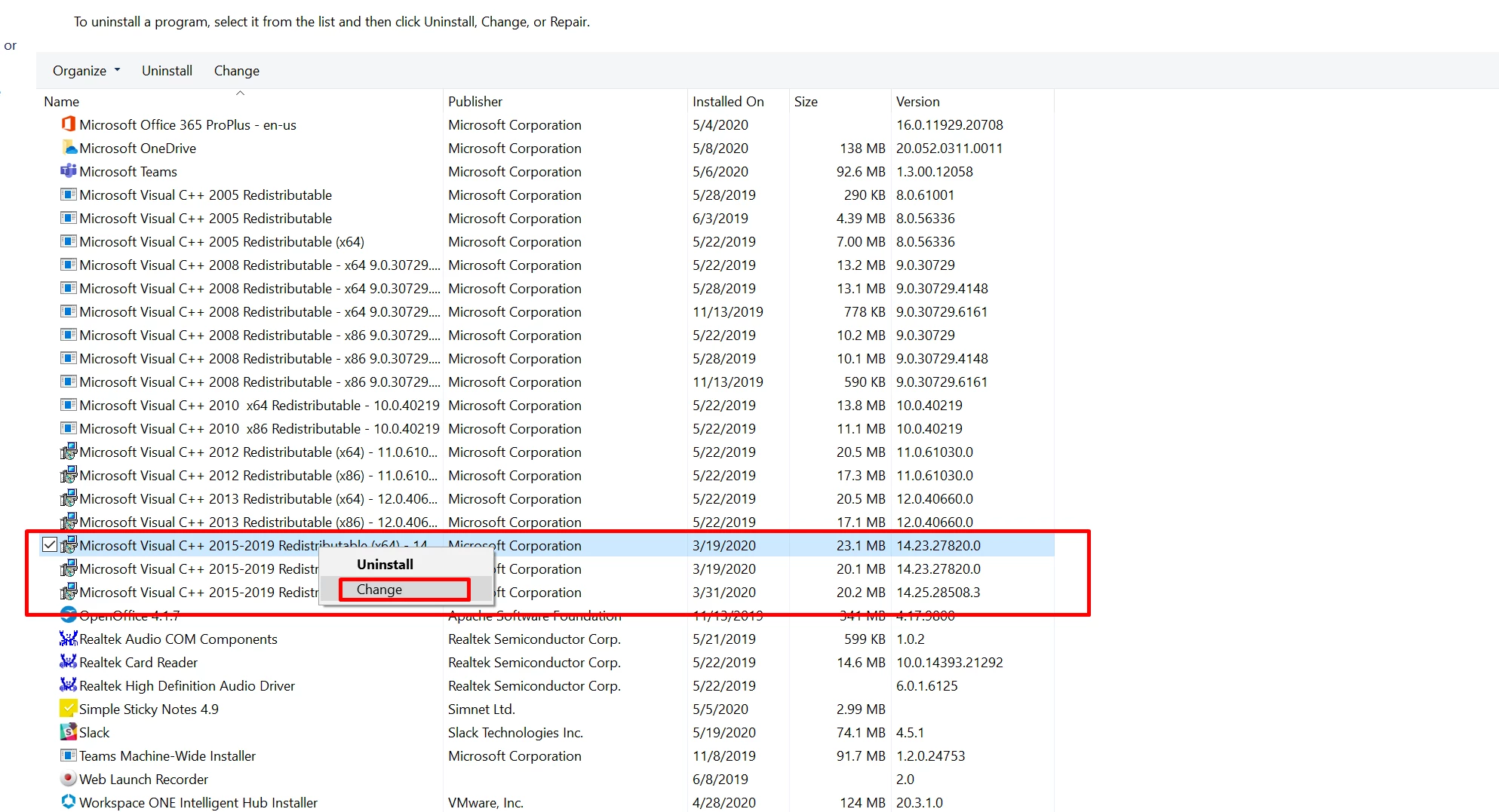
  • Go to Control Panel\Programs\Programs and Features.
  • Right click Microsoft Visual C++ 2015-2019 (x64)/ 2017-2019 (x64).
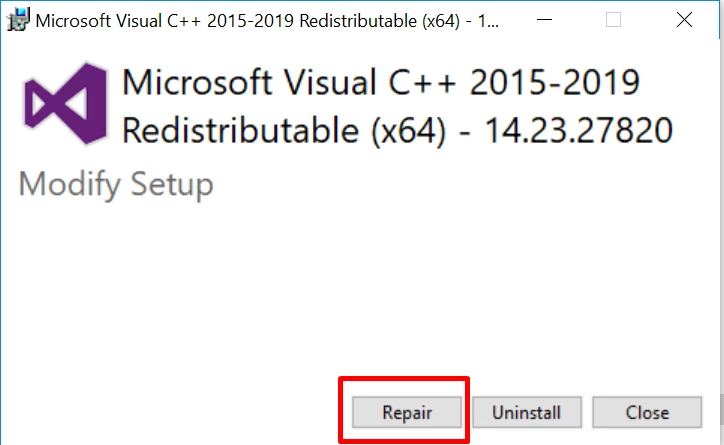
  • Click Change > Repair.
     
  • Restart the system.
  • Relaunch InDesign and check how it works.


 Let us know if that helps!


 Regards,

 Sheena

8 replies

MaximumUnreal
Participant
February 3, 2021

Thanks! Worked a treat (once I actually did it to the correct C++ feature/app). My first attempt didn't work and then I realised I have two features/apps titled 'Microsoft Visual C++ 2015-2019 Redistributable...' but one ends with "(x86)..." and one edns with "(x64)..." - I must have first run those steps on the "(x86) feature/app.


All fixed. Cheers.

Participant
September 20, 2020

This helped so much! Thank you, thank you, thank you!!

Participant
June 2, 2020

!solutionverified

Sheena Kaul
Sheena KaulCorrect answer
Legend
May 20, 2020

Hi all,


Please try the steps below:

  • Close all the Applications.
  • Go to Control Panel\Programs\Programs and Features.
  • Right click Microsoft Visual C++ 2015-2019 (x64)/ 2017-2019 (x64).
  • Click Change > Repair.
     
  • Restart the system.
  • Relaunch InDesign and check how it works.


 Let us know if that helps!


 Regards,

 Sheena

Participant
May 20, 2020

Hi Sheena,


This worked for me. InDesign and the other applications launch without a problem now.


Thank you so much!

Sheena Kaul
Legend
May 20, 2020

Perfect!

Thanks for confirming. 

Participant
May 19, 2020

I too am now having this problem. I've used inDesign for the greater part of a year - no problem. A couple days ago this issue arrived and I can no longer use it. I really need access to this for a project I'm working on. I've reset my PC, done the safe mode. I've uninstalled creative cloud, uninstalled indesign (deleting preferences as well). Reinstalled to a brand new location. For whatever reason it is not installing Generic Page Item.rpln as part of the package and inDesign will crash when it tries to launch without it. 😞

Participant
May 19, 2020

I have the same problem here too.

I have tried to install the latest german version of Adobe Creative Cloud and InDesign on my

- Mac Pro (1.1, RAM 20 GB, Intel Xeon CPU 3.00 GHz 2.99 GHz (2 Prozessoren)
- under Bootcamp (Windows 10 Pro, Version 1903, Systembuild 18362.836).

After installing and opening InDesign the program crashed after I have received two error messages

"Das Zusatzmodul PATH TYPE.RPLN (second: PATH TYPE UI.APLN) kann nicht geladen werden. Es ist abhängig von Zusatzmodul GENERIC PAGE ITEM.RPLN, das nicht geladen wurde. Bitte lesen Sie die Dokumentation zu Zusatzmodul GENERIC PAGE ITEM.RPLN."

On 2020-05-19 I have installed Windows-updates before I have tried to install Adobe Indesign.


Today I have tried to deinstall and reinstall the programs after using the AdobeCreativeCloudCleanerTool.exe . The same problem. 


Adobe please find a solution for this problem.


Participant
May 16, 2020

It seems like there is no fix for this issue as I'm also experiencing the same problems and have spent hours trying to get my way out of this. Help us out here Adobe! 

Willi Adelberger
Community Expert
Community Expert
January 28, 2020

Darf ich fragen, mit welcher InDesign-Version Du arbeitest?

SvenniAuthor
Participant
January 28, 2020

Ich habe gestern ein Test-Abo für InDesign gestartet und dabei InDesign mit dem Installer heruntergeladen. Daher denke ich, dass es die neueste Version "2020" sein muss.
Mein Rechner hat einen AMD Ryzen 7 3700X 8-Core Prozessor der neuesten Generation und 16 GB Hauptspeicher. Da sollte eigentlich nichts anbrennen. Das Windows 10 Home 64bit ist auch originär installiert; also kein Upgrade einer Version 7.

Willi Adelberger
Community Expert
Community Expert
January 28, 2020

Dann würde ich es nochmals installieren. Stelle in den Voreinstellungen der CC auf eine andere Sprache außer Englisch und Deutsch um und installiere die. Nachher stelle wieder auf Deutsch um. Das sollte fehlende oder beschädigte Komponenten nachinstallieren.

Rishabh_Tiwari
Legend
January 28, 2020

Hi Svenja,


Sorry to hear about the trouble. I would request if you can try the steps below and share your observation:


Let us know if this helps or if you need any further assistance.


Regards

Rishabh


SvenniAuthor
Participant
January 28, 2020

Hi Rishabh
Thanks for your prompt answer. Unfortunately trying the safe mode also ended up in the same error messages. This time I snapped the second one to attach it here.

I uninstalled InDesign meanwhile three or four times to then re-install it. Everytime I got the same result/issue.

So sorry, no progress. Maybe I can try anything else ?

Regards,  Svenja