Participant
November 10, 2018
Question

InDesign Interactive Epub Format Problem

  • November 10, 2018
  • 6 replies
  • 2224 views

Hello All,

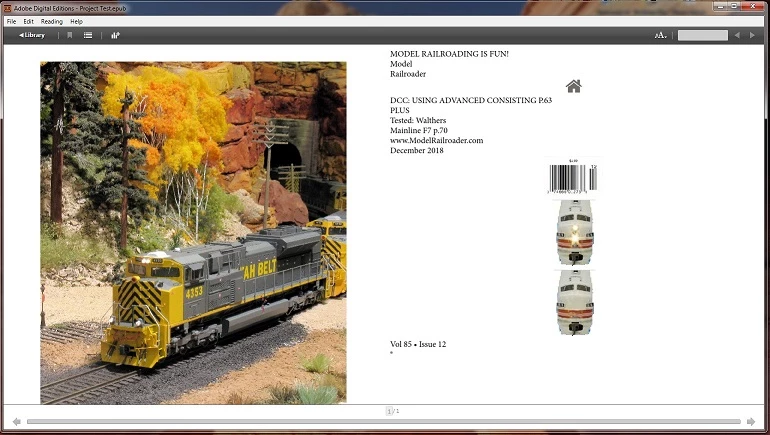
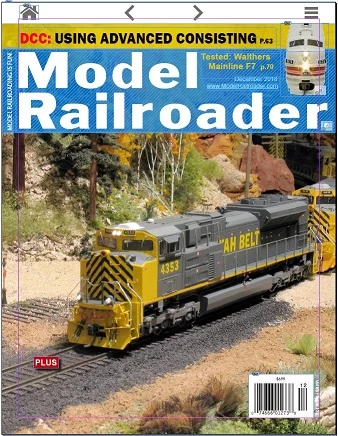
I am recreating a magazine as an interactive epub for my class.  When I export to epub format my images, text, and shapes do not appear the same as in the InDesign file.  Text and Images are separated and placed on a separate page and none of my animations work as well.  I know I must be missing something but have never created an epub before.  Any help would be greatly appreciated. 
This topic has been closed for replies.

6 replies

rayek.elfin
Legend
November 13, 2018

You may not have to. InDesign CS6 does export to fixed layout interactive epub files with the alternative CircularFLO epub exporter plugin. The free version will export up to 10 pages (with watermarks), but it might be a solution to keep working with CS6. https://www.circularflo.com/

*edit* Oh snap! You seem to be using Windows. CircularFLO is Mac only. In that case... you will have to upgrade to the latest version.

Or travel the rough path: use the open source command line tool pdf2htmlEX and export your pages as PDF, then convert to html page snippets using pdf2htmlEX, then wrap the entire thing up as an FXL epub file using Sigil (or hand code it), and export to epub. Which will still leave us with a non-interactive non-animated FLX epub file. It is relatively easy to add that functionality if you have html and css coding skills. "Relatively" should not be underestimated, though.

Not for the faint-hearted. But still a free option.

pdf2htmlEX Windows Version | RubyPdf Technologies

GitHub - iapain/pdf2htmlEX-macport: A macport repo for pdf2htmlEX

If you need to export InDesign CS6 pages as HTML while retaining full visual fidelity and text, the PDF2htmlEX tool is a good option, albeit not quite so straightforward.

Anyway, probably not a good answer. But I thought it might be of some use.

bones211Author
Participant
November 10, 2018

Got it,  thank you both for your help.  It looks like I will have to upgrade for this course

bones211Author
Participant
November 10, 2018

Thank you all for the reply,

I was reading about fixed and reflowable layouts, the problem is that I dont see those options when I am exporting to epub.  I am using CS6.  How can I access Design's publish online?  Will I be able to save a copy or is it just a reader?  Thanks again for the info.

bones211Author
Participant
November 10, 2018

Also when I try to anchor my images the selection is greyed out,  I dont have much experience with InDesign but am familiar with outher Adobe products such as Photoshop and Illustrator.  Thanks

Derek Cross
Community Expert
Community Expert
November 10, 2018

You can download the trial version of InDesign CC2019 to try out Publish Online.

There's quite a steep learning curve with InDesign – Lynda.com have some useful online video tutorials, (you can get a 30-day free trial).

You might find this short introductory course helpful; InDesign Quick Start

BobLevine
Community Expert
Community Expert
November 10, 2018

You've exported to reflowable epub and should be using fixed layout. Note that most epub readers do a poor job with fixed layout but things are getting a bit better.

Derek Cross
Community Expert
Community Expert
November 10, 2018

Are you creating a FXL ePub or a Reflowable ePub?

Have you anchored your images?

You might be better off, for your purposes, using InDesign‘s Publish Online.

(Easy to produce from any InDesign document, you can include animations etc, it’ll work on any device that has an HTML5 browser - computers, tablets and smart phones. Disadvantages, the reader has to be online and you can’t monetise it.)

Steve Werner
Community Expert
Community Expert
November 10, 2018

Moving to InDesign EPUB forum