


Indesign Javascript mixed ink creation
Greetings, and health and happiness in the new year! 🙂
I've made solid progress with my script and overcame quite a bit of unexpected (deep down expected of course) complexity. Have a peek!
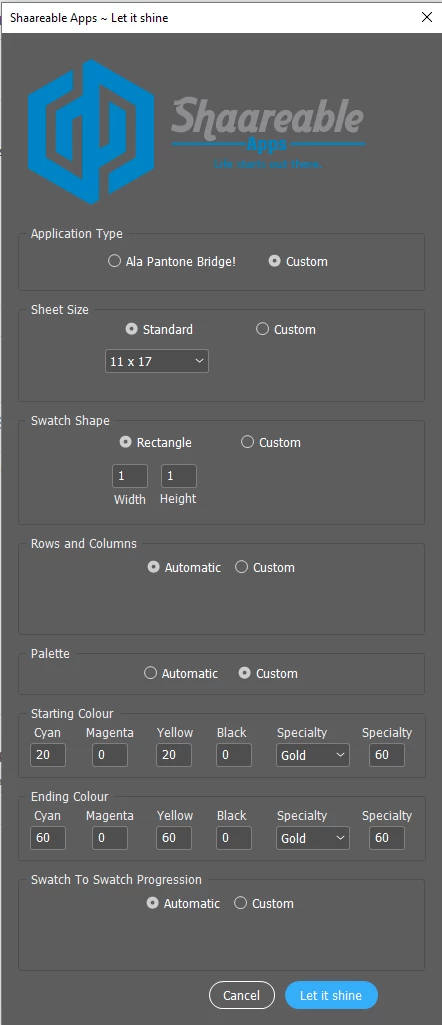
Now, what I've been struggling with for a few hours, which humbly warrants my presence here I dare to hope, is that I do have a piece of code that will create the mixed ink swatch. But when I used into a function it stops working. By that I mean, when I start parametrizing the colorants using parameters passed in the function, the code breaks.
Let me show you with a video first:
The exact code, in a blank file, works.
Notice the 'Process Cyan' etc are just straight numbers hard coded in.
Here it is:
// Your settings
// -------------------------------------
var MY_MIX_INKS = {
    // Valid ink names are required
    // At least 2 process inks are required
    'Process Cyan'    :   0,      // Process1 : %
    'Process Magenta' :   0,      // Process2 : %
    'Process Yellow'     : 100,      // Custom1  : %
    'Gold'   : 100       // Custom2  : %
    },
    MY_MIX_NAME = 'DoubleColor';

// Ink Validator
// -------------------------------------
var validateInkData = function(o, c, ll, pp)
    {
    var k, t, z=0, r=1;

    ll.length = pp.length = 0;

    for( k in o )
        {
        if( !o.hasOwnProperty(k) ) continue;
        if( !(t=c.itemByName(k)).isValid ){ r=0; break; }
        ll[z] = t.getElements()[0];
        pp[z++] = +o[k];
        }

    return r;
    };

// Main Code
// -------------------------------------
var doc = app.activeDocument,
    inkList,    // will receive validated ink list (array)
    inkPerc;    // corresponding percentages (array)

if( !doc.mixedInks.itemByName(MY_MIX_NAME).isValid )
    {
    if( validateInkData(MY_MIX_INKS,
        doc.inks, inkList=[], inkPerc=[]) )
        {
        doc.mixedInks.add(inkList, inkPerc,
            {
            name: MY_MIX_NAME,
            model: ColorModel.MIXEDINKMODEL,
            space: ColorSpace.MIXEDINK
            });

        alert( "The mixed ink '" + MY_MIX_NAME +
            "' has been successfully created." );
        }
    else
        {
        alert( "Unable to create mixed ink. " +
            "Some inner inks are missing." );
        }
    }
else
    {
    alert( "The mixed ink '" + MY_MIX_NAME +
        "' already exists." );
    }
The same code, called from inside a function in my code file, fails at the adding mixed in step.
The only change is that I pass the function's parameters to the 'Process Cyan' etc.
And that breaks it for some reason.
//--------------------------------------------------------------------------------------------------------------------------------------------------------ADD SWATCHES TO THE SWATCHES PANEL ONE BY ONE----------------------------------------------------------------
function addMixedInk(cyan, magenta, yellow, black, specialty, mixedInkName)
{

    $.writeln(cyan + " " +  magenta+ " " +  yellow+ " " +   black+ " " +   specialty+ " " +  mixedInkName);

    // Your settings
    // -------------------------------------
    var MY_MIX_INKS = {
        // Valid ink names are required
        // At least 2 process inks are required
        'Process Cyan'    :   cyan,      // Process1 : %
        'Process Magenta' :   magenta,      // Process2 : %
        'Process Yellow'     : yellow,      // Custom1  : %
        'Gold'   : specialty // Custom2  : %
        },
        MY_MIX_NAME = 'DoubleColor';

        // Ink Validator
        // -------------------------------------
        var validateInkData = function(o, c, ll, pp)
            {
            var k, t, z=0, r=1;

            ll.length = pp.length = 0;

            for( k in o )
                {
                if( !o.hasOwnProperty(k) ) continue;
                if( !(t=c.itemByName(k)).isValid ){ r=0; break; }
                ll[z] = t.getElements()[0];
                pp[z++] = +o[k];
                }

            return r;
            };

        // Main Code
        // -------------------------------------
        var doc = app.activeDocument,
            inkList,    // will receive validated ink list (array)
            inkPerc;    // corresponding percentages (array)

        if( !doc.mixedInks.itemByName(MY_MIX_NAME).isValid )
            {
            if( validateInkData(MY_MIX_INKS,
                doc.inks, inkList=[], inkPerc=[]) )
                {
                doc.mixedInks.add(inkList, inkPerc,
                    {
                    name: MY_MIX_NAME,
                    model: ColorModel.MIXEDINKMODEL,
                    space: ColorSpace.MIXEDINK
                    });

                alert( "The mixed ink '" + MY_MIX_NAME +
                    "' has been successfully created." );
                }
            else
                {
                alert( "Unable to create mixed ink. " +
                    "Some inner inks are missing." );
                }
            }
        else
            {
            alert( "The mixed ink '" + MY_MIX_NAME +
                "' already exists." );
            }


    switch(selectedSpecialty)
    {
        case "Silver":
            theMixedInk = { 'Process Cyan': cyan, 'Process Magenta' : magenta, 'Process Yellow': yellow, 'Process Black': black, 'Silver' : specialty}, mixedInkName;
            break;
        case "Gold":
            theMixedInk = { 'Process Cyan': cyan, 'Process Magenta': magenta, 'Process Yellow': yellow, 'Process Black': black, 'Gold': specialty},  mixedInkName;
            break;
    }

}
Any help is greatly appreciated!
I will be sharing the code of course and its been great fun to learn all this.
Thank you for your kindness, and time!!!
Antoine

 AdChoices