
Answered
Indesign kearning options grayed out
My kearning options in InDesign are grayed out. Have tried with several different documents...grayed out on all documents. Any ideas? Google search hasn't returned any results for this issue. Thanks!
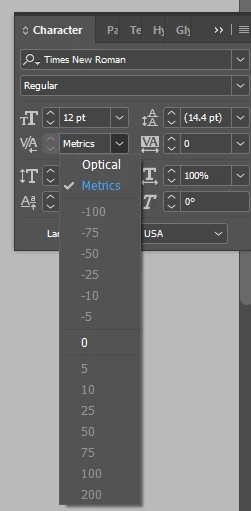

My kearning options in InDesign are grayed out. Have tried with several different documents...grayed out on all documents. Any ideas? Google search hasn't returned any results for this issue. Thanks!
Kerning is different than tracking. It only changes the spacing between a pair of characters. You do this by placing a cursor between the two characters.
Tracking affects the overall spacing for a range of characters. You make a selection of characters.
What you're seeing indicates you have selected a range of characters.
Already have an account? Login
No account yet? Create an account
Enter your E-mail address. We'll send you an e-mail with instructions to reset your password.


 AdChoices