
Participant
April 21, 2020
Answered

InDesign missing fonts that are installed

  • April 21, 2020
  • 2 replies
  • 1527 views

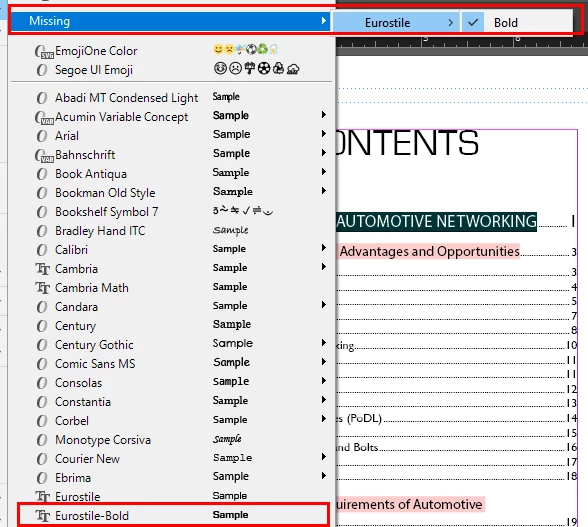
I just started using InDesign a few days ago, so hopefully this is a simple problem.  I open a document that we are preparing to revise and I get an error about missing fonts.  I have uninstalled, reinstalled, reinstalled as admin, and I am at a loss.  I now see in the fonts menu that the font is installed and missing at the same time.  Any advice would be appreciated.


This topic has been closed for replies.
Correct answer Barb Binder
  • Is it the same version of Eurostile-Bold?
  • Can you show us a screenshot of the way the font appears in the fonts list in the control panel or in the properties panel?
  • Does either the name or the style (or both) appear in brackets?


  • ~Barb

2 replies

Barb Binder
Community Expert
Community Expert
May 7, 2020

Glad we could help.


~Barb 

~Barb at Rocky Mountain Training
Barb Binder
Community Expert
Barb BinderCommunity ExpertCorrect answer
Community Expert
April 21, 2020
  • Is it the same version of Eurostile-Bold?
  • Can you show us a screenshot of the way the font appears in the fonts list in the control panel or in the properties panel?
  • Does either the name or the style (or both) appear in brackets?


  • ~Barb
~Barb at Rocky Mountain Training
Participant
May 7, 2020

Thanks, and sorry it took a while to respond.  Yes, it was a case of a different version of the font.  Thanks for your help!