
Participant
July 20, 2017
Answered

Indesign pagine mastro / Indesign Master Pages

  • July 20, 2017
  • 2 replies
  • 1759 views

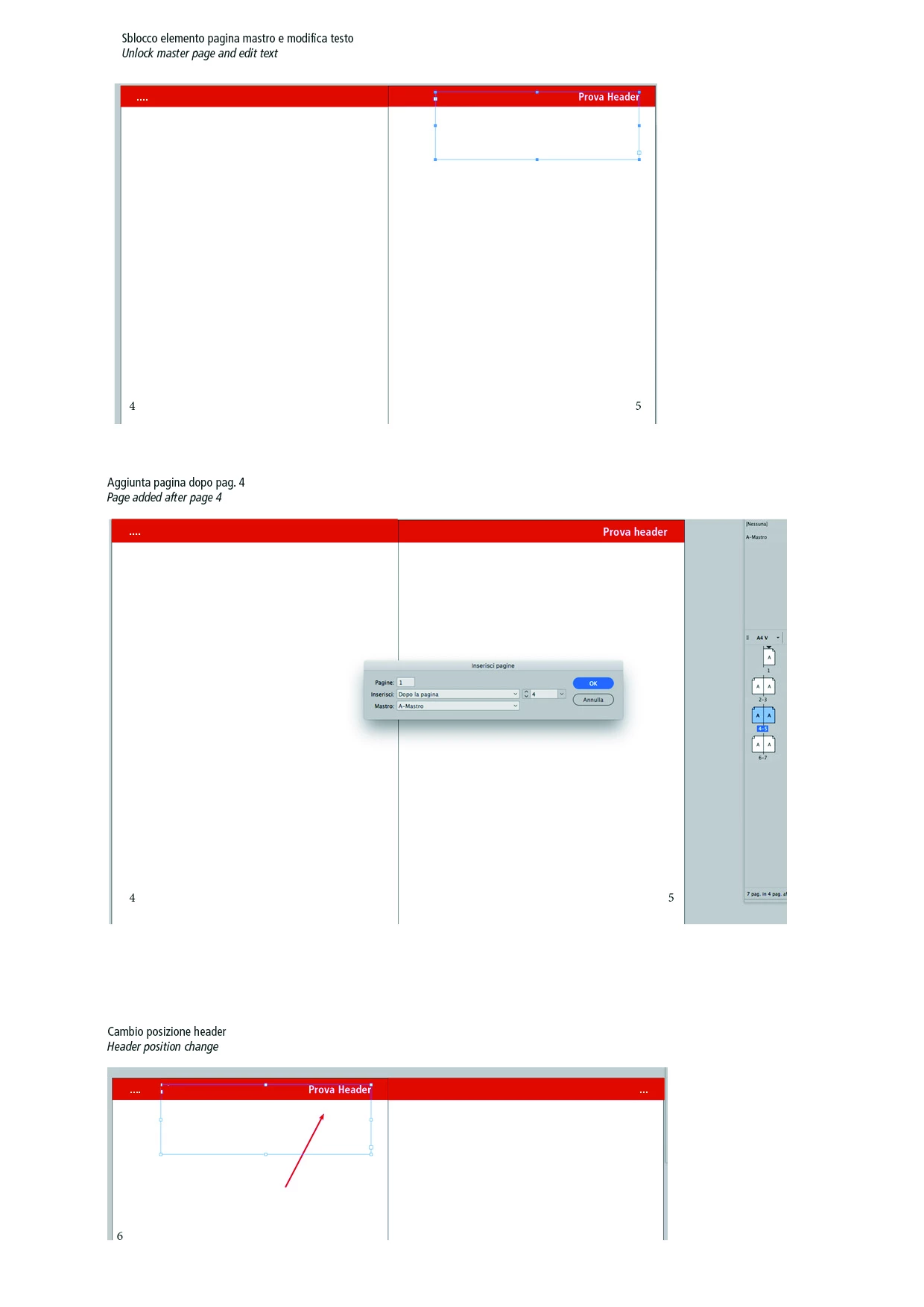
Buongiorno ho un documento in Indesign dove le intestazioni nelle pagine mastro sono orientate a destra e a sinistra della pagina (in base se la pagina affiancata si trova a destra o a sinistra), spesso devo modificare l'intestazione localmente, facendo così perde il riferimento della mastro, così se io aggiungo una pagina prima, la pagina che ho modificato slittando da destra a sinistra non mi mantiene il posizionamento che vorrei continuasse a seguire (come in pagina mastro...) c'è un metodo in cui si riesca a modificare il testo localmente e che questo continui a seguire il posizionamento della pagina mastro? spero di essere stato abbastanza chiaro grazie mille

allego foto con specifiche

Hello, I have a document in Indesign where headers in the master pages are oriented to the right and left of the page (depending on the side on the left or right), I often have to change the header locally, thus losing the master reference , So if I add a page before, the page I edited by sliping from right to left I do not keep the placement I would like to continue (as in the master page ...) there is a method where you can edit the Text locally and that this keeps track of the master page placement? I hope to have been fairly clear thank you so much

I attach photos with specifications
[Here is the list of all Adobe forums... https://forums.adobe.com/welcome]

[Moved from Comments forum to specific Program forum... Mod]
This topic has been closed for replies.
Correct answer Eugene Tyson

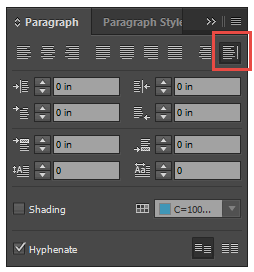
Instead of making the text in the headers aligned left or right, instead align them away from spine.

Click Align Towards Spine or Align Away From Spine.

  • When you apply Align Towards Spine to a paragraph, text on a left-hand page is right-aligned, but when the same text flows onto (or if the frame is moved to) a right-hand page, it becomes left aligned. Similarly, when you apply Align Away From Spine to a paragraph, text on a left-hand page is left aligned, while text on a right-hand page is right aligned.

    In vertical frames, aligning to or away from the spine has no effect, since text alignment is parallel to the spine direction.

2 replies

Eugene TysonCommunity ExpertCorrect answer
Community Expert
July 20, 2017

Instead of making the text in the headers aligned left or right, instead align them away from spine.

Click Align Towards Spine or Align Away From Spine.

  • When you apply Align Towards Spine to a paragraph, text on a left-hand page is right-aligned, but when the same text flows onto (or if the frame is moved to) a right-hand page, it becomes left aligned. Similarly, when you apply Align Away From Spine to a paragraph, text on a left-hand page is left aligned, while text on a right-hand page is right aligned.

    In vertical frames, aligning to or away from the spine has no effect, since text alignment is parallel to the spine direction.

nicolavc4Author
Participant
July 20, 2017

thank you so much!!! It seems to me that this is the solution to my problem. Thanks again

TᴀW
Legend
July 20, 2017

If you just need to change the text in the running header to match the chapter title or the contents on the page, etc., look up "text variables" in the Help. With text variables you would not need to override master-page text frames at all, and so there would be no issue.

Here's a link: Learn how to number pages, chapters, and sections in InDesign

Ariel

nicolavc4Author
Participant
July 20, 2017

Thank you for the reply!!! I looked at the link mentioned but maybe I did not understand ... the text I have to add to the header of each page does not match any title or other text on the page, so I have to customize each page by hand ... the problem is that If the customer subsequently asks me to add the first pages I find that what should be aligned to dx is in sx and vice versa, so i have to fix all the subsequent headers ... i would like to automatically reposition them in the correct position as from pag Master ... I do not know if it's feasible. Thanks again

grazie per la risposta!!! ho guardato il link menzionato ma forse non ho capito... il testo che devo aggiungere all'header di ogni pagina non corrisponde a nessun titolo o altro testo presente nella pagina, quindi devo personalizzare ogni pagina a mano... il problema è che se il cliente successivamente mi chiede di aggiungere delle pagine prime mi trovo che quello che dovrebbe essere allineato a dx si trova a sx e viceversa, così devo sistemare tutti gli header successivi... vorrei che in automatico si riposizionassero nella posizione corretta come da pag mastro... non so se sia fattibile. Grazie ancora

Loic.Aigon
Legend
July 20, 2017

If it's just a matter of having the text (whatever adjustments you made) be opposed to the spline, then draw a frame whose the size matches the width from left margin to right margin. Then set the paragraph Style justification to be opposed to the spline.

That way, your text will always be relocated to the opposite side of the spline no matter what the page side is.