
Participating Frequently
June 15, 2017
Answered

InDesign text boxes being rasterized???

  • June 15, 2017
  • 2 replies
  • 3179 views

Hi,

I'm trying to create a document that is being exported to HTML.  When I am doing this the program is taking text boxes within the main page text box and they are being rasterized which is no good for being transferred into a mobile app.

Please can anyone shed any light on this?

Many thanks in advance.

Regards

Daniel
    This topic has been closed for replies.
    Correct answer BobLevine

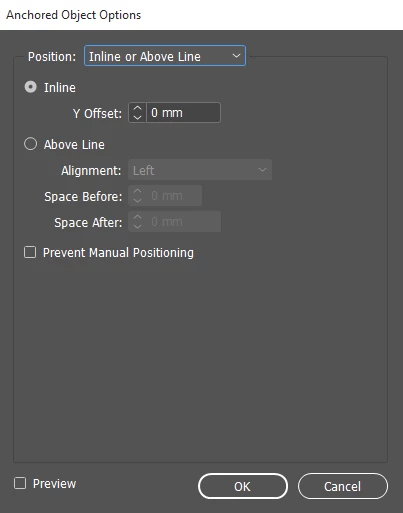
    I think this to do with the way the objects have been anchored as when I move one of the boxes and it changes to the custom settings it shows correctly in the HTML file.

    Would the below setting cause this?


    Use custom instead of inline or above line. That will give you an anchored text frame instead of an inline text frame.

    2 replies

    Alexandre Becquet
    Community Expert
    Community Expert
    June 15, 2017

    Hello, you should test with the plug in IN5, in the trial version to see if it's the same result

    BobLevine
    Community Expert
    Community Expert
    June 15, 2017

    What version of InDesign? What operating system? Are these anchored frames? What are the exact HTML export settings?

    Participating Frequently
    June 15, 2017

    Hi Bob,

    Its the latest version of InDesign so CC 2017 Version 12.1.0.56 x64 Build.

    Operating on Windows 10.

    These boxes are anchored to the text above and I have attached images of the settings being used.

    Thanks

    Daniel

    jane-e
    Community Expert
    Community Expert
    June 15, 2017

    You didn't say if you created the ID file yourself, but click on a troublesome frame and check the Object Export Options (Object menu) > EPUB  and  HTML     and make sure it says Default, not Rasterise.

    Default means use the settings that Daniel displayed in the Export box.

    Check to see if an Object Style has been set. If so, you can redefine it and catch them all. Otherwise you fix them one at a time.