Participant
October 31, 2017
Answered

kerning after a drop cap [LOCKED--Duplicate Post]

  • October 31, 2017
  • 3 replies
  • 966 views

Hello - i quite often have trouble Adjusting the Space Between a Drop Cap and the Next Letter with Kerning. its hit n miss. Sometimes works, sometimes doesn't! why is this? very frustrating.

Thanks

[Duplicate post -- please see drop caps by same OP. This is now locked.]

.

    This topic has been closed for replies.
    Correct answer hammer0909

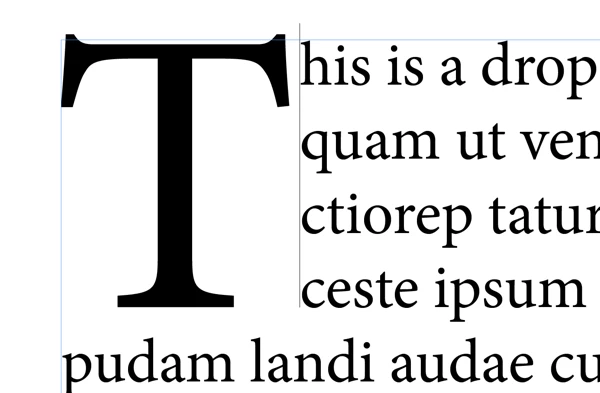
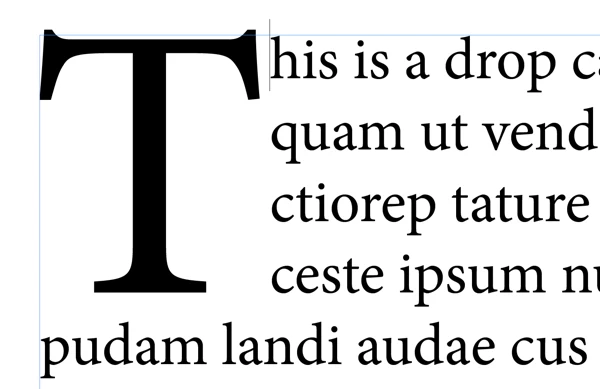
    Ah, I think you're running into a common issue when trying to adjust the kerning between the CAP and the rest of the body text. Take a look at the figures below. If you click to the right of the CAP but near the baseline of the  first line of body text, you'll get a giant cursor next to the CAP. Although this seems like what you would want, it doesn't work. Applying kerning using the shortcut just does nothing at all. But if you're a little more careful and you click directly to the left of the first body character, you'll get a smaller (normal) sized cursor and now when you adjust the kerning, it works like a charm. It's obscure, but once you know the trick, it's not too bad.
    3 replies

    hammer0909
    Community Expert
    hammer0909Community ExpertCorrect answer
    Community Expert
    October 31, 2017

    Ah, I think you're running into a common issue when trying to adjust the kerning between the CAP and the rest of the body text. Take a look at the figures below. If you click to the right of the CAP but near the baseline of the  first line of body text, you'll get a giant cursor next to the CAP. Although this seems like what you would want, it doesn't work. Applying kerning using the shortcut just does nothing at all. But if you're a little more careful and you click directly to the left of the first body character, you'll get a smaller (normal) sized cursor and now when you adjust the kerning, it works like a charm. It's obscure, but once you know the trick, it's not too bad.

    Steve Werner
    Community Expert
    Community Expert
    October 31, 2017

    Which is Preferences > Units and Increments > Keyboard Increments > Kerning/Tracking

    Mike Witherell
    Community Expert
    Community Expert
    October 31, 2017

    What is your kerning keyboard shortcut preference amount set to?

    Mike Witherell