
finv2179235
Participant
March 1, 2018
Answered

Menu mouseover

  • March 1, 2018
  • 4 replies
  • 910 views

Hey guys, I hope you can help me with this small but very anoying problem.

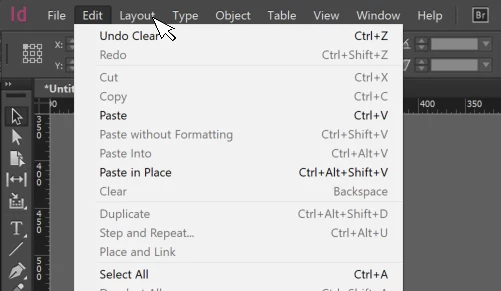
When I click an item in the main menu, for some reason, the item which is a few centimeters left of where I clicked opens instead of the one I actually clicked. When I start moving the mouse, it keeps opening the submenu over which my mouse is not hovering at that moment. To make this even weirder, I've got this problem on both my old and new laptop. Tried it with the touchpad, with different mouses, messed around with the screen settings etc. but nothing fixes it.

Has anyone had this problem as well? I can't find anything about it.

(For some reason the screenshot won't get the cursor, so I just threw in an image to make the idea clear. )
This topic has been closed for replies.
Correct answer Barb Binder

Hi finv2179235:

I'm guessing Windows with two monitors? I think it relates to conflicting Windows Scale and Layout settings between the two displays. You might try disabling the external display to see that fixes it. Then reconnect and  put both at the recommended value. (Right click the desktop > Display Settings).

~Barb

4 replies

Dave Creamer of IDEAS
Community Expert
Community Expert
March 3, 2018

Quit your programs, log out of your account and log back in again (no need to restart).

David Creamer: Community Expert (ACI and ACE 1995-2023)
Dave Creamer of IDEAS
Community Expert
Community Expert
March 4, 2018

To add to Barb's info, here is what happens on my system:

If I plug an external monitor in while I'm logged into my user account, it can create problems like you mention.

If I plug in an external monitor and then start up and log on, it is fine.

If you are already in your user account, log out and log back in.

Before you do, make sure all your monitor display scale percentage is the same for all monitors.

David Creamer: Community Expert (ACI and ACE 1995-2023)
S_Gans
Community Expert
Community Expert
March 2, 2018

Oh, Goodness! I didn't even notice the "Ctrl" in the commands! Of COURSE it's Windows - 'Duh! They're starting to look so alike, nowadays!

Barb's suggestion sounds very reasonable. Please, finv2179235​, let us know the results.

Adobe Community Expert / Adobe Certified Instructor
Barb Binder
Community Expert
Barb BinderCommunity ExpertCorrect answer
Community Expert
March 2, 2018

Hi finv2179235:

I'm guessing Windows with two monitors? I think it relates to conflicting Windows Scale and Layout settings between the two displays. You might try disabling the external display to see that fixes it. Then reconnect and  put both at the recommended value. (Right click the desktop > Display Settings).

~Barb

~Barb at Rocky Mountain Training
finv2179235
Participant
March 3, 2018

The dual monitor thing was indeed exactly the problem. Also explains why it happened on both my old and new laptop. Thank you very much!

Barb Binder
Community Expert
Community Expert
March 4, 2018

You are very welcome, finv2179235

~Barb

~Barb at Rocky Mountain Training
S_Gans
Community Expert
Community Expert
March 2, 2018

I must admit, I'd find this more than a "small" issue - it'd bug me no end!

I'm afraid I've never encountered this - however if I'm not mistaken, you're using the MacOS? If that's the case, are both testing machines using OS 10.13 High Sierra? I know there're all sorts of problems coming up for some people who've upgraded to High Sierra and are using Adobe products of all kinds...

On my OS 10.2 Sierra machines, I've encountered nothing like this. I'm sorry...
Only thing I might suggest is to find the mouse or trackpad preference file in the Library and remove it. The OS'll recreate one (don't throw out the old one, just in case you need to put it back), and maybe that new one'll resolve that issue. It'd be the first troubleshooting I'd try, if it was happening on my machines.

Sorry you have this issue! UGH!

Adobe Community Expert / Adobe Certified Instructor
BobLevine
Community Expert
Community Expert
March 2, 2018

That is a Windows screenshot!

Barb is right though. We’ve seen a couple reports like this.