
Missing univers (T1) font
Hi Everybody,
i have the following Problem:
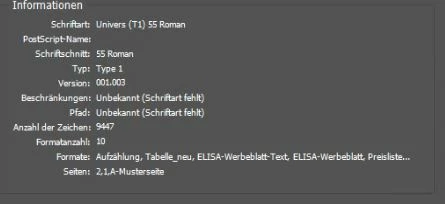
certain PCs have the issue, if you open certain documents with InDesign v15, they get the msg that the font "Univers (T1) 55 Roman" is missing.
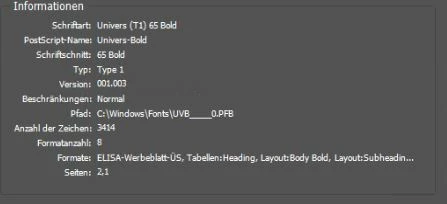
The strange thing is, InDesign seem to find the other T1 fonts:
Roman cant be found, but Bolt is
All PCs WITH the issue have their Fonts installed from the following list:
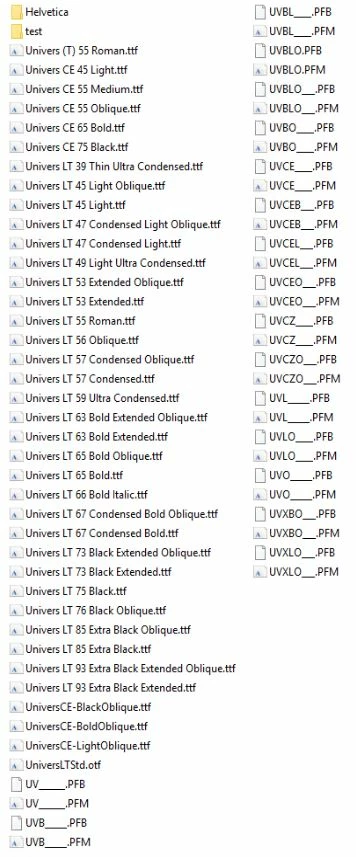
Now, we also got some PCs where this issue doesnt exist. Those PCs seem to have something in common, they had Win7 and got their font installed (from the same list) with the help of the "Adobe Type Manager". After that, they had an inplace upgrade to Win10.
the following pictures show the list of fonts available in InDesign
(top a PC without, and bottom a PC with the issue)
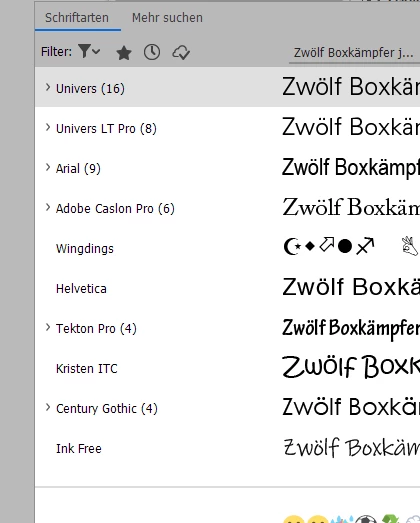
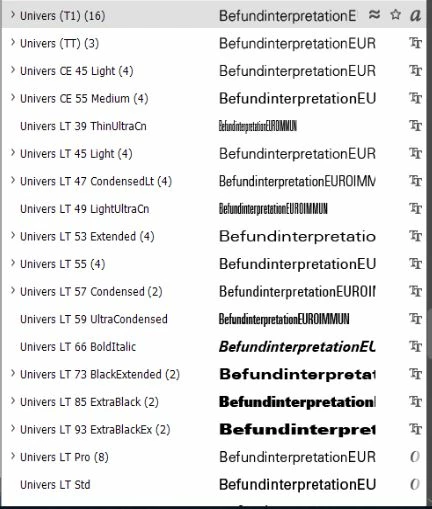
If i open the univers (T1) tab all fonts including 55 Roman are there
Also if a Coworker with the problem logs in to another PC that doesnt have the problem, the issue doesnt exist. So the Problem doesnt seem to be useraccount oder cloud based.
What i already tried:
- Copy all the fonts from a working PC and installing them on the others. (also with uninstalling all univers fonts beforehand)
- comparing the registry keys under HKLM/Softwar/microsoft/WindowsNT/Font and editing them to fit the other PCs
- converting the PFB files to TTF and installing them again
- using a PC fresh out of the Box
-deleting all kinds of caches, restarting etc.
is there any way to edit the missing path in picture 1 to point to the installed roman font, or fix this issue in total without replacing the fonts on a few dozen files and compare them to each other to make sure they are identical?
thanks!
Sebastian
 AdChoices