Exit
  • Global community
    • Language:
      • Deutsch
      • English
      • Español
      • Français
      • Português
  • 日本語コミュニティ
  • 한국 커뮤니티
0

Multi-column table of contents

Explorer ,
Apr 03, 2018 Apr 03, 2018

Hi,

Just wondering if anyone could help with some direction.

I need to have a table of contents with multiple columns like in the example below and I am wondering what the best approach is:
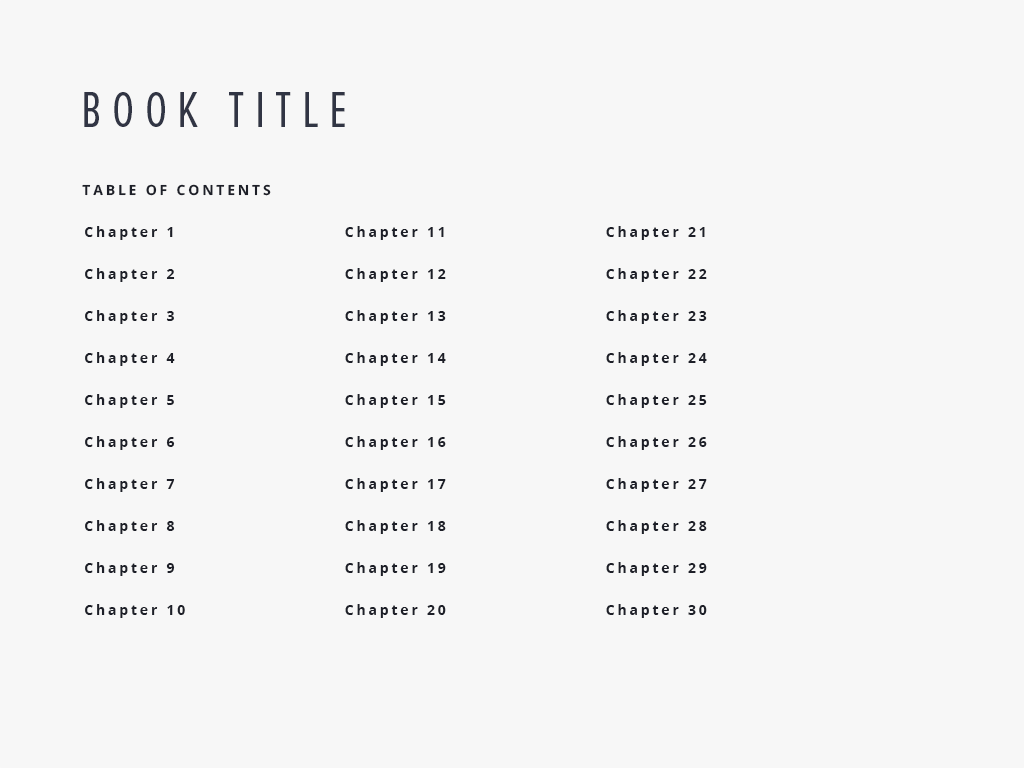
It's a fixed width EPUB for iPad. I have the first column working well ( Chapters 1 to 10) but I am wondering how to add the other columns. Obviously, the 30 chapters would be too tall for the page design so multiple columns are needed.

I am new-ish to InDesign so any advice would be great.

Thanks,

Eoin

4.6K
Translate
Report
Community guidelines
Be kind and respectful, give credit to the original source of content, and search for duplicates before posting. Learn more
community guidelines

correct answers 1 Correct answer

Community Expert , Apr 03, 2018 Apr 03, 2018
  1. Select the frame (or click in the text)
  2. Object > Text Frame Options
  3. Define 3 columns with Balance Columns on.
    Screenshot 2018-04-03 12.09.21.png

~Barb

Translate
Community Expert ,
Apr 03, 2018 Apr 03, 2018

Unless I'm missing something, why can't you put the TOC into a multi column text frame.

Translate
Report
Community guidelines
Be kind and respectful, give credit to the original source of content, and search for duplicates before posting. Learn more
community guidelines
Community Expert ,
Apr 03, 2018 Apr 03, 2018
  1. Select the frame (or click in the text)
  2. Object > Text Frame Options
  3. Define 3 columns with Balance Columns on.
    Screenshot 2018-04-03 12.09.21.png

~Barb

Translate
Report
Community guidelines
Be kind and respectful, give credit to the original source of content, and search for duplicates before posting. Learn more
community guidelines
Explorer ,
Apr 03, 2018 Apr 03, 2018

Hi Bob and Barb,

It was me who was missing something - it was not knowing I could use a multi-column text frame as a table of contents Sorry but I am new-ish to InDesign and didn't know that feature.

Thanks for the really prompt and great help.

Eoin

Translate
Report
Community guidelines
Be kind and respectful, give credit to the original source of content, and search for duplicates before posting. Learn more
community guidelines
Community Expert ,
Apr 03, 2018 Apr 03, 2018
LATEST

We are here to help!

~Barb

Translate
Report
Community guidelines
Be kind and respectful, give credit to the original source of content, and search for duplicates before posting. Learn more
community guidelines


