Participating Frequently
April 21, 2014
Answered

Override elements by script problems

  • April 21, 2014
  • 10 replies
  • 15628 views

I need to override elements by script and have them end up at the same place they were in master. Now it overrides and puts them to the new page but it changes their position. Here is my function:

function loadPagesAndOverrideElements(document, csvData) {

    // add pages defined in CSV and correct layout

    for (var i=0; csvData.numberOfRows>i; i++) {

        var masterSpread = document.masterSpreads.itemByName(csvData["master"]);

        document.pages.add();

        document.pages[i+1].appliedMaster = masterSpread;

        var allItems = document.pages[i+1].appliedMaster.pageItems.everyItem().getElements();

        for(var j=0;j<allItems.length;j++){

            try {

                allItems.override(document.pages[i+1]);

            } catch(e) {

                // alert(e);

            }

        }

    }

    document.pages[0].remove();

    return document;

}

This topic has been closed for replies.
Correct answer Marc Autret

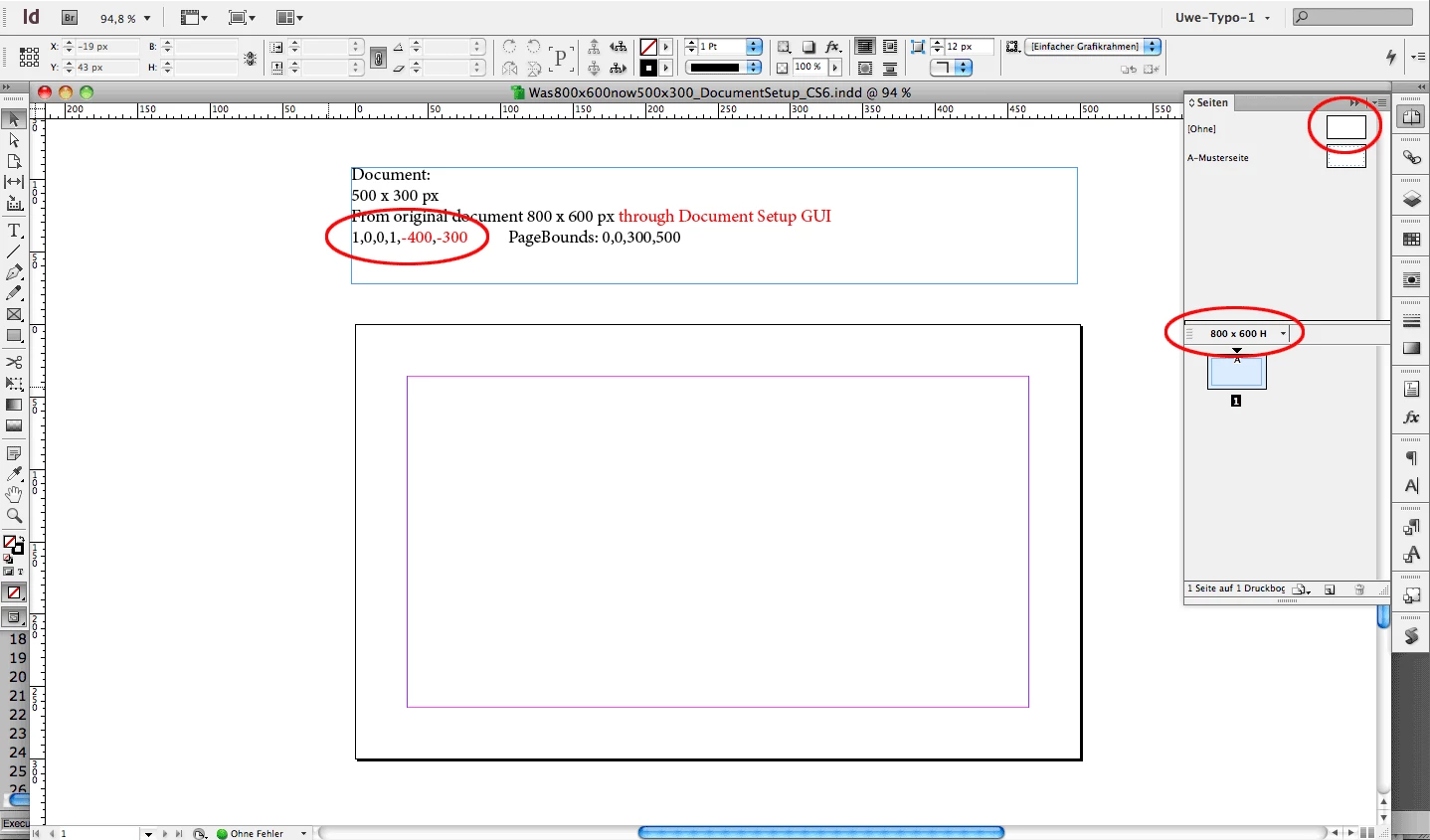
And two screenshots to illustrate the difference of changing document page sizes in InDesign CS6 (and above):

1. "Wrong" or "dangerous" approach with the Document Setup GUI:
2. "Appropriate" approach with the Pages Tool:
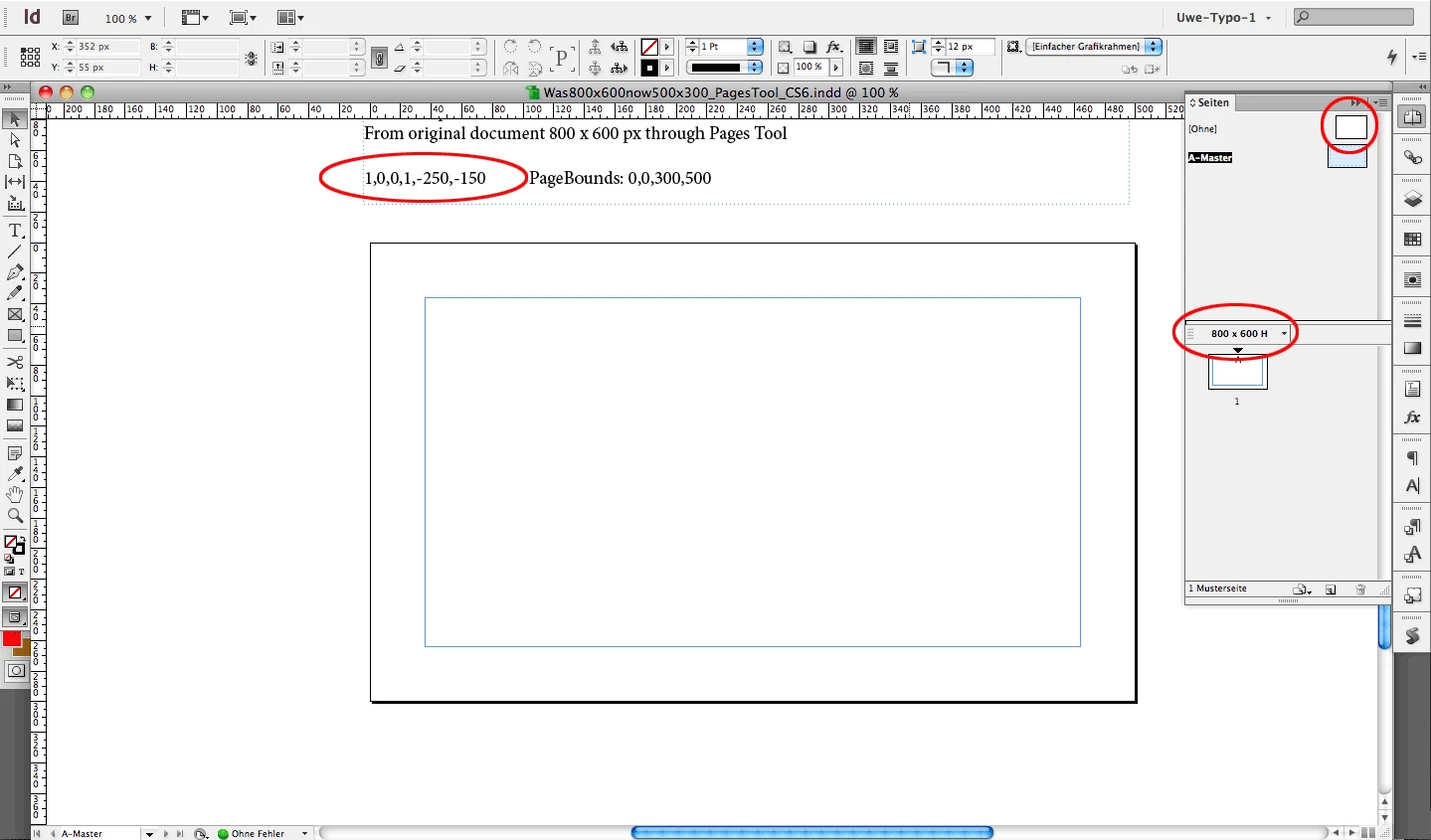
"Wrong", "dangerous" and "appropriate" in the sense, that scripting will work as expected without moving overridden page items to their original positions.

To correct the problematic example #1, just use the Document Setup GUI and go back to the original size and change size again by using the Page Tool.

Uwe


Uwe, Trevor, tomas8,

Thanks to Uwe's investigations/tests I finally came up with a scripted solution that sounds clean to me—but it still needs to be tested in CS5/5.5.

My main finding is that the matrix Page.masterPageTransform (property available in CS5 and later) accurately reflects the shift we are trying to circumvent.

When a new page is created in the 'corrupted' document based on any master spread, CS6 and CC show the following result:

alert( myNewPage.masterPageTransform.matrixValues );

// => 1,0,0,1,-150,-150      Here it is!

As far as I understand this matrix determines the transformation "applied to the master page before it is applied to Page," that is, how the page is mapped to its master page. In normal case that should be—I suppose—the IDENTITY matrix.

My guess is that CS6/CC improperly uses those matrix values during scripted overrides, so that we have to explicitly apply the inverse matrix to the newly created page, as follows:

var document = app.activeDocument; 

var csvData = {

    "master" : ["A-Master", "B-Master", "C-Master"],

    "numberOfRows" : 3

    };


loadPagesAndOverrideElements(document, csvData);


function loadPagesAndOverrideElements(document, csvData)

{

    // Constants

    // ---

    const CS_INNER = +CoordinateSpaces.innerCoordinates,

          ORIGIN = [[0,0],CS_INNER];


    // Variables

    // ---

    var i, n = csvData.numberOfRows,

        ms, pg, mx;

    // Unlock ALL layers

    // ---

    document.layers.everyItem().locked = false;

    // Page creation loop

    // ---

    for( i=0 ; i < n ; ++i )

        {

        // Select the master spread

        // ---

        ms = document.masterSpreads.itemByName(csvData["master"]);


        // Create new page and override master items

        // ---

        ms.pageItems.everyItem().override( pg=document.pages.add({appliedMaster:ms}) );

        // Revert the masterPageTransform if needed

        // ---

        (mx=pg.properties.masterPageTransform) && pg.transform(CS_INNER, ORIGIN, mx.invertMatrix());

        }


    // Remove the 1st page

    // ---

    document.pages[0].remove();

};

Seems to work for me.

What about CS5?

@+

Marc

10 replies

Community Expert
July 21, 2020

Hi Mathis,

thank you for your positive feedback.

Depending on the structure of your document you could shorten your loop a bit by using the activeSpread property:


var mA = app.menuActions.itemByName("$ID/Override All Master Page Items");

var doc = app.documents[0];
var allDocSpreads = doc.spreads.everyItem().getElements();
var allDocSpreadsLength = allDocSpreads.length;

for( var n=0; n<allDocSpreadsLength; n++ )
{
	doc.layoutWindows[0].activeSpread = allDocSpreads[n];
	if( mA.isValid && mA.enabled ){ mA.invoke() };
};


Alternative by scripting avoiding the loop:

I also tried to select all pages with the Page Tool which is selecting also all pages in the Pages panel, but I had no success to override all master page items for all pages in one go by invoking the menu action. It only worked for the active spread or active page.


FWIW: When I do this within the UI it will work:


[1] Make the Page Tool the active tool.

[2] Do Select All with the keyboard shortcut.

[3] Invoke the menu "Override all master page items" from the Pages panel.


Regards,
Uwe Laubender

( ACP )

Community Expert
July 21, 2020

Hi Mathis,

if the menu command "Override All Master Page Items" is working for you and you do not use InDesign Server, but the desktop version, you should be able to invoke the menu command by scripting like so:


var mA = app.menuActions.itemByName("$ID/Override All Master Page Items");
if( mA.isValid && mA.enabled ){ mA.invoke() };


Regards,
Uwe Laubender

( ACP )

Known Participant
July 21, 2020

Hej Uwe,

thanks for the quick reply and wonderful solution 🙂

I actually wanted it to apply to all pages, so I built a for-loop around it and it works great:

var myDocument = app.activeDocument;

var TotalPages = (myDocument.pages.count());
var mA = app.menuActions.itemByName("$ID/Override All Master Page Items");

for(var CurrentPage=0; CurrentPage < TotalPages; CurrentPage++) {

    app.activeWindow.activePage=app.activeDocument.pages[CurrentPage]; //just switches the active page
    if( mA.isValid && mA.enabled ){ mA.invoke() };
}
app.activeWindow.activePage=app.activeDocument.pages[0]; // to jump back to page 1

and added an undo script, because that got out of hand quickly 😄

https://indesignsecrets.com/add-undo-to-your-script.php


Thanks again and best wishes

Mathis

Known Participant
July 21, 2020

Hi!

I'm working with CC 2020 and I guess I'm having the same issue...

I used your script and altered csvDATA to my needs (4 masters as alternative layouts)

However, InDesign returns error 30480:


"There is no data of the requested type" (translation from German, sorry)

ms = document.masterSpreads.itemByName(csvData["master"]);


I tried all the few other solutions I could find on google/bing. Only this one worked yet, but it messes up the alternative layouts:

https://stackoverflow.com/questions/31994396/indesign-applescript-override-master-page-items-glitch

(the js, not the applescripts)


The only thing I want to do is the dropdown menu task "Override All Master Page Items".


All the best

Mathis

Inspiring
October 25, 2018

If everyone should need a applescript solution for this override issue…

tell application id "com.adobe.indesign"

  tell document 1

  tell page 1

  set mMasterPageTransform to master page transform

  end tell

  transform page 1 in inner coordinates from center anchor with matrix (invert matrix mMasterPageTransform)

  end tell

end tell

and it works in CC2018

Stefan Rakete
Inspiring
September 21, 2018

I am using InDesign CC 2018 13.1 and the script with the fix still applies. Very useful! Thank you

loyal_operator154A
Legend
November 5, 2014

This script is not full, or it's not working on InDesign CC 2014, or am I doing something wrong?

I need simple working script that will override all master page items, and fix those shifting

Marc Autret
Legend
May 3, 2014

Hi tomas8,

Leaving aside coding wordkarounds already provided by my fellows, and the 'locked' layer problem that Kaï pointed out above, I suspect that the main issue is not in your code. Instead, we seem to have here a slightly corrupted document in terms of coordinate spaces—which may explain the unexpected shift of master items during overrides.

Considering your document in its original state, let's study the affine map of the first master page:

var page = app.activeDocument.spreads[0].pages[0],

    mx = pg.transformValuesOf(CoordinateSpaces.parentCoordinates)[0];

alert( mx.matrixValues );   // =>  1,0,0,1,-400,-300   (!)

In a document based on 500×300 the default page mapping should be [1,0,0,1,-250,-150], since the origin [0,0] of the page (i.e. top-left corner) should be expressed [-250,-150] in the spread coordinate space.

But in your case, the origin of pages is mapped to [-400,-300] so we have something of a hidden translation (dx = –150, dy = –150) that makes things go wrong under various circumstances. Note that overriden items are unexpectedly moved by (+150px,+150px) when the script invokes myMasterItem.override(myPage).

The issue is visible in IDML export as well. Extracting the spread-related XMLs you see that all page elements have the following attributes:

GeometricBounds="150 150 450 650" ItemTransform="1 0 0 1 -400 -300"

while correct values should be:

GeometricBounds="0 0 300 500" ItemTransform="1 0 0 1 -250 -150"

Whether this is an ID bug, I don't know. Since Page supports transformations the user can alter many parameters (via the Page tool, etc) without even realizing some underlying effects.

How to fix this?

(a) The best thing you can do is to edit those XML files so that all pages have the correct geometric attributes, then to re-zip the package and open the fixed IDML into InDesign to get a fresh document.

(b) I'm pretty sure that we could as well repair page matrices through scripting, but this is not as easy as I originally thought! For the time being I've not managed to get happy results by this method Perhaps my colleagues will find a way…

Once the document is clean you can use your loadPagesAndOverrideElements() function without error. (Sorry I don't know how to upload the corrected IDML file.)

BTW, here is a shorter form of your original function:

function loadPagesAndOverrideElements(document, csvData)

{

    // Assumed that layers and master objects aren't

    // locked and allow override...


    var i, n=csvData.numberOfRows, ms;

    for( i=0 ; i < n ; ++i )

        {

        ms = document.masterSpreads.itemByName(csvData["master"]);

        ms.pageItems.everyItem().override( document.pages.add({appliedMaster:ms}) );

        }

    document.pages[0].remove();

}

@+

Marc

Community Expert
May 5, 2014

@Marc – very interesting this all…

I did some tests with the provided files.

1. Exporting to IDML, not editing the IDML

2. Opened the IDML in InDesign CS5.5 v7.5.3

3. Ran the following script (just using your minimized code adding a line where all layers are set to locked = false)

/**

* @@@BUILDINFO@@@ 140505-1_LoadMasterSpread-Override-Test.jsx !Version! Mon May 05 2014 11:13:17 GMT+0200

*/

var document = app.activeDocument;

var csvData = {

    "master" : ["A-Master", "B-Master", "C-Master"],

    "numberOfRows" : 3

    };

document = loadPagesAndOverrideElements(document, csvData);

function loadPagesAndOverrideElements(document, csvData){


    //EDIT: unlock ALL layers of the document before doing anything:

    document.layers.everyItem().locked = false;


    //Marc Autret's minimized code:


    var i, n=csvData.numberOfRows, ms; 


    for( i=0 ; i < n ; ++i ) 

        { 

        ms = document.masterSpreads.itemByName(csvData["master"]); 

        ms.pageItems.everyItem().override( document.pages.add({appliedMaster:ms}) ); 

        } 


    document.pages[0].remove(); 

};

Result with CS5.5 v7.5.3: No problems. No shifting page items!

Ok. I redid the test with an edited IDML according to the values for GeometricBounds and ItemTransform you suggested.

Also no problems. That I had expected.

Next test:

Opened the unedited IDML with InDesign CS6 v8.0.2, ran the script.

Result with CS6 v8.0.2: Page items shifted.

Then I opened the edited IDML with InDesign CS6 v8.0.2, ran the script again:

NO PROBLEM (as expected).

So it seems, something has changed between InDesign CS5.5 and CS6.

I'd call it a bug…

Uwe

Community Expert
May 5, 2014

And another test:

Used the following code – the one I proposed in my answer #14 that stores the positions and move all the overridden page items to their initial positions with InDesign CS6 v8.0.2:

/**

* @@@BUILDINFO@@@ 140505-1_MOVE-TO-INITIAL-LOCATION-LoadMasterSpread-Override-Test.jsx !Version! Mon May 05 2014 11:35:18 GMT+0200

*/

var document = app.activeDocument;

var csvData = {

    "master" : ["A-Master", "B-Master", "C-Master"],

    "numberOfRows" : 3

    };

document = loadPagesAndOverrideElements(document, csvData);

function loadPagesAndOverrideElements(document, csvData) {


    document.layers.everyItem().locked = false;


    // add pages defined in CSV and correct layout

    for (var i=0; csvData.numberOfRows>i; i++) {

        var masterSpread = document.masterSpreads.itemByName(csvData["master"]);


        document.pages.add();


        document.pages[i+1].appliedMaster = masterSpread;

        var allItems = document.pages[i+1].appliedMaster.pageItems.everyItem().getElements() ;

        for(var j=0;j<allItems.length;j++){

            try {

                var bounds = allItems.geometricBounds


                //Get x and y of position:

                var xB = bounds[1];

                var yB = bounds[0];


                var obj = allItems.override(document.pages[i+1]);


                //Move object to original position:

                obj.move([xB,yB]);


            } catch(e) {

                // alert(e);

            }

        }

    }

    document.pages[0].remove();

    return document;

}

That did the trick after opening the un-edited version of the IDML with InDesign CS6 v8.0.2.

A workaround. But obviously, according to Kai, not working with InDesign CC v9.2.0. Cannot test that right now with this version.

Uwe

Community Expert
April 24, 2014

@tomas8 – Can you post some screen shots to give a "before" and "after" of a positive example what you like to do (without scripting)?

I have an idea what's going wrong, but need a visual representation of a positive example first…

Uwe

tomas8Author
Participating Frequently
April 24, 2014

It looks like pretty much the same, before and after.

This is what I want to do

And this is what it does by script

Harbs.
Legend
April 25, 2014

Without seeing your document, I can't think off-hand why it would be doing that.

This workaround should help:

function loadPagesAndOverrideElements(document, csvData) {

    // add pages defined in CSV and correct layout

    for (var i=0; csvData.numberOfRows>i; i++) {

        var masterSpread = document.masterSpreads.itemByName(csvData["master"]);

        document.pages.add();

        document.pages[i+1].appliedMaster = masterSpread;

        var allItems = document.pages[i+1].appliedMaster.pageItems.everyItem().getElements() ;

        for(var j=0;j<allItems.length;j++){

            try {

                var bounds = allItems.geometricBounds

                var obj = allItems.override(document.pages[i+1]);

                obj.geometricBounds = bounds;

            } catch(e) {

                // alert(e);

            }

        }

    }

    document.pages[0].remove();

    return document;

}

Harbs

Harbs.
Legend
April 24, 2014

Is your master spread a single page or multiple pages?

If it's multiple pages, you need to make sure that the object is on the same master page location as the local page. If it's simple facing pages, you can compare the side property...

Harbs

Peter Spier
Community Expert
Community Expert
April 21, 2014

I've moved your question tot he scripting forum, but you should understand that once overridden, the object will be part of the regular stacking order for that layer, and in front of any other master page objects that are not overridden.

tomas8Author
Participating Frequently
April 21, 2014

The layer order is not a problem, problem is the element position. When I use override from indesign menu element stayes in its position, but when I use script it moves to some random position.

Peter Spier
Community Expert
Community Expert
April 21, 2014

I'm not a scripter, so I can't help with writing the script, but what you describe sounds like a bug in ID, not your script. Do you have the latest update for your version of ID installed?