
muskoka lake
Inspiring
June 27, 2020
Answered

overset symbol on photo

  • June 27, 2020
  • 2 replies
  • 625 views

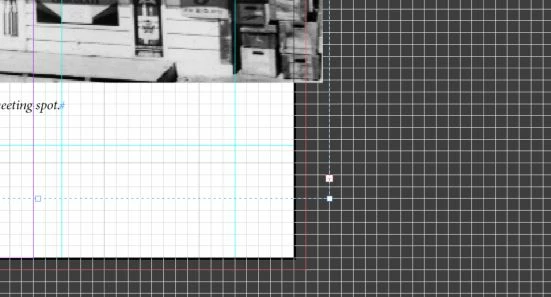
I have an error message for overset text. when I go to the page I can not see the little pink overset symbol on any of the text boxes. If I drag the photo off the page I now see an overset symbol. It appears to be attached to the photo frame. If I shorten this box it changes the photo (ie crops it).

I have 32 of these errors so would really appreciate some help with this

See image below
 

This topic has been closed for replies.
Correct answer Derek Cross

Check with "Preflight" and with "Edit in Story Editor" to see if they give any pointers, also view the document with Show Hidden Characters as you may have spare "Carriage Returns" that need deleting.

2 replies

Frans v.d. Geest
Community Expert
Community Expert
June 27, 2020

Looks like a grouped item: image grouped with text frame, and text set to align on baselinegrid.

muskoka lake
Inspiring
June 27, 2020

Yes it was grouped and when I Ungroup it I can delete the text box.

I was trying to set up a caption Setup and I think i changed the setting for baseline, but no longer see it as an option when I go to Caption Setup. Is that where it would be located?

Here is the text box or frame that i can see when I move the photo off the page a bit. But when I try to shorten it in height the photo gets cropped.

.

muskoka lake
Inspiring
June 27, 2020

I found Baseline Options under Text Frame Options but I don't know what to choose to make the caption box just the height needed for the text. The photo and caption are now ungrouped but I have a caption box that is way too  big.

Derek Cross
Community Expert
Derek CrossCommunity ExpertCorrect answer
Community Expert
June 27, 2020

Check with "Preflight" and with "Edit in Story Editor" to see if they give any pointers, also view the document with Show Hidden Characters as you may have spare "Carriage Returns" that need deleting.

muskoka lake
Inspiring
June 28, 2020

 The page with the error has a Page break applied in the text box frame, so all that appears is the photos and the captions. I can get one of the captions to appear in the Story Editor but not the other.  Show Hidden Characters is selected.

is there a list somewhere that will tell me what the little symbol in the Story Editor means?

Is there a reason why one caption will appear in the Story Editor but not the other?