
Participant
September 19, 2019
Question

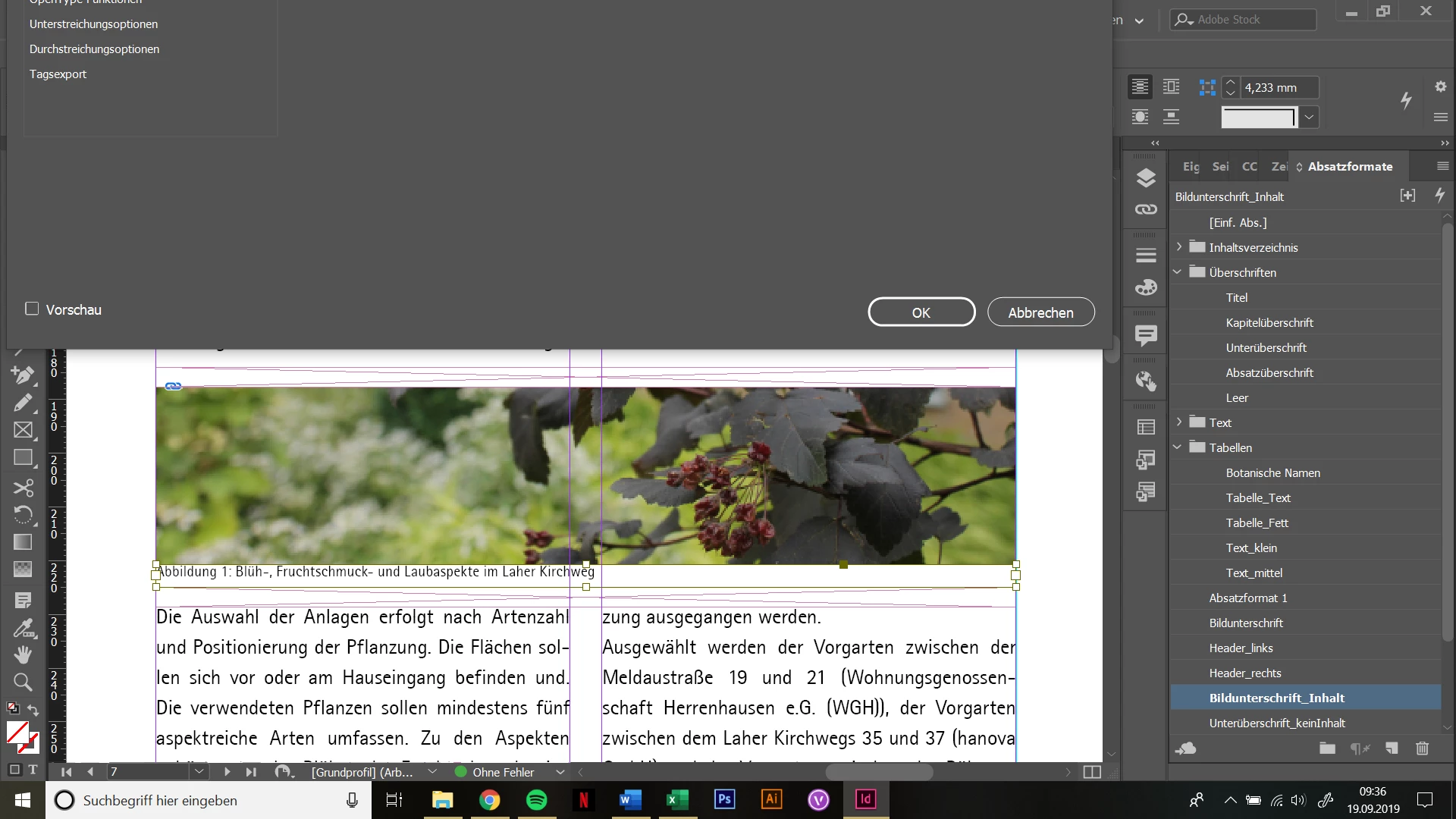
Paragraph styles window out of reach

  • September 19, 2019
  • 4 replies
  • 1928 views

Hello!

If I try to open paragraph styles in an extra window, it is half out of reach. There's no way to pull ist down or reposition it.

I've been working with two monitors and after separating them the first time, this happend. Now, even if I connect the second monitor, the window stays out of reach. 

I'm relatively new to Indesign, so I'm sorry if this is an easy fix. I tried googling, but the solutions there (reinstalling etc.) just didn't work. Resetting prefernces didn't work neither, because ctrl + shift + alt didn't work ... I also suspect it might not be a problem with Indesign but maybe with my monitor settings. I'm just hoping someone here might have a solution, because it is really annoying and I have to print my thesis in about a week, so it's kind of pressing.

Thank you in advance!
    4 replies

    Legend
    October 14, 2019

    Wenn in den Systemeinstellungen eine kleinere Anzeigeauflösung gewählt wird, zentriert InDesign bei mir den Dialog, danach zurück zur normalen/größeren Auflösung und er hängt oben links.

    Der Dialog war bei mir aber auch nicht aus dem Bildschirm herausgeschoben, von daher weiss ich nicht ob das in dem Spezialfall hilft ...

    Inspiring
    January 29, 2021

    Hi, I'm having the same problem with the paragraph styles window and have not found a solution (resizing, changing display settings on my monitors, restarting). Character styles and object styles open in an accessible location.  Would appreciate any guidance, thanks! 


    Community Expert
    October 14, 2019

    Hallo Marlene,

    dann kann ich nur den Rat geben:

    InDesign vollständig deinstallieren, Rechner neu starten und InDesign wieder installieren.


    Zuvor jedoch Deine Arbeitsbereiche im Verzeichnis Workspaces sichern, sofern Du eigene angelegt haben solltest:

    Dieser PC > Lokaler Datenträger (C:) > Benutzer > [Dein Benutzername] > AppData > Roaming > Adobe > InDesign > Version 14.0 > de_DE > Workspaces


    Gruß,
    Uwe Laubender

    ( ACP )

    Community Expert
    September 19, 2019

    Hallo Marlene,

    was klappen könnte: "Arbeitsbereich" zurücksetzen.

    Was in jedem Fall klappt:


    InDesign beenden.

    Backup machen vom Verzeichnis Version 14.0. Pfad siehe weiter unten.

    Die InDesign Preferences löschen, also das Verzeichnis Version 14.0.

    InDesign hochfahren.


    Die InDesign-Preferences sollten sich bei Dir dort befinden:

    Dieser PC > Lokaler Datenträger (C:) > Benutzer > [Dein Benutzername] > AppData > Roaming > Adobe > InDesign > Version 14.0 > de_DE


    Achtung: Das Verzeichnis AppData ist unter Windows 10 möglicherweise unsichtbar.

    Kannst Du aber ändern:  "Ausgeblendete Elemente anzeigen" einschalten unter "Ansicht", wenn Du das Verzeichnis [Dein Benutzername] geöffnet hast.


    Gruß,
    Uwe

    Participant
    October 14, 2019
    Vielen Dank für die Antwort! Leider behebt es das Problem immer noch nicht. Ich habe wirklich keine Ahnung, weshalb dieser Fehler auftritt.
    Participant
    October 14, 2019
    Grüße, Marlene
    Geоrge
    Legend
    September 19, 2019

    This is payment workaround (I'm the user of this tool many years already, because works with two monitors too many years):

    https://www.actualtools.com/windowmanager/

    After installing you can use shortcut WIN+2 on NUMLOCK to move window to the bottom edge of the screen.


    Not only Adobe applications can have such type of bugs when you work on multiple monitors. I prefer to use AWM and forget about stealing my nervous.

    Remember, never say you can't do something in InDesign, it's always just a question of finding the right workaround to get the job done. © David Blatner
    Geоrge
    Legend
    September 19, 2019

    Try this -


    Remember, never say you can't do something in InDesign, it's always just a question of finding the right workaround to get the job done. © David Blatner
    iman.barabadi
    Participant
    August 7, 2023

    Thank you George as I have tried anything that came to my mind and nothing worked. During my 20+ years of experience with InDesign, I have never had this issue on Mac! I wish someone comes here and defend Windows...