

sfabravo
Known Participant
March 8, 2018
Question

Placing text into InDesign with 'special characters'

  • March 8, 2018
  • 2 replies
  • 4141 views

As part of our process, our staff writes in Open Office, tag stories and save as text for importing into InDesign (using the format <ASCII-WIN>. When the writers include 'special characters' (such as é), it does not come into InDesign (Mac) properly. Apparently this has been an issue for a long time but I wasn't aware of it.

I've search the Adobe forums but have yet to be able to come up with an answer.

Here's an example of what is being saved and then imported:

<pstyle:calendartext><CharStyle:inlinebold>'Life is a Dream'<CharStyle:> Internationally celebrated director Dominique Serrand adapts Pedro Calderón de la Barca's 1635 drama "Life is a Dream," considered one of the greatest plays of the Spanish Golden age. Serrand reimagines this tale where truths are mutable, identities uncertain and happy endings are never guaranteed. March 1-3; 8 p.m. $5 students, $10 faculty/staff/seniors, $15 general. Roble Studio Theater, 375 Santa Teresa, Stanford. taps.stanford.edu

Note the ó in the name. When it is placed in InDesign, it turns to this:
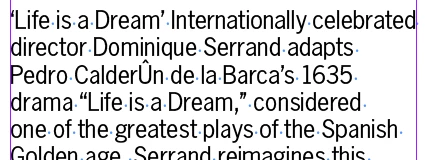
Any ideas on how to make this work for them? Right now the designers are having to search and replace for these characters, which is not very streamline. I thought about just writing a script for them to run, but again, didn't think that was the best solution.

Thanks in advance.

This topic has been closed for replies.

2 replies

Legend
April 17, 2018

ASCII, unfortunately, does not include accented characters. So, this "ASCII-WIN" is presumably some particular encoding. You need to find out what this encoding really is, and match this in InDesign. Don't assume anything. Especially don't assume "ASCII will work".

Legend
March 8, 2018

The name fir this effect is “mojibake” and it happens all the time when people don’t pay attention to the encodings they save in and import. Or assume all text will “just work”.

So, how exactly is the text entered, what encoding is used to save, how is it placed, what character set is used? Control and match up.

sfabravo
sfabravoAuthor
Known Participant
April 17, 2018

As stated, it's encoded as ASCII. The character is either typed from the keyboard or copy and pasted. I've replicated from both PCs and Macs and various different text editors all with the same issue.

It's placed in InDesign with the menu command to import text. I've also attempted to do so with drag and drop to the same (lack of) success.

@srishtib8795206​ Nothing about the above comment is helpful as far as I can tell because it's just asking more questions, most of which has been previously mentioned in my original post.

MW Design
Inspiring
April 17, 2018

You should be at least using UTF-8 for the encoding. That will cure the problem.