
Known Participant
July 13, 2017
Question

Possible Running Header Text Variable error

  • July 13, 2017
  • 7 replies
  • 3938 views

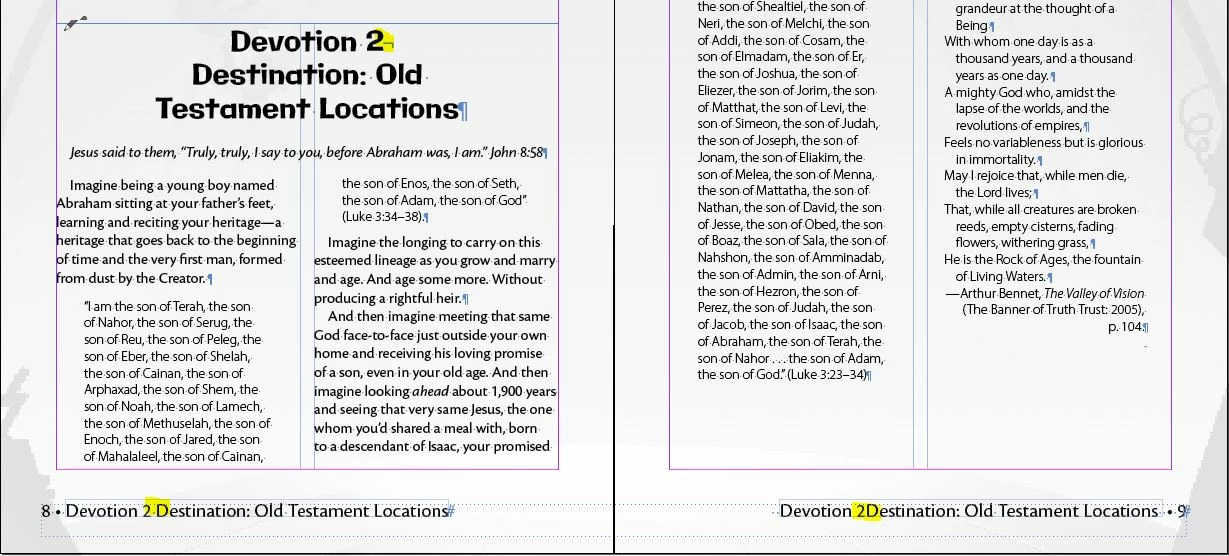
Has anyone else seen this error using the Running Header text variable? I have used a line break in a several-line heading in order to properly distribute the text. In the footer, that line break is counted as a space in the first instance of the running header, but on subsequent pages it isn't counted as a space. So if I put a space before the line break in the heading, I end up with two spaces on the first instance and one space on the rest, but if I remove the extra space, I end up with one space on the first instance and no space on the rest. I have to have the line break. I now have this problem in multiple books where I've used a forced line break in headings, and I believe the forced line break is the source of the error. If I remove it, I can get the running headers to space correctly. Weirdly enough, I have been able to export some of the offending documents to idml and fix the error, but this does not work on all of them. Anyone have any ideas why this is an issue and what I can do to fix it?

NOTE: I'm using 2017.0 on a Windows 10 computer. I didn't like the changes to the UI in the newest release of InDesign.

This topic has been closed for replies.

7 replies

Community Expert
August 4, 2021

Thanks for the hint. Now I inspected your screenshot from 2017 in your initial post.


This case is ideal!

One  can clearly identify the first word in the paragraph that is followed by a blank that is followed by digit(s) and that is followed by a end of line special character. With GREP Find/Change you could find that special character and replace it with a blank where a character style is applied.


Find pattern definition:

Find a blank character ( in case you already did some manual work ) or an end of line special character where before there is the word Devotion at the start of a paragraph followed by a blank that is followed by an unknown number of digits.

^Devotion\x{0020}\d+\K[\n\x{0020}]

with characterstyle [None] and the paragraph style you assigned to your headline.


Change to a blank:

\x{0020}

with the character style applied that makes this blank very wide.


Regards,
Uwe Laubender

( ACP )

Community Expert
August 4, 2021

Hi DKingDesigner,

possibly yes. Could you show some real-world samples with screenshots where hidden characters are showing?

Menu Type > Show Hidden Characters


What could be a consistent word that would triggers this?


Regards,
Uwe Laubender

( ACP )

Community Expert
August 4, 2021

Ideally that word is positioned either directly before or directly after the blank that should break the line of text.


Regards,
Uwe Laubender

( ACP )

Known Participant
August 4, 2021

The original post for this thread is my annual headache. The devotion titles change, but I do these same books every year with a new theme. Devotion 1, 2, 3, 4, 5 would be the first lines. They are in a single InCopy file shared across multiple books. 

Community Expert
February 16, 2021

Hi together,

another workaround:

Instead of using a line break character use a simple blank character and format it to a very wide width.

E.g. 1000% width combined with a tracking value of 10000 perhaps.

A text frame could be perhaps 300 mm wide with text of 8.5 Pt and the blank character will still break the line.


Regards,
Uwe Laubender

( ACP )

Known Participant
August 4, 2021

Interesting work around. I still think this bug needs to be fixed, but changing that space to extra wide did get my headers and footers to look correct in both my full page and half page layouts. Because the story appears in multiple size columns via InCopy, I was having a hard time finding a solution that worked in all the books the story appeared in, but this workaround works universally. Would there be a way to GREP this in the paragraph style if there is a consistent word in the first line to search for? 

Participant
July 26, 2019

The method that works for me all the time: go to the Variables menu, and choose "Use: Last on Page", and you may also also check in "Delete End Punctuation" (however, this is not necessary, I think). And, if this works for you, spread the word . And see the SS for proof.

Participant
February 12, 2021

This works for me!

Thank you so much for sharing!!

Known Participant
August 4, 2021

Unfortunately, that didn't work for me. 

amaarora
Inspiring
August 17, 2017

Hi,

Yes that is a bug within InDesign...(Running headers are designed in a way, to convert all line breaks to a single line.. but the issue you pointed out is certainly a bug)

I was able to reproduce it with CC 2017 though.

I would like to add that although the UI may not be very pleasing to you (but we are improvising on it in the upcoming release), each release comes with its own new set of features. I hope you give it another try:)

Like someone correctly posted above, please use the workaround at Re: Forced line breaks on variables don't turn to spaces​ for the time being.

-Aman

InDesign Engineering Team

Known Participant
December 11, 2017

I am seeing the same error in 2018, FYI.

Edit: I will add, that after taking this snapshot, I exported the book to IDML and reopened and the footers were correct after that step.

kyriosity
Inspiring
November 9, 2018

Encountered this issue again in November 2018. Tried your INDD > IDML > INDD trick, but it didn't correct it in my case.

Om Nath Jha
Legend
July 14, 2017

Hi there,

Did you try updating InDesign to 2017.01 / Build 12.1.0.56? Are you still facing this issue?

Regards,

Om

Known Participant
August 17, 2017

No, I have not updated. The lack of contrast in the new UI color schemes is headache producing, so I had to go back to the older version. I have used paragraph indents to force the line flows the way I need them so I can remove the forced line breaks. That appears to have worked for now.

If you have fixed this issue in the newer versions, then I hope at some point you put the UI back to usable color contrasts. I may be stuck with 17.0 for a good long while else. I live in InDesign, so usability of the interface is far more important to me than bug fixes that may affect a small portion of my work flow.

July 13, 2017

Seems to be a bug, same problem here: Re: Forced line breaks on variables don't turn to spaces

But it seems to be fixed, for I don't see this issue in InDesign 2017.01 / Build 12.1.0.56

Fenja