This topic has been closed for replies.
Correct answer amaarora

Hi,

Do you intend to change the below shown order?
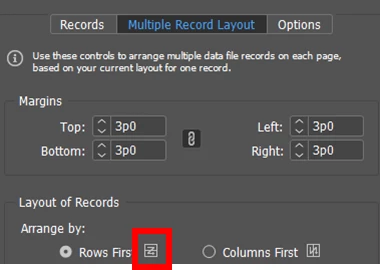
I do not think it is possible within InDesign presently. But do file a feature request here. Feature Request/Bug Report Form

-Aman

3 replies

greissAuthor
Known Participant
June 12, 2017

Thanks, I did assign a request just now.

Participating Frequently
January 2, 2018

I need this as well. I need it to print the backs of price tags. Has there been a solution found?

thanks

amaarora
amaaroraCorrect answer
Inspiring
June 12, 2017

Hi,

Do you intend to change the below shown order?

I do not think it is possible within InDesign presently. But do file a feature request here. Feature Request/Bug Report Form

-Aman

Community Expert
January 2, 2018

amaarora  wrote

… I do not think it is possible within InDesign presently. …

Hi Aman,

it's doable—sort of—but requires an extra step after creating the merged document.

1. Let's start with a document where the page is mirrored horizontally. The page, not the contents. So uncheck that contents will move with the page. You do that with the Page Tool and with the Transformation menu. From my German InDesign that is "Horizontal spiegeln" with the Page Tool:

2. Next step would be to do the merge. I used a small source text file with only one column of entries called "Value" and with 32 records, just numbers that count from 1 to 32:

Result was this:

What's left to do?

3. Mirror the result pages horizontally without moving the contents:

But that also means, you have to do it for every result page:

InDesign CS6 and above.

Regards,
Uwe

Participating Frequently
January 2, 2018

thank you! looks promising for me. I will test this when I get my data.

Mike Witherell
Community Expert
Community Expert
June 12, 2017

Have you tried installing and using the Middle Eastern version of InDesign?

Mike Witherell
