
Inspiring
May 24, 2018
Answered

Script to convert text to foot note with "*"

  • May 24, 2018
  • 2 replies
  • 2690 views

Hi,

I am trying to use the following script to convert all those text which have " * " to footnotes:

var  

    myDoc = app.activeDocument, 

mStory = app.selection[0].texts[0].parentStory, 

    mEndNotes = myDoc.textFrames.add( {name:"EndNotes"} ), 

    k, len, cIP, currPara, currFoot, mMarkers; 


app.findGrepPreferences = app.changeGrepPreferences = null; 

//--------------------------------------------- 

// edit doc.footnoteOption here 

with (myDoc.footnoteOptions)  

    { 

    showPrefixSuffix = FootnotePrefixSuffix.PREFIX_SUFFIX_BOTH; 

    prefix = "["; 

    suffix = "]"; 

    separatorText = "\t"; 

    markerPositioning = FootnoteMarkerPositioning.NORMAL_MARKER; 

    } 

//------------------------------------------------------------ 

// move endnotes to a separate textFrame 

for (k=mStory.paragraphs.length - 1; k >=0; k--)  

    { 

    if (mStory.paragraphs.contents.search(/^\[\d+\]/) == 0)  

        { 

        currPara = mStory.paragraphs.move(LocationOptions.AT_BEGINNING, mEndNotes.parentStory); 

        currPara.words[0].remove(); 

        } 

    } 

//-------------------------------------- 

// create footnote markers 

app.findGrepPreferences.findWhat = "\*+"; 

mMarkers = mStory.findGrep(); 

len = mMarkers.length; 

while (len-->0) { 

    cIP = mMarkers[len].insertionPoints[0].index; 

    mMarkers[len].remove(); 

    mStory.footnotes.add( LocationOptions.AFTER, mStory.insertionPoints[cIP] ); 

    } 

//------------------------------------------------------- 

// fill footnote contents with proper text 

for (k=0; k < mStory.footnotes.length; k++) { 

    currFoot = mStory.footnotes

    mEndNotes.paragraphs[0].texts[0].move(LocationOptions.AT_END, currFoot.texts[0]); 

    if (mStory.footnotes.characters[-1].contents == "\r") mStory.footnotes.characters[-1].remove(); 

    } 


mEndNotes.remove();

However, the script does not seem to work. Could any one help me regarding the same? How do I make the script search * text references and put them as footnotes.

I have attached a snap for better clarity, as well.
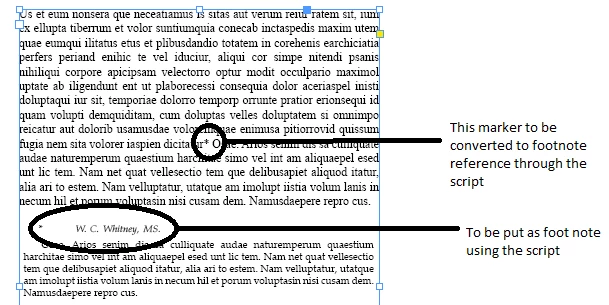
Any help, would be greatly appreciated.

Regards,

Aman Mittal

This topic has been closed for replies.
Correct answer amanm5143

var  

    myDoc = app.activeDocument, 

mStory = app.selection[0].texts[0].parentStory, 

    mEndNotes = myDoc.textFrames.add( {name:"EndNotes"} ), 

    k, len, cIP, currPara, currFoot, mMarkers; 


app.findGrepPreferences = app.changeGrepPreferences = null; 

//--------------------------------------------- 

// edit doc.footnoteOption here 

with (myDoc.footnoteOptions)  

    { 

    showPrefixSuffix = FootnotePrefixSuffix.PREFIX_SUFFIX_BOTH; 

    prefix = "["; 

    suffix = "]"; 

    separatorText = "\t"; 

    markerPositioning = FootnoteMarkerPositioning.NORMAL_MARKER; 

    } 

//------------------------------------------------------------ 

// move endnotes to a separate textFrame 

for (k=mStory.paragraphs.length - 1; k >=0; k--)  

    { 

    if (mStory.paragraphs.contents.search(/^\*+/) == 0)  

        { 

        currPara = mStory.paragraphs.move(LocationOptions.AT_BEGINNING, mEndNotes.parentStory); 

        currPara.words[0].remove(); 

        } 

    } 

//-------------------------------------- 

// create footnote markers 

app.findGrepPreferences.findWhat = "\\*+"; 

mMarkers = mStory.findGrep(); 

len = mMarkers.length; 

while (len-->0) { 

    cIP = mMarkers[len].insertionPoints[0].index; 

    mMarkers[len].remove(); 

    mStory.footnotes.add( LocationOptions.AFTER, mStory.insertionPoints[cIP] ); 

    } 

//------------------------------------------------------- 

// fill footnote contents with proper text 

for (k=0; k < mStory.footnotes.length; k++) { 

    currFoot = mStory.footnotes

    mEndNotes.paragraphs[0].texts[0].move(LocationOptions.AT_END, currFoot.texts[0]); 

    if (mStory.footnotes.characters[-1].contents == "\r") mStory.footnotes.characters[-1].remove(); 

    } 


mEndNotes.remove(); 

2 replies

amanm5143AuthorCorrect answer
Inspiring
May 28, 2018

var  

    myDoc = app.activeDocument, 

mStory = app.selection[0].texts[0].parentStory, 

    mEndNotes = myDoc.textFrames.add( {name:"EndNotes"} ), 

    k, len, cIP, currPara, currFoot, mMarkers; 


app.findGrepPreferences = app.changeGrepPreferences = null; 

//--------------------------------------------- 

// edit doc.footnoteOption here 

with (myDoc.footnoteOptions)  

    { 

    showPrefixSuffix = FootnotePrefixSuffix.PREFIX_SUFFIX_BOTH; 

    prefix = "["; 

    suffix = "]"; 

    separatorText = "\t"; 

    markerPositioning = FootnoteMarkerPositioning.NORMAL_MARKER; 

    } 

//------------------------------------------------------------ 

// move endnotes to a separate textFrame 

for (k=mStory.paragraphs.length - 1; k >=0; k--)  

    { 

    if (mStory.paragraphs.contents.search(/^\*+/) == 0)  

        { 

        currPara = mStory.paragraphs.move(LocationOptions.AT_BEGINNING, mEndNotes.parentStory); 

        currPara.words[0].remove(); 

        } 

    } 

//-------------------------------------- 

// create footnote markers 

app.findGrepPreferences.findWhat = "\\*+"; 

mMarkers = mStory.findGrep(); 

len = mMarkers.length; 

while (len-->0) { 

    cIP = mMarkers[len].insertionPoints[0].index; 

    mMarkers[len].remove(); 

    mStory.footnotes.add( LocationOptions.AFTER, mStory.insertionPoints[cIP] ); 

    } 

//------------------------------------------------------- 

// fill footnote contents with proper text 

for (k=0; k < mStory.footnotes.length; k++) { 

    currFoot = mStory.footnotes

    mEndNotes.paragraphs[0].texts[0].move(LocationOptions.AT_END, currFoot.texts[0]); 

    if (mStory.footnotes.characters[-1].contents == "\r") mStory.footnotes.characters[-1].remove(); 

    } 


mEndNotes.remove(); 

Community Expert
May 24, 2018

Hi Aman,

how do you know where the footnote text starts and ends?

Regards,
Uwe

amanm5143Author
Inspiring
May 24, 2018

All the footnotes start with " * " followed by a tab or space and end with a paragraph break.

FRIdNGE
May 24, 2018

Hi Uwe,

I understand your points. I am new to scripting thing so any idea where I should start to include your suggestions?

Regards,

Aman


Hi,

Maybe simpler [and cooler) to tell us Jarek [Jump_Over] wrote this code 4 years ago and play it replacing each * by an incremental numbering!

Re: convert text to footnote

Best,

Michel, from FRIdNGE