csm_phil
Legend
December 21, 2011
Answered

Selected Object Group row wise or column wise in javascript

  • December 21, 2011
  • 2 replies
  • 2555 views

Hi Scripter All

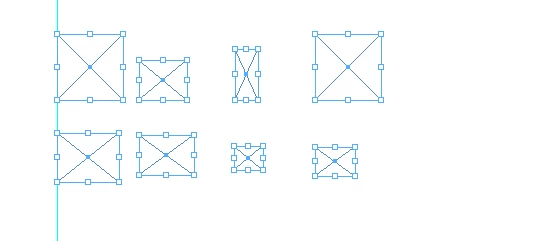
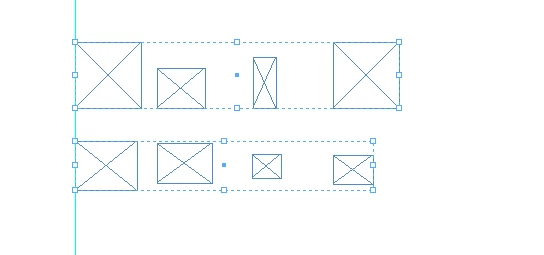
I want to group my selected object row/column wise it is possible to achieve this using javascript if yes, please give your input ow? to do? It is possible please see the below snapshots.

This snapshot is my selected object not grouping in row wise.

,

This output is after  grouped in row wise see the below snapshot. this is i m done is manually. But i need to do this in javascript.

Please help any one have idea or technical methods i want this output using javascript.

thx

csm_phil

This topic has been closed for replies.
Correct answer Jongware

I just implemented my idea step by step and I think it totally fullfills your objective.

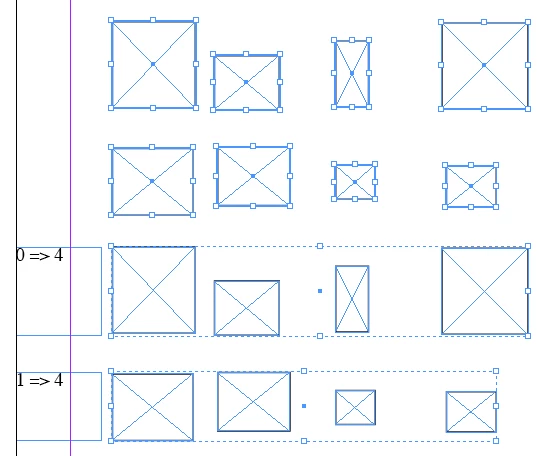
absqua is wrong -- overlaps are important. Here is a before–after screenshot; larger objects may overlap previously defined groups ('buckets'), and if they do they have to be added to that bucket and its information updated. Initially I saved both top and bottom extremas, but after some more consideration that's not even necessary, and I could write it out exactly as I suggested earlier.

//DESCRIPTION:Group by horizontal extent

// A Jongware Script 26-Dec-2011

// grab selection

elements = app.selection;

// sort on tops

elements.sort (function(x,y)

{

    return x.geometricBounds[0] - y.geometricBounds[0];

}

);

// put in simple buckets, saving bottom and contains:array of elements

buckets = [ ];

for (i=0; i<elements.length; i++)

{

  e_top = elements.geometricBounds[0];

  e_bottom = elements.geometricBounds[2];

  b = 0;

  while (b < buckets.length && (e_top > buckets.bottom) )

    b++;

  // not in an available bucket? add one!

  if (b == buckets.length)

    buckets.push ( {bottom:e_bottom, contains:[ elements ] } );

  else

  {

    // put in bucket

    buckets.contains.push ( elements );

    // update range

    if (e_bottom > buckets.bottom)

      buckets.bottom = e_bottom;

    }

}

// add label for debugging purposes:

for (i=0; i<buckets.length; i++)

{

  app.activeDocument.textFrames.add ({geometricBounds:[ buckets.contains[0].geometricBounds[0], 0, buckets.bottom, 20 ], contents:String(i)+" => "+String(buckets.contains.length) } );

}

// deselect all

app.select(null);

// convert to groups and re-select

for (i=0; i<buckets.length; i++)

{

  if (buckets.contains.length > 1)

    app.select ([app.activeDocument.groups.add (buckets.contains)], SelectionOptions.ADD_TO);

  else

    app.select(buckets.contains, SelectionOptions.ADD_TO);

}

2 replies

Jongware
Community Expert
JongwareCommunity ExpertCorrect answer
Community Expert
December 26, 2011

I just implemented my idea step by step and I think it totally fullfills your objective.

absqua is wrong -- overlaps are important. Here is a before–after screenshot; larger objects may overlap previously defined groups ('buckets'), and if they do they have to be added to that bucket and its information updated. Initially I saved both top and bottom extremas, but after some more consideration that's not even necessary, and I could write it out exactly as I suggested earlier.

//DESCRIPTION:Group by horizontal extent

// A Jongware Script 26-Dec-2011

// grab selection

elements = app.selection;

// sort on tops

elements.sort (function(x,y)

{

    return x.geometricBounds[0] - y.geometricBounds[0];

}

);

// put in simple buckets, saving bottom and contains:array of elements

buckets = [ ];

for (i=0; i<elements.length; i++)

{

  e_top = elements.geometricBounds[0];

  e_bottom = elements.geometricBounds[2];

  b = 0;

  while (b < buckets.length && (e_top > buckets.bottom) )

    b++;

  // not in an available bucket? add one!

  if (b == buckets.length)

    buckets.push ( {bottom:e_bottom, contains:[ elements ] } );

  else

  {

    // put in bucket

    buckets.contains.push ( elements );

    // update range

    if (e_bottom > buckets.bottom)

      buckets.bottom = e_bottom;

    }

}

// add label for debugging purposes:

for (i=0; i<buckets.length; i++)

{

  app.activeDocument.textFrames.add ({geometricBounds:[ buckets.contains[0].geometricBounds[0], 0, buckets.bottom, 20 ], contents:String(i)+" => "+String(buckets.contains.length) } );

}

// deselect all

app.select(null);

// convert to groups and re-select

for (i=0; i<buckets.length; i++)

{

  if (buckets.contains.length > 1)

    app.select ([app.activeDocument.groups.add (buckets.contains)], SelectionOptions.ADD_TO);

  else

    app.select(buckets.contains, SelectionOptions.ADD_TO);

}

csm_phil
csm_philAuthor
Legend
December 28, 2011

Hi Jongware,

Thanks its working perferct this what i needed.

Thanks a lot again!

thx

csm_phil

John Hawkinson
Inspiring
December 22, 2011

You've got to do it the hard way. Go through your objects, worry about whether they overlap, and find the boundaries the define the sets, and then group them. I think you might find a basic computer graphics textbook helpful here.

csm_phil
csm_philAuthor
Legend
December 22, 2011

Hi John,

First, thanks for looking my problem.

Can you please explain brief, how to get the group in row wise,I am not clear, And also you mentioned basic computer graphics textbook helpful here, where i  get this book.

It is possible to achieve my requirement.

Please help me i am waiting for your reply

thx

csm_phil

John Hawkinson
Inspiring
December 22, 2011

Can you please explain brief, how to get the group in row wise,I am not clear,

You have to compare the geometricBounds of each and every box in order to sort them into rows. This is really a pain.

And also you mentioned basic computer graphics textbook helpful here, where i  get this book.

This is not my area, I can't give you a reference. Try google. You'll have to spend some time at it.

It is possible to achieve my requirement.

That's a very good question. If you were doing it from scratch I'd suspect it would take you several days-weeks of work. But if you're lucky you can find someone else's algorithm that solves this. (But I may be too pessimistic!)

It's well worth thinking that it is not worth it and just giving up though. We'll see what other people say.