
Inspiring
January 19, 2018
Answered

Setting Indents

  • January 19, 2018
  • 4 replies
  • 4556 views

What is the secret to setting the indents? I have to click a dozen times or more to finally select the indent icons. If you miss ever so slightly InDesign sets a tab location.

Suggestion to Adobe either make the indent icon selection more selective, that is, there is a way to differentiate between setting a tab and selecting the indent icons or add a key selection to the operation, like Option + click. It's been like this since InDesign 3.

This topic has been closed for replies.
Correct answer Katie Houghton

Just use the Paragraph controls in the controls panel or the Paragraph panel. You can use the Tab panel, Paragraph panel or Control panel with the paragraph Formatting controls in view.  (same icons as the Paragraph panel)

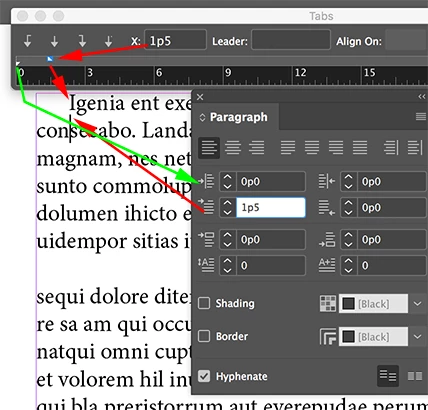
This shows the Tabs panel compared to the Paragraph panel. (Under Window>Type & Tables>Paragraph

This shows the Control panel with the Paragraph Formatting Controls in view.

Hope that helps.

4 replies

Inspiring
January 19, 2018

Thank you to Katie for a reasonable work around. None the less, this is very poor design by Adobe. Obviously they only write the code for the application - no one ever tries to use it.

Inspiring
January 19, 2018

I have a Mac so I think I have a tendency to work around the issues by zooming on my screen (I am old and blind), though usually do not have a problem grabbing the icons. I also know the keyboard shortcuts to bring up Tab (CMD-SHIFT-T), Character CMD-T) and Paragraph CMD-OPTION-T) so I just get the panel I need. But you are right sometimes it is a bit of a pain.

Tell Adobe. If we work around the issues they will never get fixed because they don't know to fix it. It is always good to tell Adobe what problems arise: Feature Request/Bug Report Form

You can also try changing the resolution of your screen so the icon is bigger. I have done that for some students though I prefer zooming in and out on More Space Screen.

jane-e
Community Expert
Community Expert
January 19, 2018

One way is, as everyone is telling you, use the Paragraph controls on the Control panel. But you want the Tabs panel to function as it ought, meaning you should be able to grab the controls with ease. You used to be able to do this.

You can file a bug report here:

Adobe InDesign Feedback

Post the link and I'll vote for it.

In Illustrator, many people complain that you it's difficult to select the anchor points, and this issue is similar.

Steve Werner
Community Expert
Community Expert
January 19, 2018

The Tabs panel is an awkward interface for setting indents.

I find it much easier to set indents precisely and quickly on either the Control panel (Paragraph mode) or Paragraph panels. (Or in the Indents section of a paragraph style.)

It looks like you're setting up a hanging indent. On the Indents section of the Control or Paragraph panel, you want to set your Left indent value (for example, .5 in) and set the First Line indent to a negative amount of the same value (in this example, -.5 in.)

See the screen capture below which shows that the same effect appears both in the Tabs panel where you're trying to set it, and simultaneously in the Indents section of the Control panel:

Katie HoughtonCorrect answer
Inspiring
January 19, 2018

Just use the Paragraph controls in the controls panel or the Paragraph panel. You can use the Tab panel, Paragraph panel or Control panel with the paragraph Formatting controls in view.  (same icons as the Paragraph panel)

This shows the Tabs panel compared to the Paragraph panel. (Under Window>Type & Tables>Paragraph

This shows the Control panel with the Paragraph Formatting Controls in view.

Hope that helps.

Inspiring
January 19, 2018

Thank you for the reply. This is an OK workaround but when you're

creating a Paragraph Style and you need to make adjustments to it, this

is very cumbersome. It means you have to go to the Paragraph panel

first, keep entering numbers until you get something you want then go

and make a Style from that.

Terry

…¡[" à ý÷

˜%ŽsÁ)çyÏû6!¹Ï!Yå æ‹ È'áj¦ d)SZƒ2LÚ Ú’l ÆqrõÈá­#aœ:¡€c

”äRAÌ ÇÇp=,âVs EE’›ŠÃ¢!k¬ÞÆj¦¬˜|âñ8 Í=Irt*º°Ÿƒ

Barb Binder
Community Expert
Community Expert
January 19, 2018

Hi Terry:

What is the secret to setting the indents

Here's the secret: just the very tip of the arrow must touch the indent triangle. On a Mac, if you can't see it well enough, set it up so that you can hold the Control key to zoom in. Once enabled, press and hold the Control key and drag two fingers up (to zoom in) or down (to zoom out). I use it all the time.

This is an OK workaround but when you're

creating a Paragraph Style and you need to make adjustments to it, this

is very cumbersome. It means you have to go to the Paragraph panel

first, keep entering numbers until you get something you want then go

and make a Style from that.

There are different ways to work with styles. Most of my students prefer to manually format one paragraph (i.e., the first heading) using the Control panel settings, and then Opt+click on the Create a New Style button to save it once it looks perfect.

And since nothing is ever really perfect, after they assign it 2500 times they see something they want to fix, so they fix one of them—again using the Control panel settings—and then update all of the other 2499 occurrences by right-clicking the style name in the Styles panel > Redefine Style. InDesign does the rest.

~Barb

~Barb at Rocky Mountain Training
