
Participant
November 30, 2017
Question

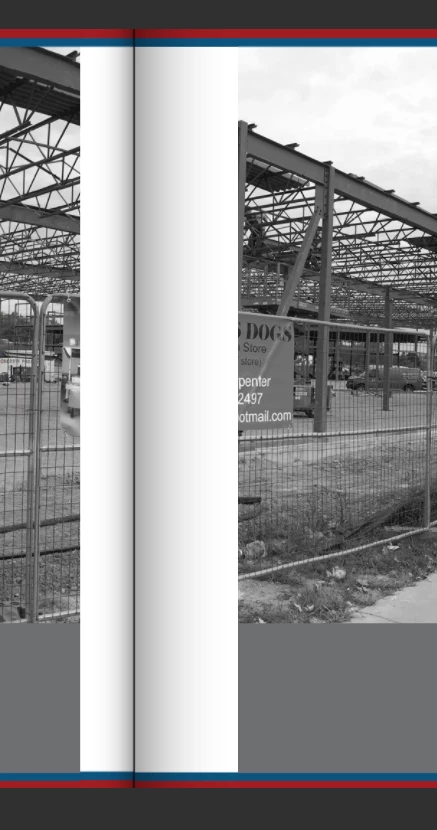
Shadows don't render on some pages

  • November 30, 2017
  • 2 replies
  • 276 views

Trying to embed a short newsletter with a double page spread. Added two black boxes with gradient feather to simulate a magazine spread (client request).  The embed version has a few pages that render the shadow as a white to black box and other pages are fine. If I click "download pdf" on the embed, that version looks fine and renders the shadow

This topic has been closed for replies.

2 replies

Mike Witherell
Community Expert
Community Expert
November 30, 2017

Have you ensured that the two gradient feather frames on the afflicted pages are not simply crossing the gutter boundary a little bit. If they are, carefully move them back so that they do not cross over. Just an utterly wild guess, of course.

Mike Witherell
Mike Witherell
Community Expert
Community Expert
November 30, 2017

Have you made sure that everything is the same color model?

InDesign: Edit > Transparency Blend Space > RGB

Placed images from Photoshop: Image > Mode > RGB

Mike Witherell
Participant
November 30, 2017

Hi Michael,


Yes I have made sure it was RGB blend space...If the PDF is downloaded from the embed page, the PDF renders the shadows but the (lower res embedded?) version renders shadows differently

Mike Witherell
Community Expert
Community Expert
November 30, 2017

What happens if you, instead of using gradient feather, made a black to white gradient fill in a frame, and set it to Multiply over the picture?

Mike Witherell