Exit
  • Global community
    • Language:
      • Deutsch
      • English
      • Español
      • Français
      • Português
  • 日本語コミュニティ
  • 한국 커뮤니티
0

Text boxes not showing up after export

Community Beginner ,
Nov 05, 2019 Nov 05, 2019

When I export my document, almost all of my textboxes aren't shown. In InDesign I see this icon. What does this mean? Why isn't my text exported? Thank you!


{Renamed by MOD}

 
TOPICS
Import and export , Type
5.7K
Translate
Report
Community guidelines
Be kind and respectful, give credit to the original source of content, and search for duplicates before posting. Learn more
community guidelines

correct answers 1 Correct answer

Community Expert , Nov 05, 2019 Nov 05, 2019

Hi,

your not printing frame is not a text frame. It's a text box for form fields.
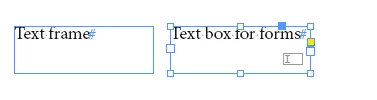
 

TextFrame vs TextBox For Forms.PNG

You can convert it back to a printing text frame:

Select the text box, go to Object > Interactive and do Convert To Object.


From my German InDesign CC 2019:
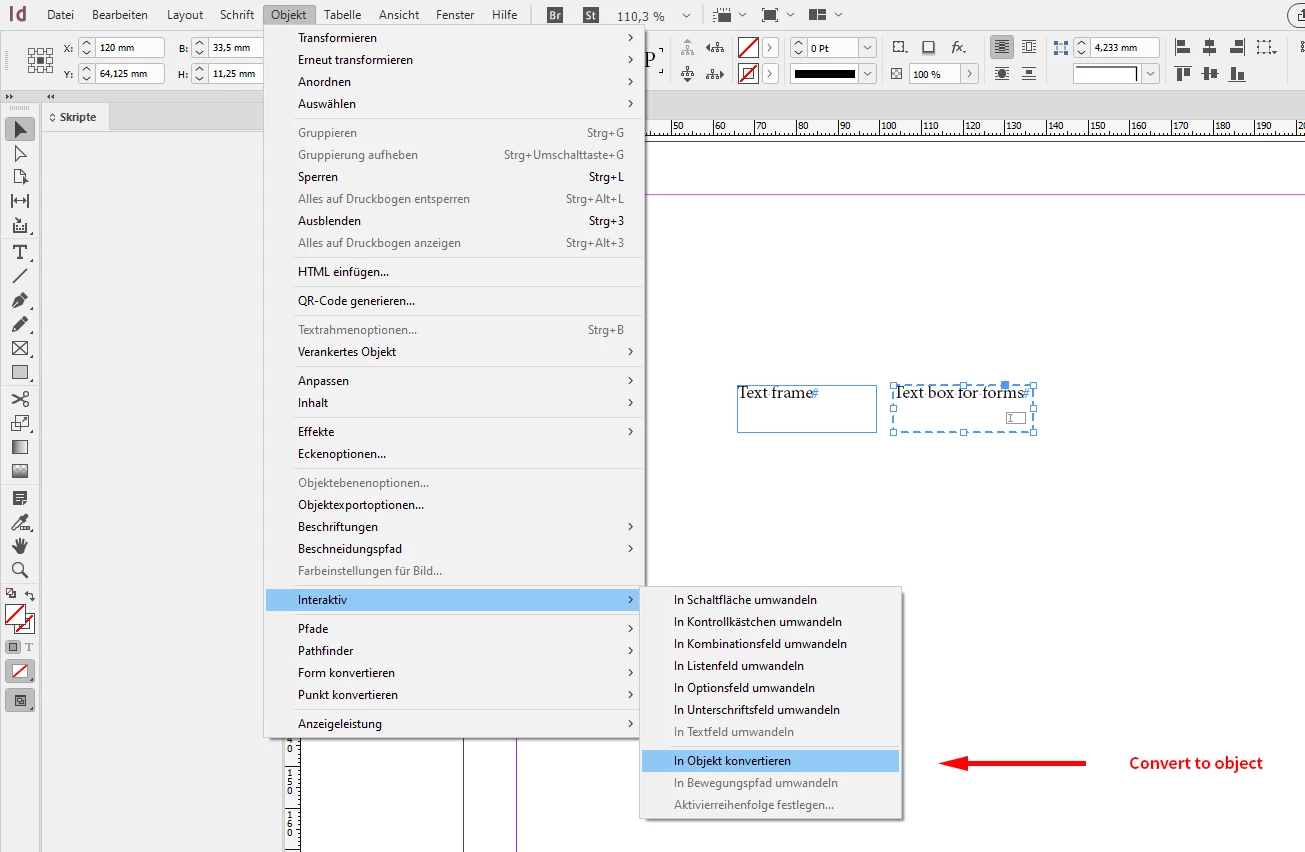
 

Convert-TextBox-to-Object.png


Regards,
Uwe Laubender

( ACP )

Translate
LEGEND ,
Nov 05, 2019 Nov 05, 2019

Hello,


We'll be happy to help. Would you mind sharing some more details like:

1. Version of InDesign and OS.

2. What are the steps you are following to export the document? (A screenshot of the issue/steps or a small video would help, you may attach it with your post)

3. Is it happening with just 1 file or with every file?


All this information would help us understand the issue better.

Looking forward to your response.


Regards,

Ashutosh

Translate
Report
Community guidelines
Be kind and respectful, give credit to the original source of content, and search for duplicates before posting. Learn more
community guidelines
Community Beginner ,
Nov 05, 2019 Nov 05, 2019

I work on Windows10 with InDesign CC (this morning 2019 14.3, now 2020 15.0).

I export with standard 'High Quality'-presets to pdf. Since it's only happening in one document, with textboxes with one font (Dolce), I thought the font wasn't embedded properly? But this doesn't seem to be the problem, because some textboxes (with the same font) are exported successfully.


The only difference between those text boxes is the 'cursor-icon': the textboxes with this icon don't get exported.

INDD:

 indd2.PNG

PDF:

 indd3.PNG

Thank you!


indd1.PNG

Translate
Report
Community guidelines
Be kind and respectful, give credit to the original source of content, and search for duplicates before posting. Learn more
community guidelines
LEGEND ,
Nov 05, 2019 Nov 05, 2019

Thanks for providing us additional details with screenshots. Would you be able to share the file with us (if not sensitive) on DM?

Translate
Report
Community guidelines
Be kind and respectful, give credit to the original source of content, and search for duplicates before posting. Learn more
community guidelines
Community Expert ,
Nov 05, 2019 Nov 05, 2019

Hi,

your not printing frame is not a text frame. It's a text box for form fields.


TextFrame vs TextBox For Forms.PNG

You can convert it back to a printing text frame:

Select the text box, go to Object > Interactive and do Convert To Object.


From my German InDesign CC 2019:


Convert-TextBox-to-Object.png


Regards,
Uwe Laubender

( ACP )

Translate
Report
Community guidelines
Be kind and respectful, give credit to the original source of content, and search for duplicates before posting. Learn more
community guidelines
Community Beginner ,
Nov 05, 2019 Nov 05, 2019
LATEST

Wow, thank you! No idea how that happened (but it is a former colleague who started this document - that might be the reason). 

Danke schön!

Translate
Report
Community guidelines
Be kind and respectful, give credit to the original source of content, and search for duplicates before posting. Learn more
community guidelines