Participating Frequently
January 2, 2018
Answered

Text disappearing - In Design CC on PC

  • January 2, 2018
  • 3 replies
  • 3478 views

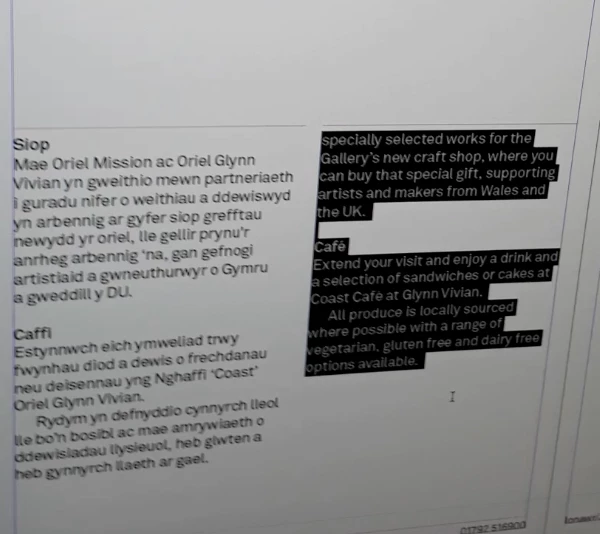
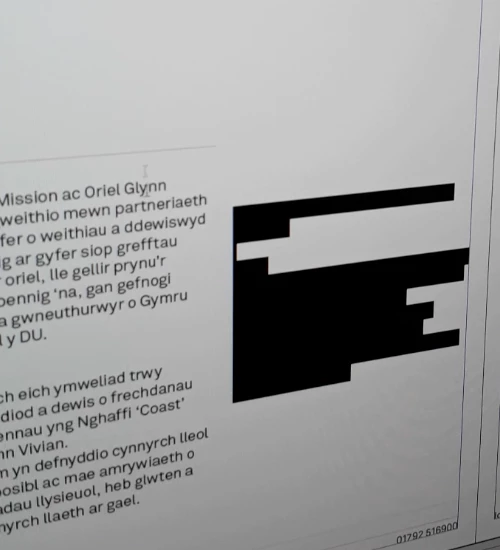
We have a new high spec PC and new installation of CC (ID 13.0.1 x64). First job in and text randomly disappears. I googled it and it looks to be something to do with the text frame refresh. When you click out of the text box and do something (highlight, put a space etc) the text reappears. This is a total nightmare. I'm trying to get my designers to change to PCs and this isn't helping the cause.

I have read that this issue has been around for years on both Mac and PC.

Pics attached. The first one shows the text missing but highlighted, the second is after an action - ta dah, the text appears.

Have changed the Live Screen Drawing pref to Immediate.

Is there a fix?
This topic has been closed for replies.
Correct answer BobLevine

Then suffice it to say that the processor is fine but the rest of the machine is bit weak especially for display purposes.

Are you sure you have the most up to date drivers? They were updated in December.

https://downloadcenter.intel.com/product/88345/Intel-HD-Graphics-530

3 replies

Dave Creamer of IDEAS
Community Expert
Community Expert
January 2, 2018

I've seen this before. I suspect a font issue. What happens if you change the text to a different font?

Also, have you rebuilt your InDesign preferences on startup?

David Creamer: Community Expert (ACI and ACE 1995-2023)
sjmcAuthor
Participating Frequently
January 2, 2018

No, not a font issue.

Graphics card - intel HD graphics 530?

I'm not an expert on the PC tbh.

BobLevine
Community Expert
BobLevineCommunity ExpertCorrect answer
Community Expert
January 2, 2018

Then suffice it to say that the processor is fine but the rest of the machine is bit weak especially for display purposes.

Are you sure you have the most up to date drivers? They were updated in December.

https://downloadcenter.intel.com/product/88345/Intel-HD-Graphics-530

hammer0909
Community Expert
Community Expert
January 2, 2018

It definitely seems to be a display issue. I’d try disabling the GPU as a start. You can do this by clicking on the rocket ship icon in the Application bar and unchecking GPU Performance.

BobLevine
Community Expert
Community Expert
January 2, 2018

Chad, GPU performance is Mac only.

The last thing I would do is change redraw to immediate. That tends to slow performance.

Try checking for updated video drivers.

sjmcAuthor
Participating Frequently
January 2, 2018

Drivers are all up to date.

Ctrl - Alt - / refreshes the frames but that is only a workaround.

Any other thoughts?

sjmcAuthor
Participating Frequently
January 2, 2018

Also, the old issue of only 1 or no undos is back. When I read up about the text issue it seems to be when you get one of the issues, you get the other too.

I wonder if they are related.

This has been around since 2014 - all a bit odd.