
Text to footnote in InDesign
Hi,
I have been trying run a script that helps in automatically converting and placing text to footnotes in an InDesign document. Script:
var scriptName = "Convert text to footnote",
doc, story;
app.doScript(PreCheck, ScriptLanguage.JAVASCRIPT, undefined, UndoModes.ENTIRE_SCRIPT, "\"" + scriptName + "\" script");
//===================================== FUNCTIONS ======================================
function Main() {
var mEndNotes = doc.textFrames.add( {name:"EndNotes"} ),
k, len, cIP, currPara, currFoot, mMarkers;
app.findGrepPreferences = app.changeGrepPreferences = null;
//---------------------------------------------
// edit doc.footnoteOption here
with (doc.footnoteOptions)
{
showPrefixSuffix = FootnotePrefixSuffix.PREFIX_SUFFIX_BOTH;
prefix = "[";
suffix = "]";
separatorText = "\t";
markerPositioning = FootnoteMarkerPositioning.NORMAL_MARKER;
}
//------------------------------------------------------------
// move endnotes to a separate textFrame
for (k=story.paragraphs.length - 1; k >=0; k--)
{
if (story.paragraphs
.contents.search(/^\[\d+\]/) == 0) {
currPara = story.paragraphs
.move(LocationOptions.AT_BEGINNING, mEndNotes.parentStory); currPara.words[0].remove();
}
}
//--------------------------------------
// create footnote markers
app.findGrepPreferences.findWhat = "\\[\\d+\\]";
mMarkers = story.findGrep();
len = mMarkers.length;
while (len-->0) {
cIP = mMarkers[len].insertionPoints[0].index;
mMarkers[len].remove();
story.footnotes.add( LocationOptions.AFTER, story.insertionPoints[cIP] );
}
//-------------------------------------------------------
// fill footnote contents with proper text
for (k=0; k < story.footnotes.length; k++) {
currFoot = story.footnotes
; mEndNotes.paragraphs[0].texts[0].move(LocationOptions.AT_END, currFoot.texts[0]);
if (story.footnotes
.characters[-1].contents == "\r") story.footnotes .characters[-1].remove(); }
mEndNotes.remove();
}
//--------------------------------------------------------------------------------------------------------------------------------------------------------
function PreCheck() {
if (app.documents.length == 0) ErrorExit("Please open a document and try again.", true);
doc = app.activeDocument;
if (doc.converted) ErrorExit("The current document has been modified by being converted from older version of InDesign. Please save the document and try again.", true);
if (!doc.saved) ErrorExit("The current document has not been saved since it was created. Please save the document and try again.", true);
if (app.selection.length == 0) {
ErrorExit("Nothing is selected.", true);
}
else if (app.selection.length == 1) {
if (app.selection[0].constructor.name == "TextFrame" || app.selection[0].hasOwnProperty("baseline")) {
story = app.selection[0].parentStory;
}
else {
ErrorExit("Please select one text frame, or some text, or place the cursor and try again.", true);
}
}
else if (app.selection.length > 1) {
ErrorExit("Only one text frame or some text should be selected, or the cursor placed into the text.", true);
}
Main();
}
//--------------------------------------------------------------------------------------------------------------------------------------------------------
function ErrorExit(error, icon) {
alert(error, scriptName, icon);
exit();
}
//--------------------------------------------------------------------------------------------------------------------------------------------------------
Whenever I try to run this script in a document containing the following styling and text:
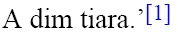
It generates the following error:
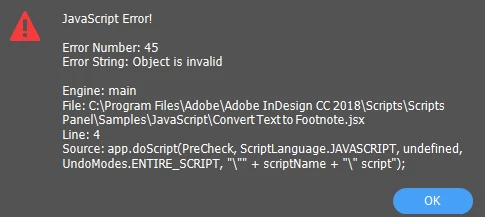
In all my documents, footnote text is marked in the same way and the text is usually at the end of the document. Though, the script worked for one of the documents however, it did not work for all others.
Could anyone help me with the idea of actually what is going wrong with the script? I have faced this problem in more than one file and have no idea about scripting.
Any help would be much appreciated.
Thanks and Regards,
Aman mittal
[This post moved from InDesign forum to InDesign Scripting forum by Moderator]
 AdChoices