
Participating Frequently
August 20, 2017
Question

The Mistery of Text Dissapearing

  • August 20, 2017
  • 3 replies
  • 2899 views

I recently had issue of my text disappearing even my text frame still have space for more words. I searched online and apparently nobody had something related to that, so I was really curious.

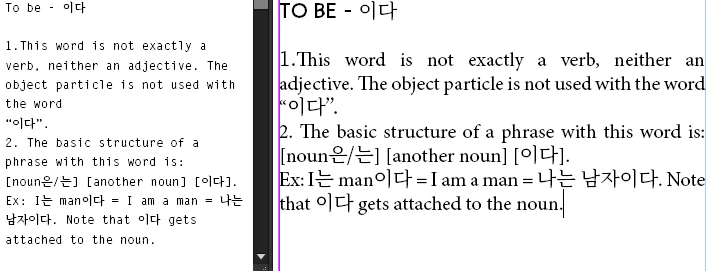
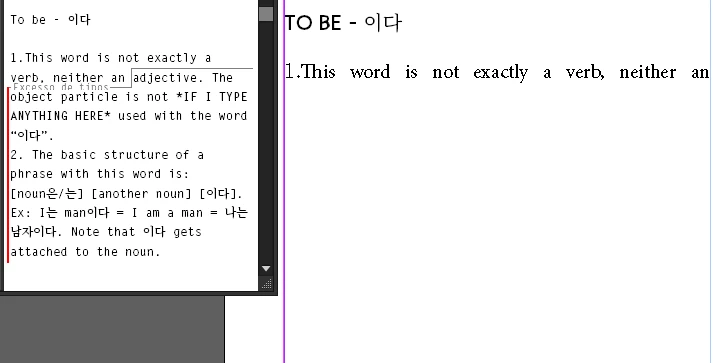
It's an strange problem. Let me give you an example, I wrote a text and I wanted to edit the beginning of it. I simply typed an "a" that was missing and then all my text down below this point disappeared and the threading box went red, even though my text frame has plenty of space for more words. I checked the story editor and it said I had an

"excess of types". I can simply press Enter and start typing on the text frame, however the text I wrote still missing. If I threaded my text to a new text frame, it would only appear if the width of the new text frame is larger than the one before, if not, the new text frame also have a red threading box.
This topic has been closed for replies.

3 replies

Jeff Witchel, ACI
Community Expert
Community Expert
August 20, 2017

Here'a another whacky possibility. I'm wondering if the defaults for your Text Frame Options have been altered, so that there a large inset at the bottom of each Frame.

Deselect all objects and and go to your Object menu > Text Frame Options.

Is there an Inset at the bottom of your Frame?

If there is, make the amount 0 (zero) and Press OK.

Draw a new Frame and see if the problem is solved.

If it is, close all documents and change the Text Frame Options, so there are no Insets. This will be your new default for Text Frames.

This, hopefully will solve the problem for all New documents going forward.

Participating Frequently
August 20, 2017

It's not that. The only parameter that I tried that fixed the problem is the space between the columns. If I put it to zero, the text appears. If I increase it to 1, the text disappears again.

Jeff Witchel, ACI
Community Expert
Community Expert
August 20, 2017

Hmm! So this only happens in the original document OR with text that is pasted from the original document?

I wonder if the original document is corrupted. Have you tried saving the layout as an IDML file and then reopening it in InDesign?

The magic of IDML is not a cure-all, but it usually works to get rid of what's causing most problems with a file.

Jeff Witchel, ACI
Community Expert
Community Expert
August 20, 2017

Have you tried Trashing your Preferences?

Trash Preferences ID: https://forums.adobe.com/thread/526990

Bill Silbert
Community Expert
Community Expert
August 20, 2017

If Jeff's suggestion to trash preferences did not work I would like you to try something that may sound a little whacky. Delete the text that remains in your text frame and see if all of the rest of the text pops back in. In the other post I mentioned deleting the last sentence before the disappearing text brought back all of the other text. It does not make sense which is why in my original post I suggested that this might turn out to be a bug.

Participating Frequently
August 20, 2017

Yeah, I tried both suggestions and still the same

Willi Adelberger
Community Expert
Community Expert
August 20, 2017

Did you apply any Character Style there? Either by applying via Character Style panel, a specific command or via a GREP style as part of a Paragraph Style?

Participating Frequently
August 20, 2017

I did actually, but if I remove all the character and paragraph styles on this paragraph and add some text on it as I did above, the same happens: the text disappears.

Bill Silbert
Community Expert
Community Expert
August 20, 2017

There was another question similar to this in the forum just yesterday so we may be looking at a bug here. Could you try creating a new document and copying and pasting the text from your original and see if the same thing happens. Also could you please list the version of InDesign and the OS that you're using.

As I said there was another post similar to this yesterday which involved a Spanish translation. Obviously, you're dealing with a different language than that but I do see that you have some foreign characters in your text. If the above suggestion doesn't work could you try changing the entire paragraph to an English language font such as Helvetica and see if the problem persists. It would be helpful to see if perhaps the foreign font you're using is at fault or even the combination of the English language font and the foreign one.