
Participating Frequently
November 30, 2017
Question

Tif Images with Transparency disappear when making and X1a PDF

  • November 30, 2017
  • 5 replies
  • 3026 views

Hi

I am running a iMac.

OS 10.11.6 El Capitan.

Adobe Photoshop CC 2018

Adobe InDesign CC 2018

Adobe Acrobat 15.010.20056 (according to App Info)

I have retouched and saved my tif images as follows

File - Save As - As Copy - TIFF

LZW Compression

Mac

Save Transparecy

I do this with all my images.

And all of a sudden on two different jobs with two totally different

images and different documents, when I create the Repro X1a PDF

the images go missing.

I have done the following to try fix:

Opened psd and re-saved the tiffs and replaced the image.

Restarted my Mac.

Placed the PSDs instead of the tiffs.

Made and idml file of my InDesign file and re-opened and

replaced the images again and saved over the old document..

Done an X1a/3 PDF which just gives me white blocks around the images (as though they are not etched)

None of these have worked.

I would be very grateful for any assistance or advice please.

Attached screenshot


Thanks
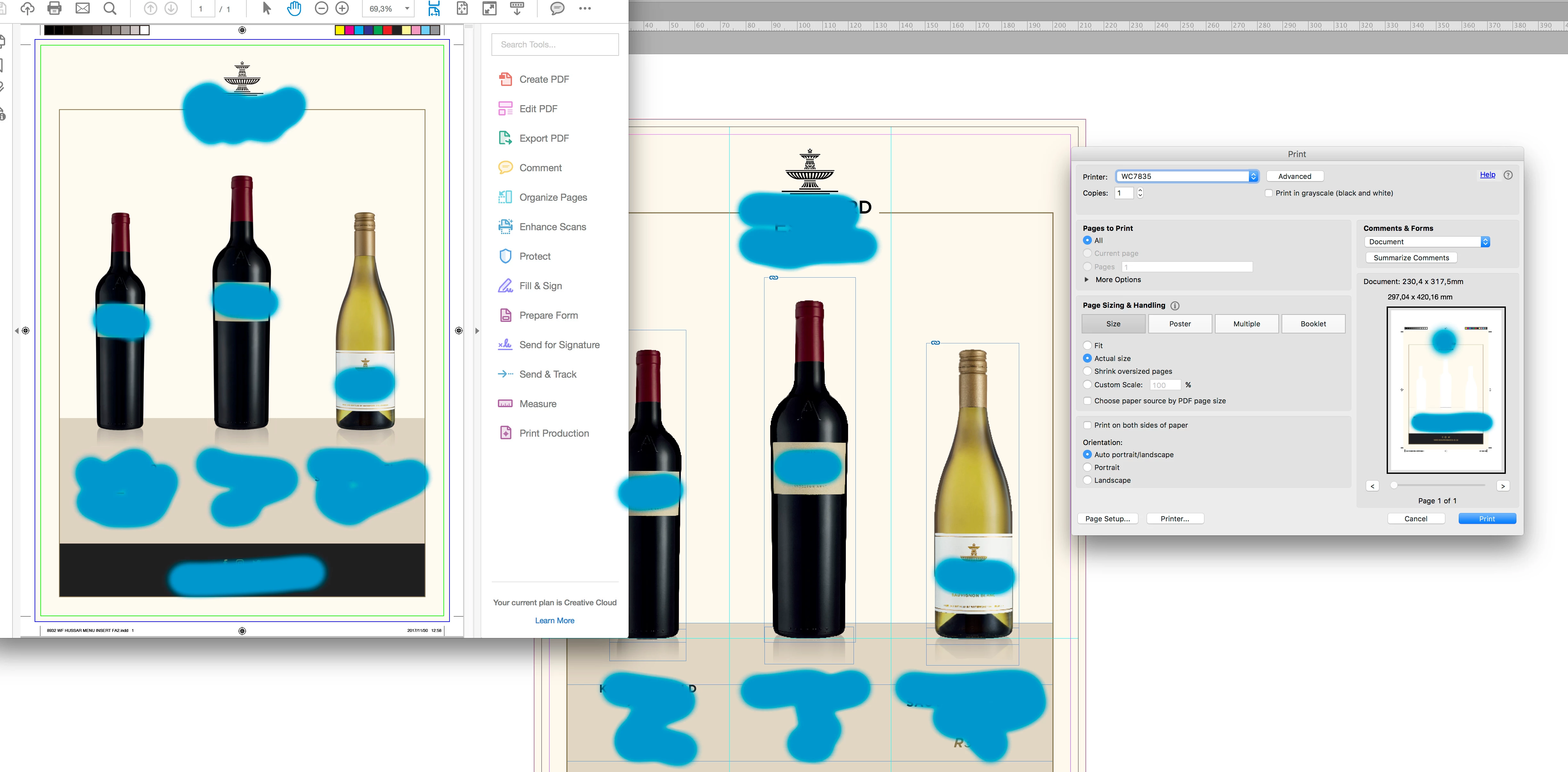
    This topic has been closed for replies.

    5 replies

    Danny Whitehead.
    Legend
    December 1, 2017

    Yeah, it's definitely got better in the last few years, but they're still asking for X-1a, even though it's unlikely that they're using RIPs that can't handle X-4, and they must get a lot of files that go over the 240% TAC. Quite often, when specs say X-1a, I'll send X-4 and everything is fine, but I don't take any chances with press ads that I'm unlikely to see a proof of.

    rob day
    Community Expert
    Community Expert
    December 1, 2017

    but they're still asking for X-1a, even though it's unlikely that they're using RIPs that can't handle X-4,

    X-4 has been around for almost ten years. I don't think it will ever be common in automated workflows like magazine or online printing. If X-1a was actually causing significant output problems the switch would have happened years ago.

    X-4 is great but really demands hands on guidance or intervention at the print end. In an automated print flow the printer will inevitably get this problem from a client, which the automation will not catch and won't be seen until delivery :

    X-4 comes in as this

    The SWOP press delivers this:

    and they must get a lot of files that go over the 240% TAC.

    But if the X-1a is made to their specification, with ISOnewspaper26v4 as the document profile and the Output Intent, the client would have to manually build a color or create transparency blend to exceed the TAC. It wouldn't be hard to at least catch the wrong output intent in an automated preflight.

    Danny Whitehead.
    Legend
    December 4, 2017

    https://forums.adobe.com/people/rob+day  wrote

    But if the X-1a is made to their specification, with ISOnewspaper26v4 as the document profile and the Output Intent, the client would have to manually build a color or create transparency blend to exceed the TAC. It wouldn't be hard to at least catch the wrong output intent in an automated preflight.

    I've had quite a few files come in with manually-built 400% rich blacks over the years. But I'd expect the most common source of excessive TAC for newsprint would be placed images that have been prematurely converted to SWOP, FOGRA39 etc. I'd guess they deal with it using device link profiles.

    Both early and late-binding workflows require some diligence and colour management knowledge on the part of the designer.

    Danny Whitehead.
    Legend
    November 30, 2017

    You're definitely, absolutely, positively sure that cream colour isn't a spot colour swatch? Because that looks precisely like what happens when you flatten a masked image that's placed over a spot colour background, and try printing to a printer that doesn't honour the overprinting trickery involved in flattening such objects.

    It will print fine so long as your printer's RIP has APPE (Adobe PDF Print Engine) enabled, in which case, you definitely should be sending PDF/X-4 anyway.

    BobLevine
    Community Expert
    Community Expert
    November 30, 2017

    Which is why I asked. Turning on overprint preview in Acrobat should correct the display if that's the case.

    Danny Whitehead.
    Legend
    November 30, 2017

    Yep. It looks from the screenshot as if Acrobat's preview is fine, it's the small preview in Print dialogue that's showing an issue.

    I bet it's a spot.

    @mj
    Community Expert
    Community Expert
    November 30, 2017

    OK, the PDF/x1-a (PDF 1.3) specification from the the ISO is not allowed to have transparency or color management.

    Check in with your printer and see if they can handle a PDF/x4 (PDF1.6). This allows for transparency and color management.

    You say it's a digital job, so there should not be a problem.

    The fine white lines you see in the PDF are flattening artifacts. They will freak you out on screen, but they do not print.

    You can see how the flattening is going to take place using the Flattener Preview from Window > Object and Layout > Flattener Preview.

    The Separations Preview window has nothing to do with flattening.

    You can read more about it here. Flatten transparent artwork in Adobe InDesign

    HTH

    rob day
    Community Expert
    Community Expert
    November 30, 2017

    OK, the PDF/x1-a (PDF 1.3) specification from the the ISO is not allowed to have transparency or color management.

    Just to clarify X-1a doesn't allow live transparency—you can still use transparent effects they just have to be flattened on export.

    X-1a doesn't let you include the CMYK profile that would be useful for future color managed conversions, but you can color manage during the conversion. The accuracy of that color managed conversion during export would depend on you setting the correct CMYK profile as the export destination. X-1a is intended for conditions where there is only one print destination and the press profile is known. X-4 is more flexible when the document needs to be output from multiple printing devices, or the printing conditions are unknown.

    hammer0909
    Community Expert
    Community Expert
    November 30, 2017

    I just want to clarify your problem. Based on your screen shot, the photos do in fact show up in the PDF file as I can see the file open in Acrobat. Your issue really is that the images don't print when printed from Acrobat. Is that correct? In the print dialog I think the printer sees that they're in the file because the wine bottles are knocking out of the background. I'd open the Separations Preview panel and see if anything stands out there. I ran a similar test on my end and the fact that they're Tiff's doesn't seem to be the issue. What if you switch to a different printer? Any change?

    Participating Frequently
    November 30, 2017

    Hi

    Yes the pics do in fact appear in the PDF when I open in Acrobat.

    And yes when i print from the created Acrobat PDF the images do not print.

    Unfortunatly we only have one printer.

    I am also afraid if its doing it on this printer it will do it on a Highend digital printer

    I have checked in the Seperation preview and all seems good

    BobLevine
    Community Expert
    Community Expert
    November 30, 2017

    Please answer the following:

    Why are you using X1-a?

    Are there spot colors involved?

    Why is IDML involved?

    What version of InDesign?

    What operating system?

    Participating Frequently
    November 30, 2017

    Hi

    Have always used X1/a printers in South Africa not always up with the new tech.
    and I have never had problems before.  Would you recommend I use something else?

    No spot colours

    As a solve i thought the document may have corrupted so exported an IDML to my

    desktop and re-opened it. Am willing to try anything now.

    Adobe InDesign CC 2018   13.0.0.125

    OS 10.11.6 El Capitan.

    BobLevine
    Community Expert
    Community Expert
    November 30, 2017

    First things first. Update InDesign to 13.0.1. It fixes a lot of issues with the initial release including output to PDF.