
cameront93
Participant
March 31, 2018
Answered

ToC not behaving what I want to do

  • March 31, 2018
  • 1 reply
  • 304 views

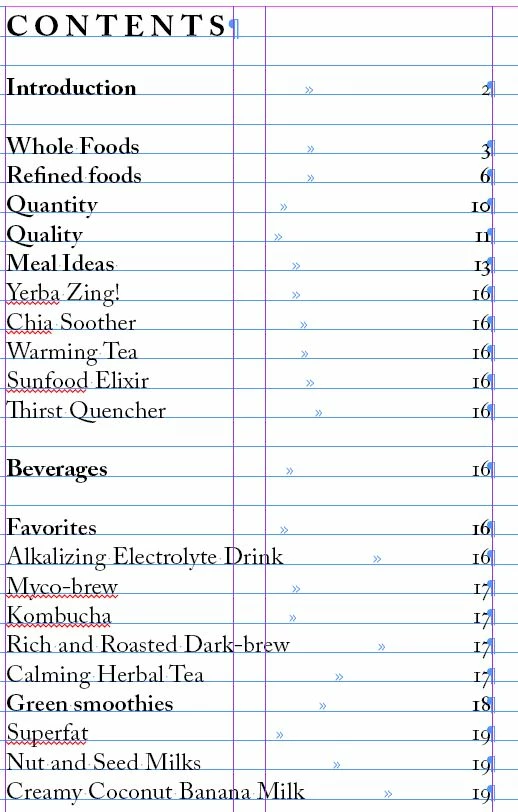
Hi, I am using the table of contents tool in a cookbook i am designing and for some reason Indesign keeps putting recipes where i don't want them. In this particular example I want to move everything under meal Ideas to go under alkalizing electrolyte drink. Can someone help me out?
This topic has been closed for replies.
Correct answer Barb Binder

That's the issue. Threaded frames are easiest to control. If you can thread them, I would. If not, try moving the frames with the recipe names to the left of the recipe ingredients.

~Barb

1 reply

Barb Binder
Community Expert
Community Expert
March 31, 2018

InDesign collects the data in chronological order (meaning the order they appear in the document). You'll need to adjust the file InDesign is pulling the text from to correct the order.

~Barb

~Barb at Rocky Mountain Training
cameront93
Participant
March 31, 2018

It seems like the material is in order but when i go make the recipe names their own text box that's what screws it up.

Barb Binder
Community Expert
Barb BinderCommunity ExpertCorrect answer
Community Expert
March 31, 2018

That's the issue. Threaded frames are easiest to control. If you can thread them, I would. If not, try moving the frames with the recipe names to the left of the recipe ingredients.

~Barb

~Barb at Rocky Mountain Training