
prtamil
Known Participant
October 24, 2017
Question

Transparency without Flattening

  • October 24, 2017
  • 8 replies
  • 7586 views

Sorry for external reference links!!!!!

As mentioned in the below Adobe help page, When we choose the Adobe PDF 1.4 (Acrobat 5.0) or later version transparency will be retained in the PDF.

Flatten transparent artwork in Adobe InDesign

But now with I am in same situation as in below thread,

High resolution PDF still generates low resolution drop shadows?

My original question is,

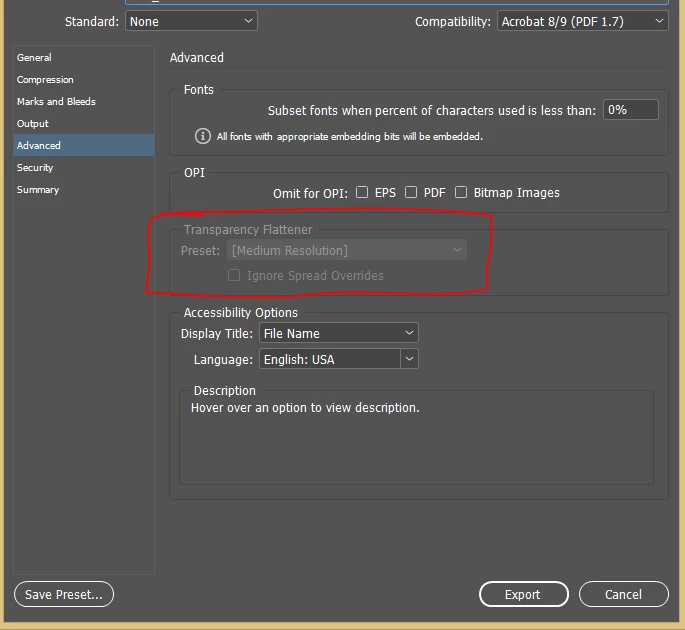
My export preset looks like below, and the transparency flattener is disabled. But indesign produced the flattened transparency output with PDF version 1.7.

Can some one help me to understand whether it is a bug in Indesign cc 2017 or do I need to enable/disable anything else in preset/preferences to get the PDF without flattened transparency ?
    This topic has been closed for replies.

    8 replies

    manal shanableh
    Legend
    November 16, 2017

    Edit>Transparency Flattener Preset to open the transparency Flattener‭ Panel‭.‬

    Click New

    Specify the Options as the photo and Name it.

    When exporting to Adobe PDF‭ (‬Print‭)‬

    transparency flattener preset is disabled in the Advanced section‭, ‬to enable it choose from compatibility‭: ‬Acrobat 4‭ (‬PDF 1.3‭) ‬

    Now the preset is enabled‭, ‬choose the preset you defined and then you can change the compatibility again to Acrobat 8/9‭ (‬PDF 1.7‭) ‬.

    Make sure that you use Adobe PDF Preset PDF/X1a (2001 and 2003)  that flattens transparency using the High Resolution setting.

    rob day
    Community Expert
    Community Expert
    November 16, 2017

    Make sure that you use Adobe PDF Preset PDF/X1a (2001 and 2003)  that flattens transparency using the High Resolution setting.

    The OP doesn't want to flatten. The issue is the resolution of Effects like drop shadows with or without flattening triggering Preflight rules

    Legend
    October 26, 2017

    An SMask is not something to ignore in any workflow, it's a translucent mask applied to another object or objects.

    Legend
    October 26, 2017

    That's interesting. I wonder if it's a bug.

    Inspiring
    October 26, 2017

    The thing I don't know: Does it have any relevance in an Adobe Printengine workflow?

    Probably not.

    But on older RIPs you may get bitten.

    Community Expert
    November 16, 2017

    Gerald, something similar came up a while back and I thought the problem was limited to flattened exports, but it's actually worse with live transparency. In this case the resolution is changing, but not relative to the grayed out flattener preset.

    Re: drop shadow with low resolution


    Hi Rob,
    just tested a bit on this issue today.
    As my experiments are showing:

    Up to a size of about 17 mm for a drop shadow resolution for the transparent object is following the flattener's resolution.
    From then on resolution will decrease for every mm you enlarge the size of the drop shadow.

    The exported PDF begins with a increase of 1 mm for the size of the drop shadow with every page on the same object, a simple square of 10 x 10mm size.

    Here I used a custom transparency flattener preset and exported to PDF/X-4.
    Before switching back to PDF/X-1 to set the flattener instead the standard one "[High Quality]".

    ( Note: The name of the flattener preset on the page does not match the one used for PDF export. )

    Flattener settings: 100% for Pixel/Vector Balance, 1200ppi for all other elements.

    As you can see from the results in this screenshot, this time drop shadows from 1 to 4 mm follow the flattener.
    Drop shadows bigger than 4 mm will enforce resolution to go down dramatically.

    If we compare screenshots 1 (flattener with 300ppi) and 3 (flattener with 1200ppi) one can see, that it might help to choose a higher flattener resolution in some situations, e.g. if you want 450 ppi effective for 175 lpi screening. But I think, that with drop shadow sizes beyond 17 mm or 20 mm every automatic preflight will act up if screens for 150 lpi or higher will be used for printing and the images are tested for 400 or 450 ppi effective resolution or less.

    Regards,
    Uwe

    Legend
    October 26, 2017

    Still, if the PDF is demonstrably still transparent and demonstrably still high quality, what other suggestion do you have? Or can you show it has poor quality? This is not about taking sides, it's about looking at the reality of the PDF.

    Inspiring
    October 26, 2017

    "demonstrably still high quality, what other suggestion do you have?"

    My suggestion is that Acrobat does not show the full picture.

    Try an experiment if you will...

    create two flattener settings:

    Export the same document once with each setting greyed out:

    Compare the file sizes of the resulting PDFs:

    Take a tool like pdfToolbox to look into the structure of the PDF:

    In other words: The PDF contains an image that defines the transparent areas of the rectangle that Acrobat shows.

    I do not know if the PDF contains additional data that a PDF-Engine can use, bypassing the image-smask.

    But at least some print-systems use the smask-image and some preflight systems check on the resolution of the smask-image.

    And the resolution of that smask-image is determined by the greyed-out flattener setting.

    rob day
    Community Expert
    Community Expert
    October 26, 2017
    Try an experiment if you will...

    To get your results you had to set Compatibility to Acrobat 4. The OP used Acrobat 8—see Document properties for the posted PDF

    Legend
    October 25, 2017

    Yes, I'm sure there is a real problem, and googling can often lead one the wrong way with false conclusions. If we can step back to the details of the problem, rather than the assumed cause, we may be better able to help the original poster,

    rob day
    Community Expert
    Community Expert
    October 25, 2017

    If we can step back to the details of the problem, rather than the assumed cause,

    Just download the PDF linked in #2 and look at it in AcrobatPro.

    Jongware
    Community Expert
    Community Expert
    October 26, 2017

    In other words, the PDF is correct. It's that particular printer which flattens the result. You cannot blame it for that either and/or "enable/disable" it, because there is no 'transparent toner'.

    Community Expert
    October 25, 2017

    I suspect the OP may believe the drop shadows are flattened due to print results. The sample does involve spot colors and transparency, which can appear on certain desktop printers with the discolored area around transparent elements, resembling stitched flattened art.

    Inspiring
    October 25, 2017

    Yes, this happens.

    I forget when, but in certain circumstances the drop-shadow is nothing but a transparent pixel-image.

    The resolution of said image is determined by the greyed out setting.

    Thus the solution: temporarily switch to PDF1.3, change to a flattener setting with high resolution and change back to PDF1.4

    HTH

    Gerald

    rob day
    Community Expert
    Community Expert
    October 25, 2017

    but in certain circumstances the drop-shadow is nothing but a transparent pixel-image.

    The OP posted a sample PDF and the drop shadows are not showing as image objects–there's no resolution associated with the shadows:

    They are showing as constant fill paths in AcrobatPro

    Inspiring
    October 26, 2017

    @rob,

    in the thread linked by prtamil it says:

    "But still, the magazine's print-technician always replies that the shadows in my document have a low resolution."

    You cannot argue "This does not happen" just by looking at a PDF in Acrobat.

    @prtamil,

    please try my suggestion and tell us if your problem goes away.

    Community Expert
    October 24, 2017

    How have you determined the art is flattened with the above export setting? Can you share the PDF?

    prtamil
    prtamilAuthor
    Known Participant
    October 25, 2017

    Hi Jeffrey_Smith

    Actually the dropshadow and the transparency objects are from Indesign. I have attached sample file for your references.

    Dropbox - Sample.zip

    Community Expert
    October 25, 2017

    Unless I am missing something, your sample PDF contains live transparency, and the art is not flattened.