
Unable to Change the Format in the Numbering/Section Options
Hi,
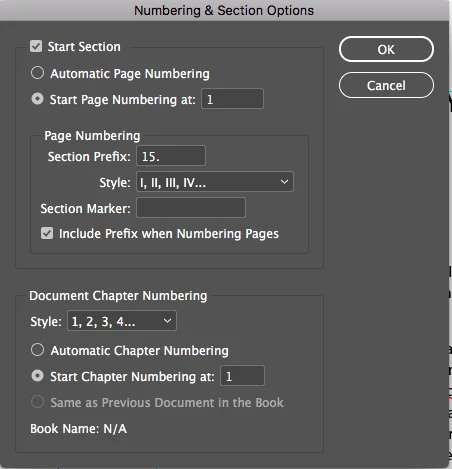
I need to alter the page numbers of a document so that they read 15.1, 15.2...., 16.1, 16.2, etc. However, when I try to change the style under Page Numbering from roman numerals to just regular numbers, it won't let me. Below is a snapshot of the panel. When I click the carrot for style, it lets me see the other options, but no matter what I click, the document won't show anything but the roman numerals. I have the most recent version of InDesign (with the cloud). I've tried uninstalling and reinstalling, but that doesn't change anything. I've tried it with page shuffling on and off, and neither of those make any difference. What's going wrong? (I know I can override the master page items, but I'd need to do that for at least twenty pages and keep altering the numbers manually if the pages shifted).
 AdChoices