
Exit
  • Global community
    • Language:
      • Deutsch
      • English
      • Español
      • Français
      • Português
  • 日本語コミュニティ
  • 한국 커뮤니티
1

Unmapped comments during import comments from PDF

Community Beginner ,
Nov 25, 2018 Nov 25, 2018

Hello,

I have problem with with importing comments from PDF.

On layout there are modules imported to InDesign via Data Merge where in each module are 6 frames.

We need to correct text in some of the frames, and I thought importing comments from PDF will be best way to do this and correction must be done via comments edited in Acrobat Reader DC.

For now it's only test file, because we have to check if the chosen solution is fitting to our needs, but I have still problems with "not mapped on page" comments while importing them from test-corrected PDF file. And it's completely random... Sometimes those frames are "readable" to InDesign, sometimes they aren't...

And I'm sure that I have not modified my InDesign document since generating PDF file.
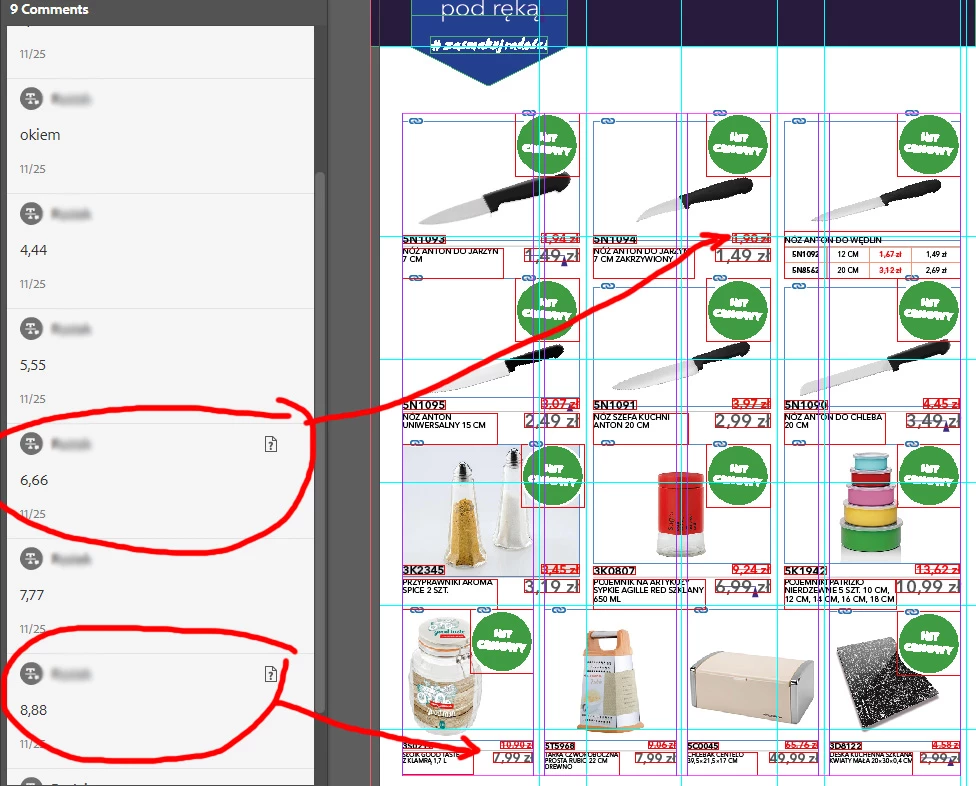
Comments_Bug.jpg

Any ideas why some frames don't export properly to PDF file?

5.1K
Translate
Report
Community guidelines
Be kind and respectful, give credit to the original source of content, and search for duplicates before posting. Learn more
community guidelines

correct answers 1 Correct answer

Community Beginner , Nov 26, 2018 Nov 26, 2018

Thanks, I've reported this in following thread: Imported PDF comments not accurate – Adobe InDesign Feedback

Translate
Community Expert ,
Nov 26, 2018 Nov 26, 2018

ryszard.r.  wrote

…Any ideas why some frames don't export properly to PDF file?

Hi,

unfortunately I have no idea. Seen some issues with tables where the comments on cell contents is not showing up, because the cell lies outside the area of the text frame. But this should not be the case with your sample.

Can you provide a screenshot of the PDF opened in Acrobat Pro DC showing the comments of the same page?

Maybe there is something different in how the comment is made to others where the PDF Comments panel is showing the comment widget?

Regards,
Uwe

Translate
Report
Community guidelines
Be kind and respectful, give credit to the original source of content, and search for duplicates before posting. Learn more
community guidelines
Community Beginner ,
Nov 26, 2018 Nov 26, 2018

Hi Laubender,

There is a screenshot You've asked.

Acrobat_Comments_Bug_2.jpg

Problems with comments are random. If I'll make new file and add comments to other parts of text and to those that I've commented in this, some of them will be unmapped, even if in this PDF they was mapped correctly....

It's confusing and since we cannot rely on this method of correcting text, we must abandon for now this idea until Adobe team will fix it.

Regards,

Ryszard

Translate
Report
Community guidelines
Be kind and respectful, give credit to the original source of content, and search for duplicates before posting. Learn more
community guidelines
Community Expert ,
Nov 26, 2018 Nov 26, 2018

Hi Ryszard,

are there tables involved?

I see a lot of issues with commented text on table cells.

Maybe this is true for all tabulated data, even text with tabs.

Also voted for a bug fix.

Regards,
Uwe

Translate
Report
Community guidelines
Be kind and respectful, give credit to the original source of content, and search for duplicates before posting. Learn more
community guidelines
Community Beginner ,
Nov 27, 2018 Nov 27, 2018

Hi Uwe,

I'll check for You if there are problems with tables also. I have lot of them in my document so that should be easy to do

Regards,

Ryszard

Translate
Report
Community guidelines
Be kind and respectful, give credit to the original source of content, and search for duplicates before posting. Learn more
community guidelines
Community Expert ,
Nov 27, 2018 Nov 27, 2018

Hi Ryszard,

thank you. Currently I am doing also some tests with comments.

Came accross one case where one comment in the PDF turns out as two comments in the PDF Comments panel.

Simple set up like two individual text frames positioned next to each other like that:

StrikethroughCommentsBetweenStories-CC-2019-14.0.1.209.PNG

Made one single comment in the exported PDF:

StrikethroughCommentsBetweenStories-CC-2019-14.0.1.209-Commented-1.pdf.PNG

Imported the PDF to the PDF Comments panel and here we suddenly have two comments imported out of one:

StrikethroughCommentsBetweenStories-CC-2019-14.0.1.209-CommentImported.PNG

Obviously the new feature has to split the one comment into two because the comment is running through two different stories.

Regards,
Uwe

Translate
Report
Community guidelines
Be kind and respectful, give credit to the original source of content, and search for duplicates before posting. Learn more
community guidelines
Community Expert ,
Nov 27, 2018 Nov 27, 2018

If you do that with a comment that should replace text, you see the replacement text two times in the PDF Comments panel where in Acrobat you did only one single comment:

StrikethroughCommentsBetweenStories-CC-2019-14.0.1.209-Commented-2.pdf.PNG

StrikethroughCommentsBetweenStories-CC-2019-14.0.1.209-ImportedComment-2.PNG

Regards,
Uwe

Translate
Report
Community guidelines
Be kind and respectful, give credit to the original source of content, and search for duplicates before posting. Learn more
community guidelines
Community Beginner ,
Dec 04, 2018 Dec 04, 2018

Hi Uwe,

At last I had a chance to test replacing text in tables from PDF comments on "living organism" of my products catalogue and...

It dosn't work at all.

I've got corrections in PDF, imported comments to ID, and when I've clicked "Accept" button, text in table disappeared... There was nothing in cell. No original text, no modified text... Simple great... But it is still Ctrl+Z and we can copy text from comment and place it "by hand". So there are some advantages of this option at the end. Now it's simpler. We don't have to jump from app to app.

Regards,

Ryszard

Translate
Report
Community guidelines
Be kind and respectful, give credit to the original source of content, and search for duplicates before posting. Learn more
community guidelines
Guide ,
Nov 26, 2018 Nov 26, 2018

I would report these problems as bugs.

Adobe InDesign: Bugs: Hot (1438 ideas) – Adobe InDesign Feedback
In many cases this feature of indesign is not perfect for now.

Translate
Report
Community guidelines
Be kind and respectful, give credit to the original source of content, and search for duplicates before posting. Learn more
community guidelines
Community Beginner ,
Nov 26, 2018 Nov 26, 2018

Thanks, I've reported this in following thread: Imported PDF comments not accurate – Adobe InDesign Feedback

Translate
Report
Community guidelines
Be kind and respectful, give credit to the original source of content, and search for duplicates before posting. Learn more
community guidelines
Guide ,
Nov 26, 2018 Nov 26, 2018

  ha scritto

Thanks, I've reported this in following thread: Imported PDF comments not accurate – Adobe InDesign Feedback

perfect, I have already voted your report.
I hope that these problems will soon be solved

Translate
Report
Community guidelines
Be kind and respectful, give credit to the original source of content, and search for duplicates before posting. Learn more
community guidelines
Community Beginner ,
Nov 26, 2018 Nov 26, 2018

Thanks for that. I really need this feature to work like it should. It will improve my multi-language work flow no end! Yes, I have problems with tables but that's not the main problem as I outlined.

Translate
Report
Community guidelines
Be kind and respectful, give credit to the original source of content, and search for duplicates before posting. Learn more
community guidelines
Community Expert ,
Nov 27, 2018 Nov 27, 2018

Hi ericad2568747 ,

the only thing you can do is reporting specific bugs where you see them.

And best coming back to the forum and discuss them. Post the link to the report so that we can vote.

Maybe join InDesign Prerelease to test and discuss issues directly with the developers.

Regards,
Uwe

Translate
Report
Community guidelines
Be kind and respectful, give credit to the original source of content, and search for duplicates before posting. Learn more
community guidelines
Community Beginner ,
Nov 26, 2018 Nov 26, 2018

I've had lots of issues with importing PDF comments but I am so excited about this that even though it doesn't work properly 100% it still saves me time, particularly as I work with a lot of what are to me, foreign languages!

Unmapped comments

Comments marks remaining in the file (although they don't print, thank goodness)

No jump to text in tables (and I have a lot of them)

Hopefully, the feature will improve because I really need this!

Translate
Report
Community guidelines
Be kind and respectful, give credit to the original source of content, and search for duplicates before posting. Learn more
community guidelines
Community Expert ,
Nov 27, 2018 Nov 27, 2018

This feature has such great potential for all designers who despise manually entering edits—voted.

~Barb

Translate
Report
Community guidelines
Be kind and respectful, give credit to the original source of content, and search for duplicates before posting. Learn more
community guidelines
New Here ,
Apr 18, 2019 Apr 18, 2019

Getting question marks '?' and when I double click it says unmapped file. I've done a test file using latest programs by highlighting the text and making a comment. Keep getting question marks. Logged into Adobe creative cloud but still doing it.

Translate
Report
Community guidelines
Be kind and respectful, give credit to the original source of content, and search for duplicates before posting. Learn more
community guidelines
New Here ,
Apr 18, 2019 Apr 18, 2019

AH, figured it out. In my Indesign document id made a headline using 'rule above'  to make the blue lines. This is why its not working. Must be a bug as it doesn't recognise this lettering when using this feature.

Translate
Report
Community guidelines
Be kind and respectful, give credit to the original source of content, and search for duplicates before posting. Learn more
community guidelines
Community Expert ,
Apr 23, 2019 Apr 23, 2019

Hi carlaj8044130 ,

can you go into more details how you exactly did the type design in InDesign?

Maybe showing frame edges and invisible characters…

Thanks,
Uwe

Translate
Report
Community guidelines
Be kind and respectful, give credit to the original source of content, and search for duplicates before posting. Learn more
community guidelines
New Here ,
Apr 23, 2019 Apr 23, 2019

Paragraph rules. Then offset the type with the rule so it looks like the type is sitting on the rule. Make the rule 40pt so the type sits over the rule. If you make a comment then import this text it, the comment doesn’t show up in adobe pdf import comments

Cheers,

Carla Jordaan

Senior Creative Designer

Clients & Markets

KPMG

[Personal information removed by moderator]

P Good planets are hard to find. Please consider ours before you print this email.

Translate
Report
Community guidelines
Be kind and respectful, give credit to the original source of content, and search for duplicates before posting. Learn more
community guidelines
Community Expert ,
Apr 23, 2019 Apr 23, 2019

Hi Carla,

so you worked with baseline shift on the text?

Regards,
Uwe

Translate
Report
Community guidelines
Be kind and respectful, give credit to the original source of content, and search for duplicates before posting. Learn more
community guidelines
New Here ,
Apr 23, 2019 Apr 23, 2019

No, ‘paragraph rule’!

Cheers,

Carla Jordaan

Senior Creative Designer

Clients & Markets

KPMG

[personal info removed by moderator. This is not appropriate on a public forum.]

P Good planets are hard to find. Please consider ours before you print this email.

Translate
Report
Community guidelines
Be kind and respectful, give credit to the original source of content, and search for duplicates before posting. Learn more
community guidelines
Community Expert ,
Apr 24, 2019 Apr 24, 2019

carlaj8044130  wrote

Paragraph rules. Then offset the type with the rule so it looks like the type is sitting on the rule. Make the rule 40pt so the type sits over the rule. If you make a comment then import this text it, the comment doesn’t show up in adobe pdf import comments

Hm. Just tried that and it works.

RuleAbove-PDF-Comments-1.PNG

RuleAbove-PDF-Comments-2.PNG

Could you share a sample InDesign document and the corresponding commented PDF with e.g. Dropbox and post the download link?

Regards,
Uwe

Translate
Report
Community guidelines
Be kind and respectful, give credit to the original source of content, and search for duplicates before posting. Learn more
community guidelines
New Here ,
Apr 25, 2019 Apr 25, 2019
LATEST

The copy shows up InDesign but it doesn’t show you which words are highlighted, so if the comment was ‘change the highlighted words’ I then don’t know which words to change?

Cheers,

Carla Jordaan

Senior Creative Designer

Clients & Markets

KPMG

[personal info removed by moderator]

P Good planets are hard to find. Please consider ours before you print this email.

Translate
Report
Community guidelines
Be kind and respectful, give credit to the original source of content, and search for duplicates before posting. Learn more
community guidelines