Participant
December 3, 2019
Answered

Very strange issue in editing old tables

  • December 3, 2019
  • 4 replies
  • 878 views

Hello everybody. I have a file with many tables created in Indesign CS 5.5 for Mac.
If I try to modify it in Indesign CC 20 (iMac) tables go crazy.

If I make a change to the text in the table the lines disappear and the symbol (+) of the text reflow appears. If I make an automatic reflow of the text between the pages the table is broken into several lines and into multiple pages.

However, even if the table is now broken into several pages, I can't change it anyway and unfortunately I can't recompose it with the copy paste.

I state that in Indesign CS 5.5 I have never had such problems. And now my 1500-page catalog seems totally compromised.

It's a very difficult thing to explain, you need to see the file live.

I am willing to send the file to whoever is available to perform a test.

Meanwhile post a video to help you understand.

https://drive.google.com/open?id=1Y6JqsdMlLK4D9foQ0v9rYbSPfhI6BM8U


Thank you
This topic has been closed for replies.
Correct answer Laubender

Hi Stefano,

looked into your InDesign 2020 document.

There are two tables on the page.


In the first table I can see the problem you describe.

In the second one at the bottom of the page I have no issues with editing the text in the table.


What's the difference?

You'll find a hint in the Cell Options dialog if you select the table:

Menu Table > Cell Options


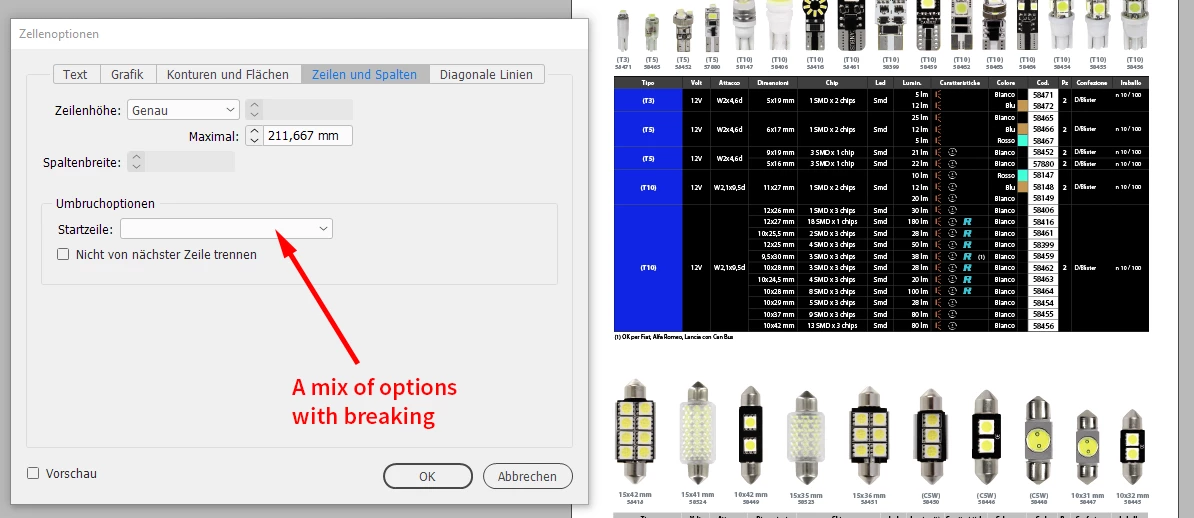
Check the value for "Start Row". If it is a mix of values in the table you see a white drop down.

Default value is: "Anywhere".


From my German InDesign when the table is selected that is showing the issue:


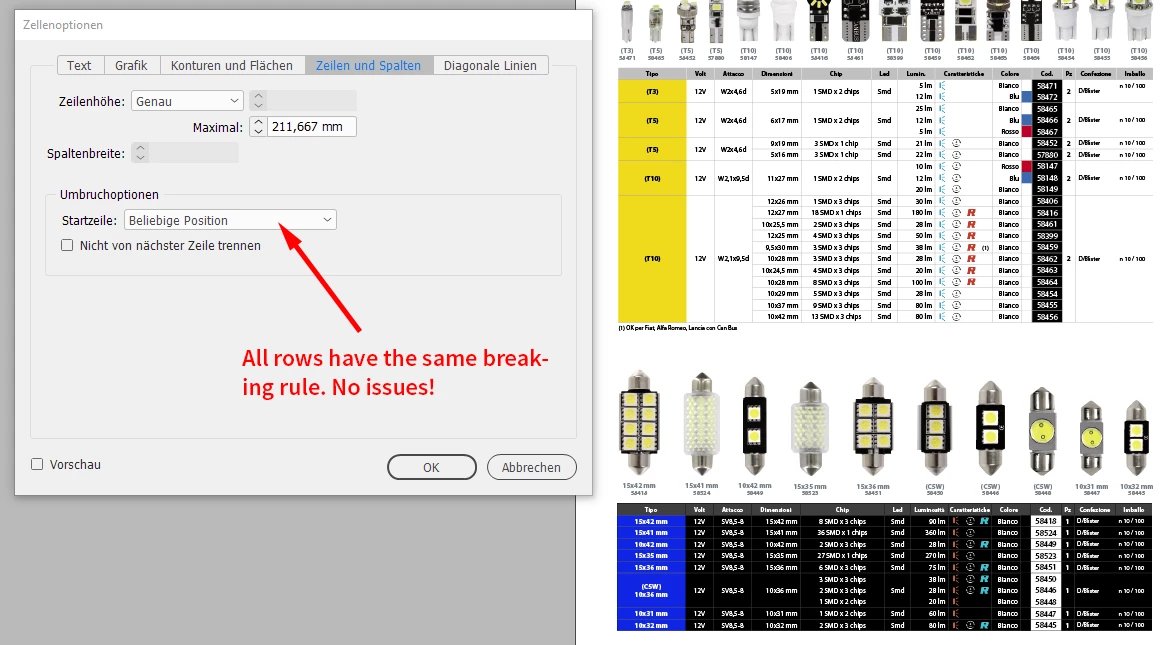
The table at the bottom selected with no issues "Start Row" value is "Anywhere" for all rows in the table:


If I change the "Start Row" value to "Anywhere" in the upper table I have no issues with editing its contents.

That's the fix for your issue.


If you want to do this for all tables in your document you could use a ExtendScript ( JavaScript ) script with the following code that is acting on the active document:

app.documents[0].stories.everyItem().tables.everyItem().rows.everyItem().startRow = StartParagraph.ANYWHERE ;


And yes, it's just one line of code.


How to work with ExtendScript code, save it to a script file, install and use the script file see:

http://www.indiscripts.com/pages/help#hd0sb2


Regards,
Uwe Laubender

( ACP )

4 replies

Community Expert
December 4, 2019

Hi Stefano,

glad that this little script solved your problem.


Nevertheless: It's very strange that this issue came up after all was OK with InDesign CS5.5.

As I already said: I would do a bug report.


Regards,
Uwe Laubender

( ACP )

stefano7Author
Participant
December 4, 2019

Hi Laubender,


well, I think I have a theory about it.

Tables were generated by Indesign Server CS 5.5 (Win) and then pasted into a Indesign document.
This is the only problem I have found throughout the catalog and  I think this maybe the cause.

Anyway, I currently no longer use Indesign Server, so I feel optimistic.


Thank you again for your support!


Best regards

LaubenderCommunity ExpertCorrect answer
Community Expert
December 3, 2019

Hi Stefano,

looked into your InDesign 2020 document.

There are two tables on the page.


In the first table I can see the problem you describe.

In the second one at the bottom of the page I have no issues with editing the text in the table.


What's the difference?

You'll find a hint in the Cell Options dialog if you select the table:

Menu Table > Cell Options


Check the value for "Start Row". If it is a mix of values in the table you see a white drop down.

Default value is: "Anywhere".


From my German InDesign when the table is selected that is showing the issue:


The table at the bottom selected with no issues "Start Row" value is "Anywhere" for all rows in the table:


If I change the "Start Row" value to "Anywhere" in the upper table I have no issues with editing its contents.

That's the fix for your issue.


If you want to do this for all tables in your document you could use a ExtendScript ( JavaScript ) script with the following code that is acting on the active document:

app.documents[0].stories.everyItem().tables.everyItem().rows.everyItem().startRow = StartParagraph.ANYWHERE ;


And yes, it's just one line of code.


How to work with ExtendScript code, save it to a script file, install and use the script file see:

http://www.indiscripts.com/pages/help#hd0sb2


Regards,
Uwe Laubender

( ACP )

stefano7Author
Participant
December 4, 2019

OMG is great!
I never thought I'd solve the problem on the entire document even with a script!
You were very kind, thank you!


Have a nice day

Stefano

Community Expert
December 3, 2019

Hi Stefano,

if an IDML from CS5.5 will crash InDesign 2020 when you open it is a strange behavior.

Best you do a bug report on this case. Indepentently from your issues with the tables:

https://indesign.uservoice.com/


In the bug report provide a download link to the CS5.5 document PLUS the IDML file so that the InDesign developers can test this.


Next I will look into your documents I downloaded and come back to you.


Regards,
Uwe Laubender

( ACP )


stefano7Author
Participant
December 3, 2019

Hi Laubender,

In the meantime I have solved the crash problem.
I deleted the file structure (View> Structure) and the CS55 IDML now opens in CC2020.
Results
IDML: the table issue is immediately displayed (rows are missing)
INDD: the table is shown correctly but the problem appears when the first change is made.
Attached new files
https://drive.google.com/file/d/1bAJyzuzcAFzeA8CL4JNIqwOavMU2mWfF/view?usp=sharing


Thank you

Best Regards

Community Expert
December 3, 2019

Hi Stefano,

how did you migrate the document from CS5.5 to InDesign 2020?
Did you just open the document with 2020 and saved the document with a new name?


If that's the case I'd try to export an IDML file from CS5.5 and open the IDML file with InDesign 2020.


And if this does not help, could you provide some sample documents with just one page and one table?

1. InDesign CS5.5 document

2. IDML file exported from CS5.5 document

3. InDesign 2020 document saved from IDML file from CS5.5

4. InDesign 2020 document ( saved after a CS5.5 doc is opened with InDesign 2020 )


Best zip all four documents.


Regards,
Uwe Laubender

( ACP )

stefano7Author
Participant
December 3, 2019

Hi Laubender,


in my career (30 years) I never needed to convert to IDML because new software versions "must" open old files ...

Furthermore, the process of converting particularly heavy files (we are talking about a catalog of 1500 pages splitted into 15 sections) takes a lot of time and is insecure.


However I did a test on an old machine with CS55 and the file works correctly.
I exported it in IDML format but on CC20 Indesign crashes and doesn't open it.
Instead I can directly open the INDD file but with the problems that you can find yourself, that is you can't change text in the table above.

https://drive.google.com/open?id=1EaEsGuX9pHJNjnfG-6JRZRe4po7plCr9


Thank you for your time that you spent for me


Regards

Stefano