
dublove
Legend
February 23, 2020
Answered

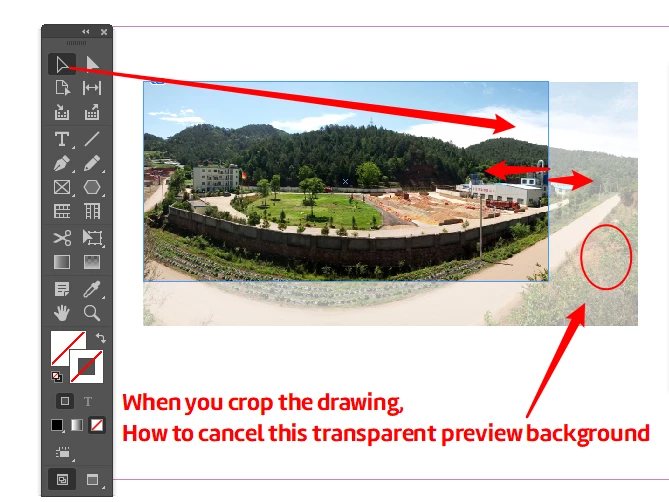
When you crop the drawing,How to cancel this transparent preview background
  • February 23, 2020
  • 2 replies
  • 1419 views

When you crop the drawing,

How to cancel this transparent preview background

This topic has been closed for replies.
Correct answer rob day

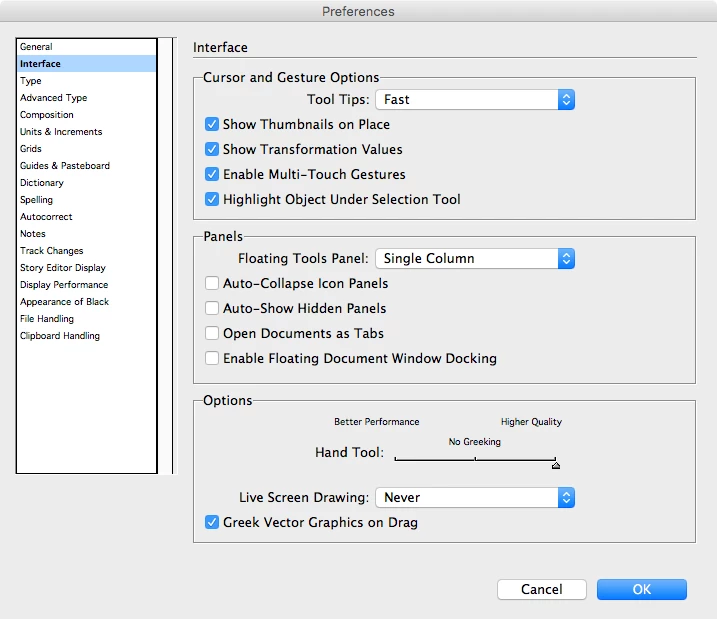
Try setting the Live Screen Drawing Preference to Never
 

2 replies

jane-e
Community Expert
Community Expert
February 23, 2020

In addition to what Bob said, are you trying to move the image within the frame or the frame itself? On the off chance you are trying to move the frame, confirm that your cursor is a black arrow and not a hand when you hover over the image. Double-clicking is one way to switch between selecting the frame or selecting the image. If the frame is selected, you won't see the preview when you drag. If the image is selected, follow Bob's instructions.

dublove
dubloveAuthor
Legend
February 23, 2020

I need CS6 without preview effect
The crop now has a preview effect, which is not what I want

jane-e
Community Expert
Community Expert
February 23, 2020

"The crop now has a preview effect, which is not what I want"


Bob and I both understand that. Can you tell us why our answers are not working? What are we not seeing from your post? Please clarify.


BobLevine
Community Expert
Community Expert
February 23, 2020

Click and drag immediately. Delaying a second or so will show that preview.

For what it's worth, I find that preview very valuable.